
 Lambogenius
The layout
Hospital ──Direct Connect / VPN──▶ VPC ──▶ internal NLB (3 AZs, health check GET /ready):7890
                                                │
                          EKS (3 AZs)           ▼
                          hl7-edge-gateway × 2  (pods as NLB IP targets)  ──HTTPS──▶ your API
                          NATS JetStream × 3    (one per AZ, encrypted gp3)
                          images from Amazon ECR
The same shared Kubernetes base as the Azure example, with:
The sample is in 08-aws-eks in the examples repository.
08-aws-eks/cluster.yaml — eksctl: nodes in private subnets, the EBS CSI driver, and IAM for the AWS Load Balancer Controller
# eksctl cluster for sample 08: three nodes in three availability zones, with the add-ons the sample
# needs (EBS CSI driver for NATS disks; IAM for the AWS Load Balancer Controller).
#   eksctl create cluster -f cluster.yaml          (setup.sh does this; set region and zones first)
apiVersion: eksctl.io/v1alpha5
kind: ClusterConfig
metadata:
  name: hl7edge
  region: ca-central-1
  version: "1.35"
availabilityZones: [ca-central-1a, ca-central-1b, ca-central-1d]
iam:
  withOIDC: true
  serviceAccounts:
    - metadata: { name: aws-load-balancer-controller, namespace: kube-system }
      wellKnownPolicies: { awsLoadBalancerController: true }
addons:
  - name: aws-ebs-csi-driver
    wellKnownPolicies: { ebsCSIController: true }
managedNodeGroups:
  - name: ng-1
    instanceType: m6i.large
    desiredCapacity: 3
    minSize: 3
    maxSize: 6
    privateNetworking: true        # nodes in private subnets
    volumeSize: 30
# Sample 08: the shared base on EKS. setup.sh fills in your registry.
apiVersion: kustomize.config.k8s.io/v1beta1
kind: Kustomization
namespace: hl7edge
resources:
  - ../shared/kubernetes
images:
  - name: lambogenius/hl7-edge-gateway
    newName: ACCOUNT.dkr.ecr.REGION.amazonaws.com/hl7-edge-gateway   # setup.sh sets your ECR repository
    newTag: "0.3.0"
patches:
  # MLLP on an internal Network Load Balancer (AWS Load Balancer Controller), never internet-facing.
  - target: { kind: Service, name: hl7edge-mllp }
    patch: |
      - op: add
        path: /metadata/annotations
        value:
          service.beta.kubernetes.io/aws-load-balancer-type: external
          service.beta.kubernetes.io/aws-load-balancer-nlb-target-type: ip
          service.beta.kubernetes.io/aws-load-balancer-scheme: internal
          service.beta.kubernetes.io/aws-load-balancer-attributes: load_balancing.cross_zone.enabled=true
          # Health check on the gateway's readiness endpoint, not only on the MLLP port:
          service.beta.kubernetes.io/aws-load-balancer-healthcheck-protocol: HTTP
          service.beta.kubernetes.io/aws-load-balancer-healthcheck-port: "8080"
          service.beta.kubernetes.io/aws-load-balancer-healthcheck-path: /ready
          service.beta.kubernetes.io/aws-load-balancer-healthcheck-interval: "10"
08-aws-eks/storageclass-gp3.yaml
# Encrypted gp3 disks for JetStream, created in the zone of the pod that uses them.
apiVersion: storage.k8s.io/v1
kind: StorageClass
metadata:
  name: gp3-encrypted
provisioner: ebs.csi.aws.com
parameters:
  type: gp3
  encrypted: "true"
volumeBindingMode: WaitForFirstConsumer
allowVolumeExpansion: true
reclaimPolicy: Retain             # keep the queue's disks if the NATS release is deleted by mistake
# EKS additions to ../shared/kubernetes/nats-values.yaml: encrypted gp3 disks for JetStream.
config:
  jetstream:
    fileStore:
      pvc:
        storageClassName: gp3-encrypted
Diagrams
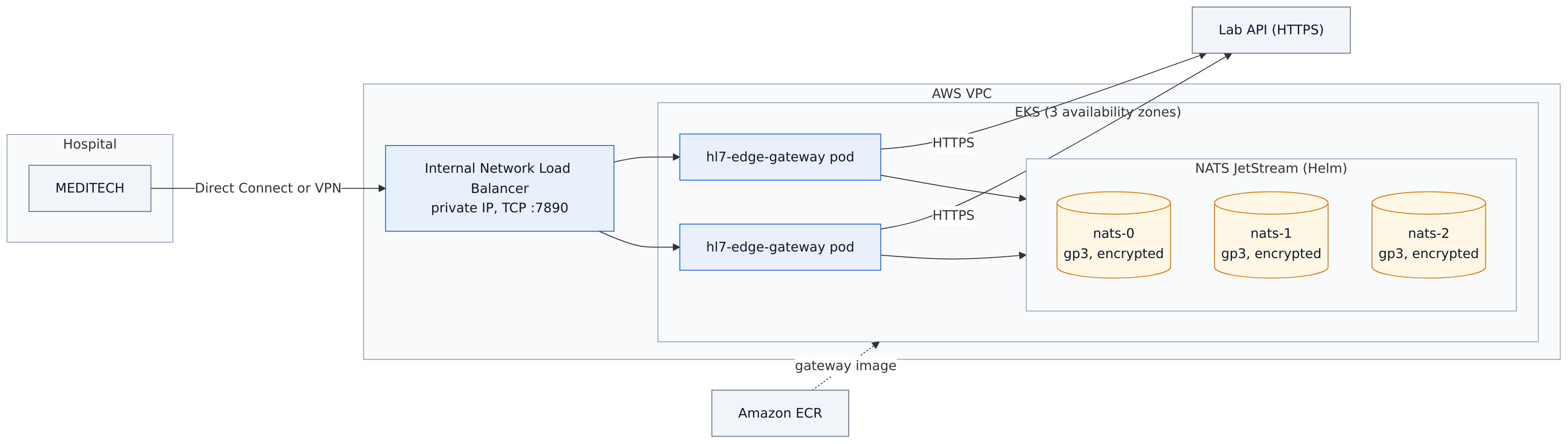
architecture.mmd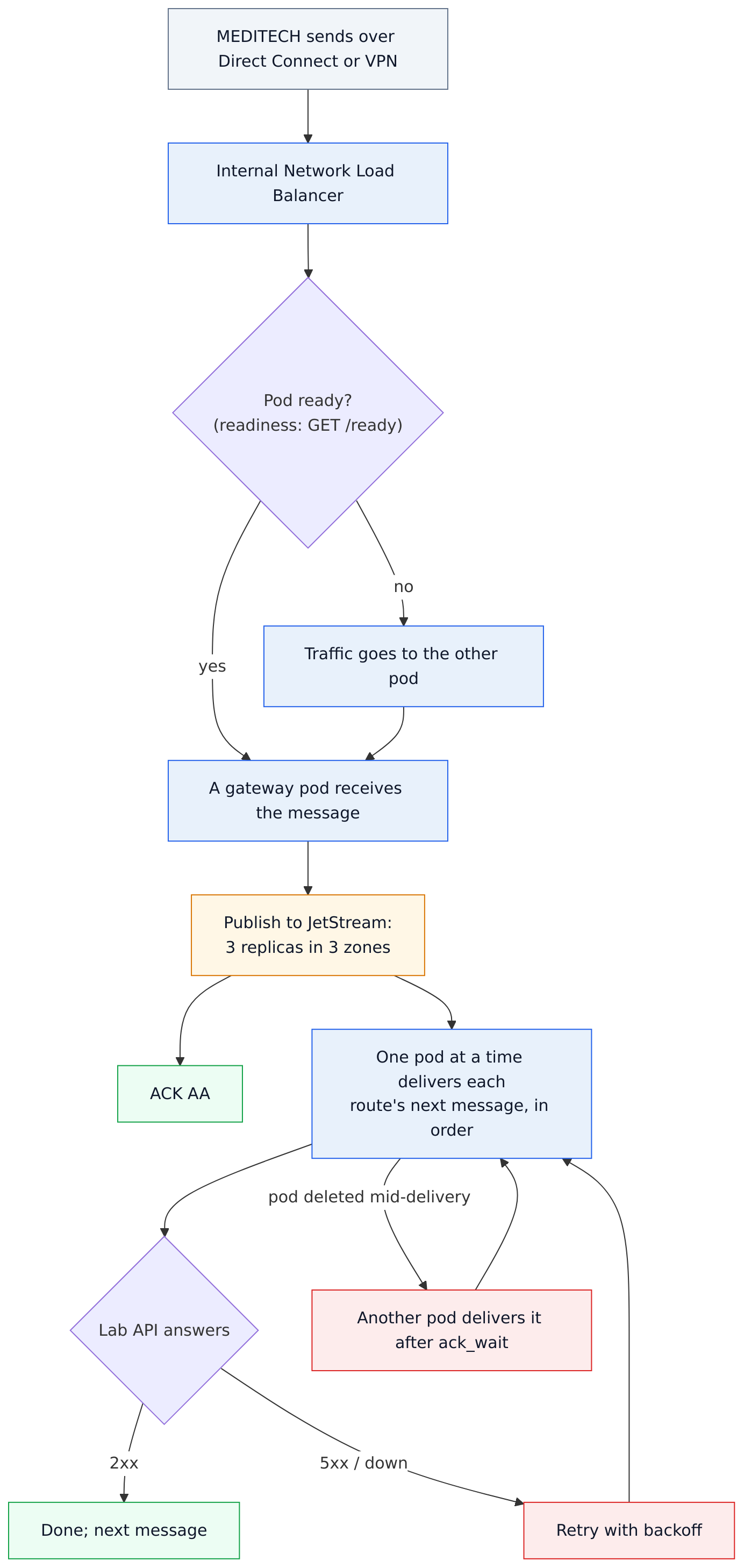
data-flow.mmd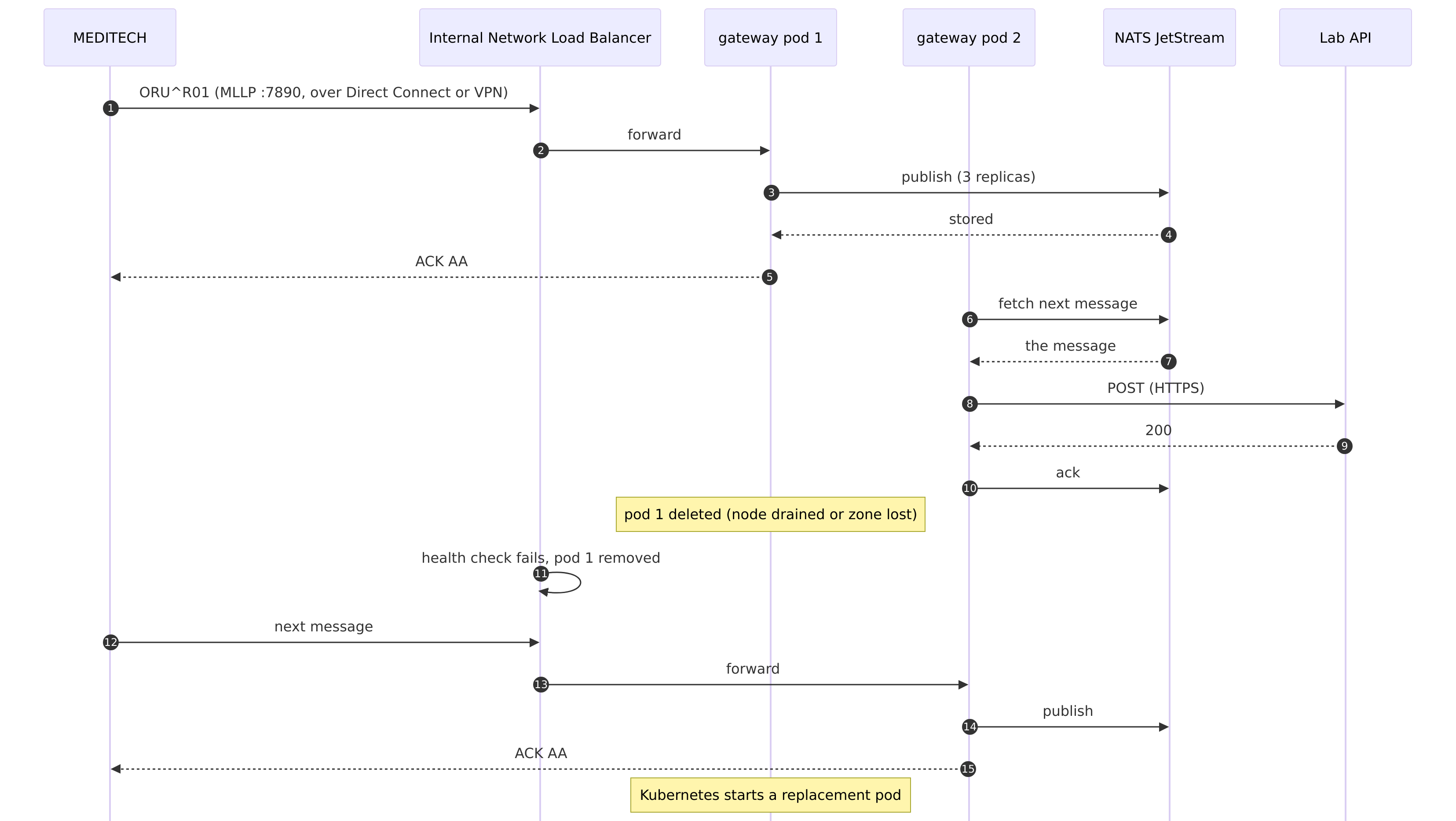
sequence.mmdDeploy
You need the AWS CLI, eksctl, kubectl, helm 3, Docker, and the image archive. Set the region and zones in cluster.yaml and .env. Creating the cluster takes about 20 minutes and creates billable resources.
#!/usr/bin/env sh
# Sample 08: HL7 Edge Gateway with NATS JetStream on EKS, across three availability zones.
# Needs the AWS CLI (signed in), eksctl, kubectl, helm and Docker. Creates billable resources;
# ./teardown.sh deletes them.
set -eu
cd "$(dirname "$0")"
[ -f .env ] || { echo "copy .env.example to .env and fill it in"; exit 1; }
set -a; . ./.env; set +a
step() { printf '\n== %s\n' "$*"; }
ACCOUNT=$(aws sts get-caller-identity --query Account --output text)
REPO="$ACCOUNT.dkr.ecr.$AWS_REGION.amazonaws.com/hl7-edge-gateway"

step "EKS cluster (about 20 minutes)"
eksctl create cluster -f cluster.yaml
aws eks update-kubeconfig --region "$AWS_REGION" --name hl7edge

step "AWS Load Balancer Controller"
VPC=$(aws eks describe-cluster --region "$AWS_REGION" --name hl7edge --query cluster.resourcesVpcConfig.vpcId --output text)
helm repo add eks https://aws.github.io/eks-charts >/dev/null 2>&1 || true
helm repo update eks >/dev/null
helm upgrade --install aws-load-balancer-controller eks/aws-load-balancer-controller -n kube-system \
  --set clusterName=hl7edge --set serviceAccount.create=false --set serviceAccount.name=aws-load-balancer-controller \
  --set region="$AWS_REGION" --set vpcId="$VPC" --wait

step "The gateway image, into ECR"
aws ecr describe-repositories --region "$AWS_REGION" --repository-names hl7-edge-gateway >/dev/null 2>&1 ||
  aws ecr create-repository --region "$AWS_REGION" --repository-name hl7-edge-gateway \
    --image-scanning-configuration scanOnPush=true >/dev/null
docker load -i "$GATEWAY_IMAGE_ARCHIVE"
aws ecr get-login-password --region "$AWS_REGION" | docker login --username AWS --password-stdin "${REPO%%/*}"
docker tag "lambogenius/hl7-edge-gateway:$GATEWAY_VERSION" "$REPO:$GATEWAY_VERSION"
docker push "$REPO:$GATEWAY_VERSION"
sed -i.bak "s|newName: .*amazonaws.com/hl7-edge-gateway.*|newName: $REPO|; s|newTag: .*|newTag: \"$GATEWAY_VERSION\"|" kustomization.yaml
rm -f kustomization.yaml.bak

step "Storage, namespace and secrets"
kubectl apply -f storageclass-gp3.yaml
kubectl create namespace hl7edge --dry-run=client -o yaml | kubectl apply -f -
kubectl -n hl7edge create secret generic hl7edge-secrets --dry-run=client -o yaml \
  --from-literal=LAMBOGENIUS_LICENSE="$LAMBOGENIUS_LICENSE" --from-literal=HL7EDGE_ADMIN_TOKEN="$HL7EDGE_ADMIN_TOKEN" \
  --from-literal=NATS_TOKEN="$NATS_TOKEN" --from-literal=LAB_API_URL="$LAB_API_URL" --from-literal=LAB_API_TOKEN="$LAB_API_TOKEN" |
  kubectl apply -f -

step "NATS JetStream (3 pods, one per zone, encrypted gp3)"
helm repo add nats https://nats-io.github.io/k8s/helm/charts/ >/dev/null 2>&1 || true
helm repo update nats >/dev/null
helm upgrade --install nats nats/nats --version 2.15.1 -n hl7edge \
  -f ../shared/kubernetes/nats-values.yaml -f nats-aws.yaml --wait --timeout 10m

step "The gateway (2 pods) and its internal NLB"
kubectl apply -k .
kubectl -n hl7edge rollout status deploy/hl7-edge-gateway --timeout=5m
echo "Waiting for the NLB's address..."
for i in $(seq 1 60); do
  host=$(kubectl -n hl7edge get svc hl7edge-mllp -o jsonpath='{.status.loadBalancer.ingress[0].hostname}')
  [ -n "$host" ] && break
  sleep 10
done
kubectl -n hl7edge get pods -o wide
echo
echo "MEDITECH connects to ${host:-<pending>}:7890 (an internal NLB: reach it over Direct Connect or a VPN)."
echo "Admin console: kubectl -n hl7edge port-forward svc/hl7edge-admin 8080, then http://localhost:8080"
When you are done, teardown.sh deletes the namespace (and with it the NLB), the cluster and the repository. The gp3 volumes are kept (Retain); it says how to find them.
#!/usr/bin/env sh
# Deletes what setup.sh created. The NLB goes with the Service, so the namespace is deleted first.
set -eu
cd "$(dirname "$0")"
set -a; . ./.env; set +a
kubectl delete namespace hl7edge --wait=true || true
eksctl delete cluster -f cluster.yaml --wait
aws ecr delete-repository --region "$AWS_REGION" --repository-name hl7-edge-gateway --force >/dev/null
echo "Deleted. The gp3 volumes have reclaimPolicy Retain: delete any that are left in the EC2 console"
echo "(Volumes with the tag kubernetes.io/created-for/pvc/namespace = hl7edge)."
Check it
kubectl -n hl7edge get pods -o wide        # 2 gateway and 3 NATS pods across the AZs
kubectl -n hl7edge get svc hl7edge-mllp    # internal-k8s-hl7edge-….elb.<region>.amazonaws.com
kubectl -n hl7edge port-forward svc/hl7edge-admin 8080
../shared/kubernetes/check.sh              # the failover test, automated
In the EC2 console under Target groups, both gateway pod IPs are healthy, checked on /ready.
check.sh is the same as for Azure: set LAB_API_URL=http://lab-api:8000/hl7/results in .env before ./setup.sh.
For production
- Give MEDITECH a Route 53 private DNS name (an alias to the NLB), because NLB addresses can change.
- Restrict sources with the NLB's security group and with
allow_from. - Keep secrets in AWS Secrets Manager (External Secrets Operator or the Secrets Store CSI driver).
On October 21, 2026, setup.sh ran in a real AWS account (ca-central-1, EKS 1.35, gateway 0.5.1) in about 30 minutes. The nodes and NATS pods were in zones a, b and d, and the failover part of check.sh passed through the hl7edge-mllp Service: K8S-1 to K8S-4 delivered once each, in order, with a gateway pod and a NATS pod deleted. teardown.sh then deleted the cluster and the repository. The internal NLB has not been tested yet: that account was new, and AWS refused to create load balancers in it.
Run kubectl -n hl7edge describe svc hl7edge-mllp. "This AWS account currently does not support creating load balancers" means AWS has not enabled Elastic Load Balancing for a new account yet: ask AWS Support to enable it. New accounts also have a low EC2 vCPU quota (this sample needs 6): check Service Quotas → Amazon EC2 → Running On-Demand Standard instances.