
 Lambogenius
What it does
- Inbound, Entra ID: a care application posts orders to
https://…:8443/hl7/orders. The gateway accepts only Entra ID access tokens issued for its API that carry the app roleHl7.Send, and passes each order to MEDITECH over MLLP (pass-through). - Outbound, Salesforce: MEDITECH's lab results go to an Apex REST class. The gateway signs in with the OAuth 2.0 JWT bearer flow: a connected app, a certificate and an integration user, with no password (store-and-forward).
You need an Entra ID tenant (a free one works) and a Salesforce org with API access (a free Developer Edition works).
The sample is in 04-entra-id-and-salesforce in the examples repository.
Diagrams
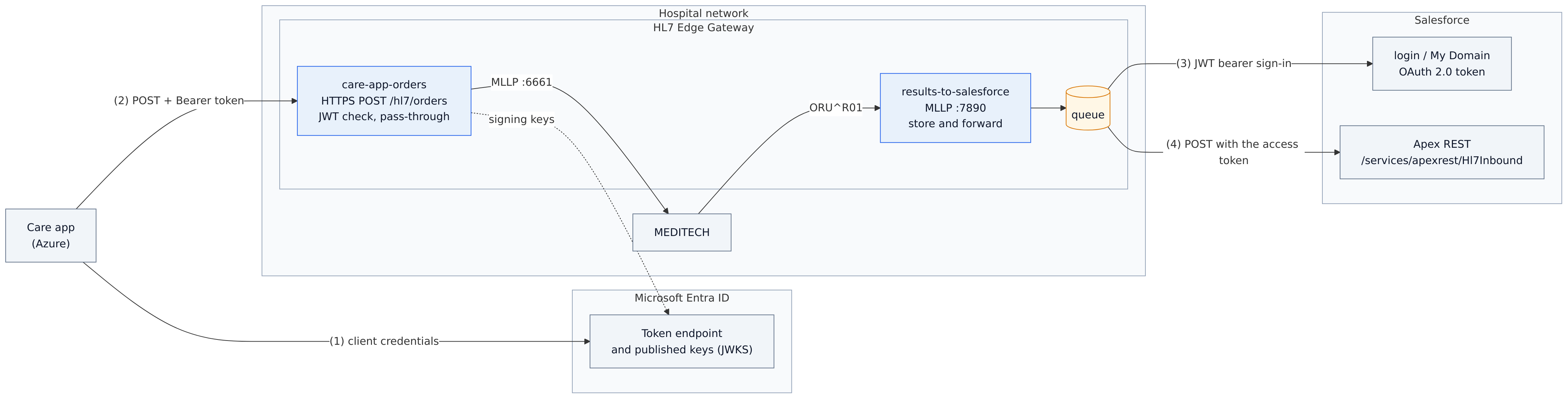
architecture.mmd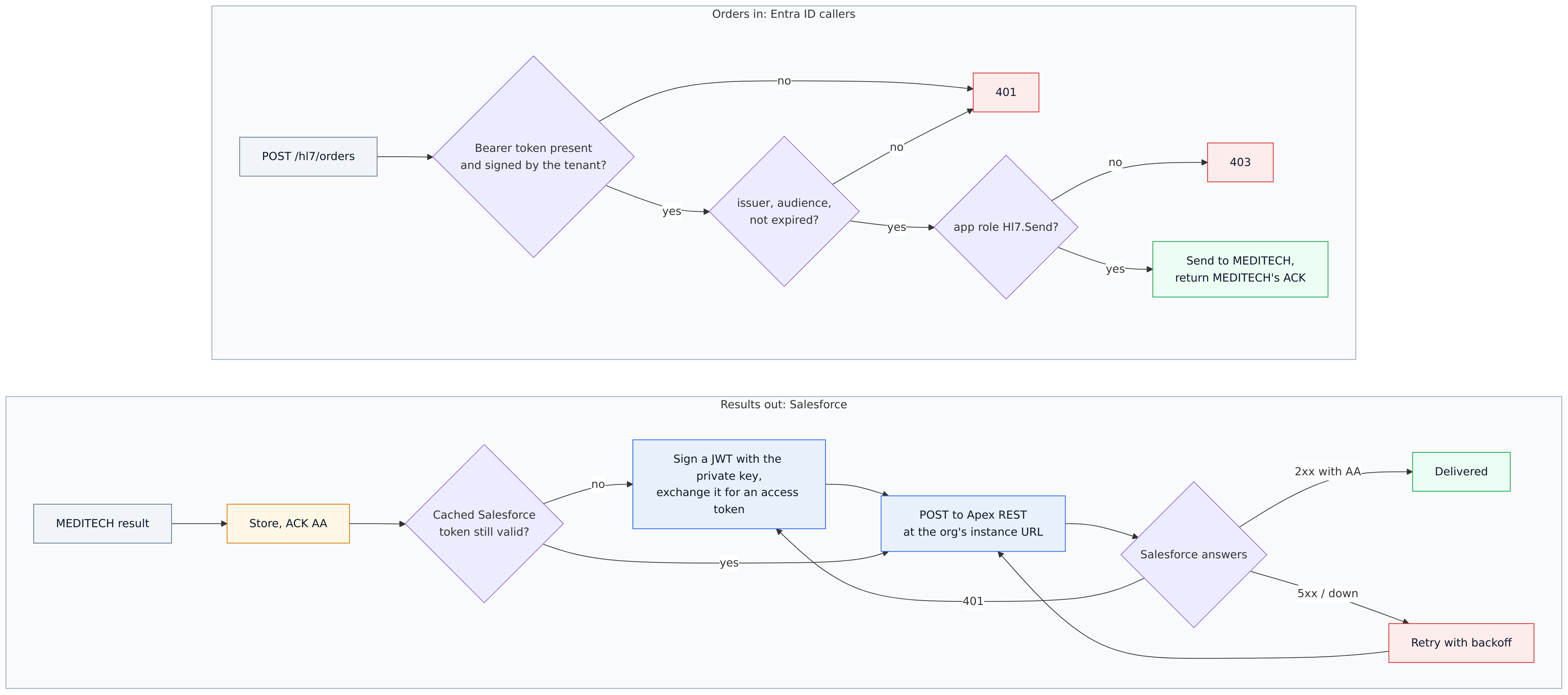
data-flow.mmd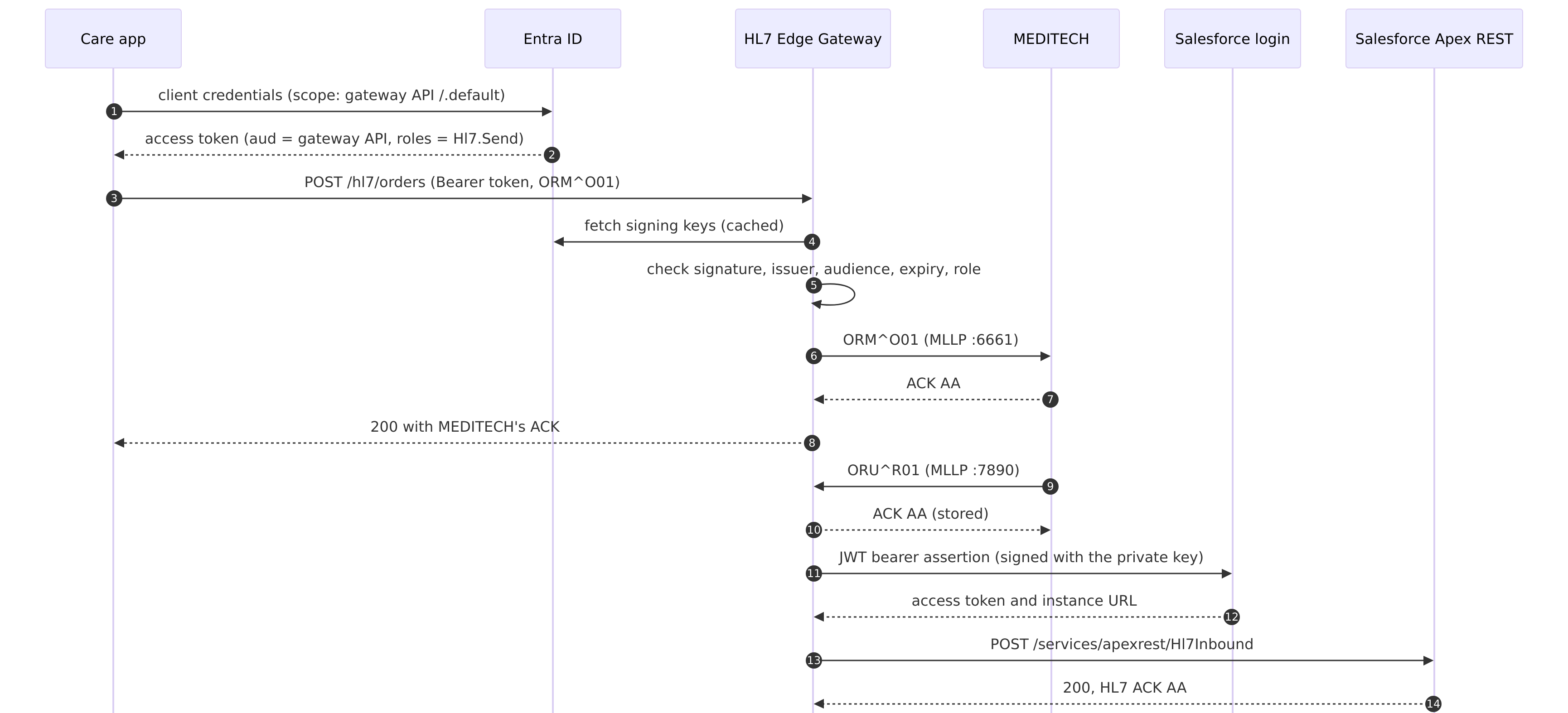
sequence.mmdThe configuration
04-entra-id-and-salesforce/gateway.toml
# Sample 04: Entra ID callers in, Salesforce out
#
#   care-app-orders        A cloud care application posts orders over HTTPS. The gateway accepts only
#                          Entra ID access tokens issued for the gateway's API and carrying the app role
#                          Hl7.Send, then passes each order to MEDITECH over MLLP and returns MEDITECH's
#                          ACK (pass-through).
#   results-to-salesforce  MEDITECH sends lab results over MLLP; the gateway posts each one to an Apex REST
#                          service in Salesforce, signed in with the OAuth 2.0 JWT bearer flow (a connected
#                          app and a certificate, no password). Store-and-forward.
#
# Every ${NAME} comes from .env; README.md shows where each value comes from.

node_id = "gateway-1"

[admin]
listen = "0.0.0.0:8080"
token = "${HL7EDGE_ADMIN_TOKEN}"
allow_payload_view = true

[store]
backend = "embedded"
path = "/var/lib/hl7-edge-gateway"

[[route]]
name = "care-app-orders"
mode = "passthrough"

[route.source]
type = "http"
listen = "0.0.0.0:8443"
path = "/hl7/orders"
ack_format = "json"
tls = { cert = "/etc/hl7-edge-gateway/certs/gateway.crt", key = "/etc/hl7-edge-gateway/certs/gateway.key" }

[route.source.auth]
type = "jwt"
issuer = "https://login.microsoftonline.com/${ENTRA_TENANT_ID}/v2.0"   # signing keys come from its openid-configuration
audience = "${GATEWAY_API_APP_ID}"   # v2 tokens carry the API's application (client) ID as audience
required_roles = ["Hl7.Send"]        # an app role of the API, assigned to each caller

[route.destination]
type = "mllp"
address = "meditech:6661"

[[route]]
name = "results-to-salesforce"
mode = "store_and_forward"
source = { type = "mllp", listen = "0.0.0.0:7890" }

[route.destination]
type = "http"
url = "${SF_LOGIN_URL}/services/apexrest/Hl7Inbound"   # the path is kept; the host becomes the org's instance URL
content_type = "text/plain"

[route.destination.auth]
type = "salesforce"
login_url = "${SF_LOGIN_URL}"         # My Domain URL, or https://login.salesforce.com (https://test.salesforce.com for sandboxes)
client_id = "${SF_CLIENT_ID}"         # the connected app's consumer key
username = "${SF_USERNAME}"           # the integration user the gateway acts as
private_key = "/etc/hl7-edge-gateway/secrets/salesforce.key"   # its certificate is uploaded to the connected app

[route.store_and_forward]
on_reject = "dead_letter"
retry = { initial = "2s", max = "60s", multiplier = 2.0 }
04-entra-id-and-salesforce/.env.example
# Copy to .env and fill in (README.md shows where each value comes from). .env is ignored by git.
LAMBOGENIUS_LICENSE=
HL7EDGE_ADMIN_TOKEN=change-me-to-a-long-random-string

# Entra ID: your tenant, and the app registration that represents the gateway's API.
ENTRA_TENANT_ID=
GATEWAY_API_APP_ID=

# Entra ID: the care application, a caller with the Hl7.Send role. Only get-token.sh / get-token.ps1
# and the demo use it; the gateway never needs it.
CARE_APP_CLIENT_ID=
CARE_APP_CLIENT_SECRET=

# Salesforce: My Domain URL, the connected app's consumer key, the integration user.
# The private key goes in secrets/salesforce.key.
SF_LOGIN_URL=https://your-domain.my.salesforce.com
SF_CLIENT_ID=
SF_USERNAME=

GATEWAY_VERSION=0.3.0
1. Entra ID
The script creates the gateway's API registration (with the app role and v2 tokens) and a care app registration (with a client secret and the role), and writes their IDs to .env:
04-entra-id-and-salesforce/entra/setup.sh
#!/usr/bin/env sh
# Creates the two Entra ID app registrations sample 04 needs, with the Azure CLI (az login first):
#   "<prefix> API"       the gateway's API: app role Hl7.Send, v2 access tokens
#   "<prefix> care app"  a caller: a client secret, and the Hl7.Send role
# and fills in ENTRA_TENANT_ID, GATEWAY_API_APP_ID, CARE_APP_CLIENT_ID and CARE_APP_CLIENT_SECRET in ../.env.
#   ./setup.sh ["HL7 Edge Gateway"]
set -eu
cd "$(dirname "$0")"
export MSYS_NO_PATHCONV=1   # Git Bash on Windows: keep the Graph URLs as they are
PREFIX=${1:-HL7 Edge Gateway}
[ -f ../.env ] || cp ../.env.example ../.env

TENANT=$(az account show --query tenantId -o tsv)
echo "Tenant: $TENANT"

API=$(az ad app create --display-name "$PREFIX API" --app-roles @app-roles.json --query appId -o tsv)
# v2 tokens: issuer https://login.microsoftonline.com/<tenant>/v2.0, audience = the API's app ID.
az rest --method PATCH --uri "https://graph.microsoft.com/v1.0/applications(appId='$API')" \
  --headers Content-Type=application/json --body '{"api":{"requestedAccessTokenVersion":2}}'
API_SP=$(az ad sp create --id "$API" --query id -o tsv)
ROLE=$(az ad app show --id "$API" --query "appRoles[?value=='Hl7.Send'].id" -o tsv)
echo "API app:  $API (app role Hl7.Send)"

CARE=$(az ad app create --display-name "$PREFIX care app" --query appId -o tsv)
CARE_SP=$(az ad sp create --id "$CARE" --query id -o tsv)
SECRET=$(az ad app credential reset --id "$CARE" --display-name "hl7-edge-gateway sample" --years 1 --query password -o tsv 2>/dev/null)
az rest --method POST --uri "https://graph.microsoft.com/v1.0/servicePrincipals/$API_SP/appRoleAssignedTo" \
  --headers Content-Type=application/json \
  --body "{\"principalId\":\"$CARE_SP\",\"resourceId\":\"$API_SP\",\"appRoleId\":\"$ROLE\"}" -o none
echo "Care app: $CARE (has Hl7.Send; client secret valid for 1 year)"

set_env() { sed -i.bak "s|^$1=.*|$1=$2|" ../.env && rm -f ../.env.bak; }
set_env ENTRA_TENANT_ID "$TENANT"
set_env GATEWAY_API_APP_ID "$API"
set_env CARE_APP_CLIENT_ID "$CARE"
set_env CARE_APP_CLIENT_SECRET "$SECRET"
echo "Wrote ENTRA_TENANT_ID, GATEWAY_API_APP_ID, CARE_APP_CLIENT_ID and CARE_APP_CLIENT_SECRET to .env."
echo "A new role assignment can take a minute to show up in tokens."
In the Azure portal, the same is: register the API, add the app role Hl7.Send (member type Applications), set "requestedAccessTokenVersion": 2 in its manifest, register the care app with a client secret, then under its API permissions add the API's application permission Hl7.Send and grant admin consent.
2. Salesforce
- 1Add the Apex class.
Developer Console → File → New → Apex Class
Hl7Inbound:04-entra-id-and-salesforce/salesforce/Hl7Inbound.cls@RestResource(urlMapping='/Hl7Inbound/*') global with sharing class Hl7Inbound { // Receives HL7 messages from HL7 Edge Gateway: keeps each one as a file titled "HL7 <control id>" // and answers with an HL7 ACK. @HttpPost global static void receive() { String msg = RestContext.request.requestBody.toString(); List<String> fields = msg.split('\r')[0].split('\\|'); String controlId = fields.size() > 9 ? fields[9] : 'unknown'; insert new ContentVersion(Title = 'HL7 ' + controlId, PathOnClient = controlId + '.hl7', VersionData = Blob.valueOf(msg)); String ack = 'MSH|^~\\&|SALESFORCE|ORG|EDGE|EDGE|' + Datetime.now().formatGmt('yyyyMMddHHmmss') + '||ACK|A' + controlId + '|P|2.5.1\r' + 'MSA|AA|' + controlId + '|stored in Salesforce\r'; RestContext.response.addHeader('Content-Type', 'text/plain'); RestContext.response.responseBody = Blob.valueOf(ack); } } - 2Make a key and certificate for the gateway.
openssl req -x509 -newkey rsa:2048 -nodes -days 730 -subj "/CN=hl7-edge-gateway" \ -keyout secrets/salesforce.key -out secrets/salesforce.crt - 3Create the connected app.
Setup → External Client App Manager → New External Client App:
- Enable OAuth, with callback
http://localhost:1717/OauthRedirect. - Scopes
apiandrefresh_token, offline_access. - Enable JWT Bearer Flow, and upload
secrets/salesforce.crt.
Copy the consumer key into
SF_CLIENT_ID. - Enable OAuth, with callback
- 4Pre-authorize the integration user.
On the app's Policies tab, set Permitted Users to Admin approved users are pre-authorized, add the user's profile or a permission set, and save. Without this, sign-in fails with
user hasn't approved this consumer.
3. Run it
docker compose up -d
./demo.sh

== 1. The care app gets an Entra ID access token (client credentials)
  issuer:   https://login.microsoftonline.com/<tenant>/v2.0
  audience: <GATEWAY_API_APP_ID>
  roles:    ['Hl7.Send']
== 2. ... and posts an order with it
{"ack":"…MSA|AA|CARE-8001|filed\r","ack_code":"AA","control_id":"CARE-8001","text":"filed"}
== 3. Requests without a valid token are refused
no token:       HTTP 401 missing bearer token
tampered token: HTTP 401 invalid token: signature does not verify
== 4. MEDITECH sends lab results; the gateway posts them to Salesforce
A valid token without the role gets 403 client <id> lacks role Hl7.Send. In Salesforce, Files then holds HL7 SFR-7001 and HL7 SFR-7002.
Troubleshooting
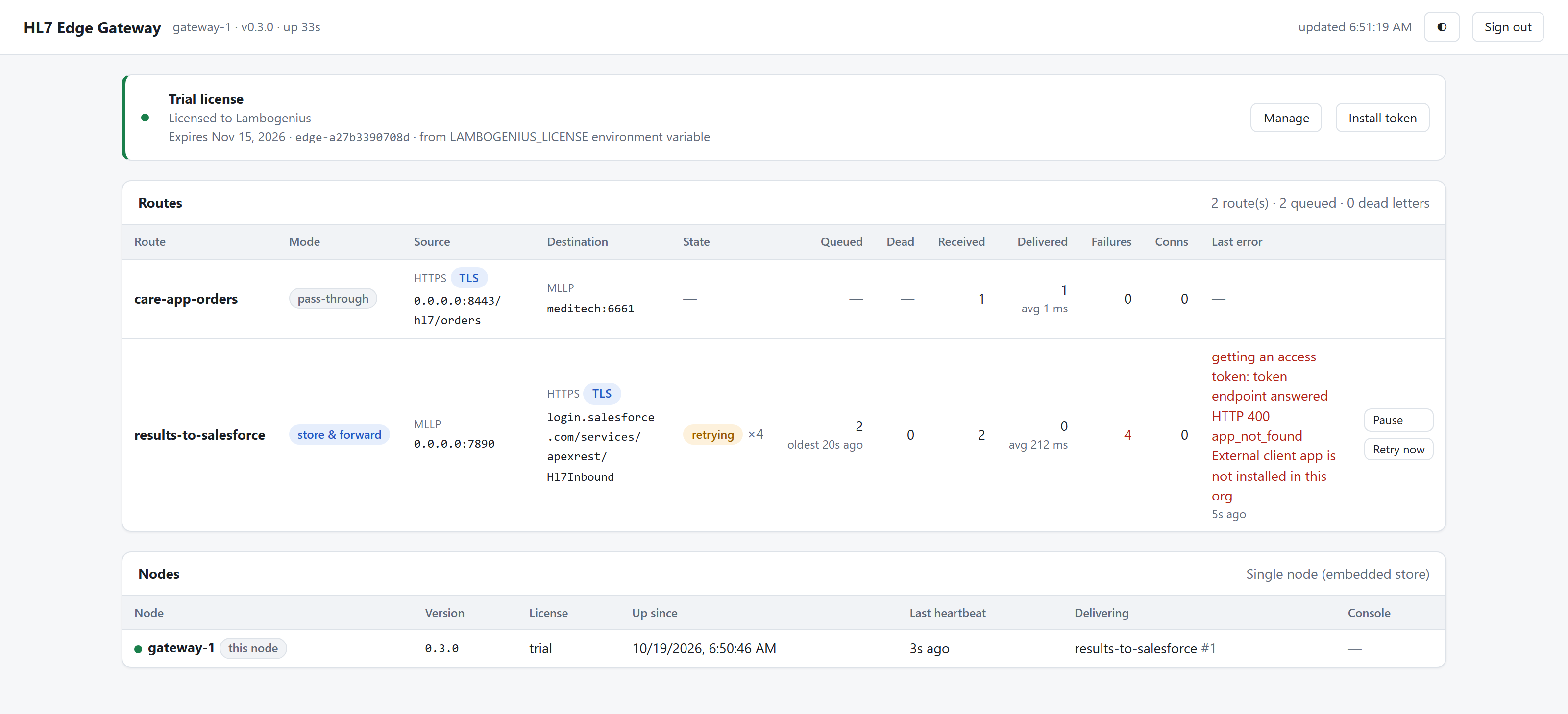
A failed sign-in to Salesforce never loses results: they stay queued, and the route shows Salesforce's answer as its last error:
| Last error | Cause |
|---|---|
app_not_found External client app is not installed in this org | Wrong consumer key, or the app isn't enabled for the org yet (a new app can take a few minutes). |
invalid_grant user hasn't approved this consumer | The user isn't pre-authorized: step 2.4. |
invalid_grant invalid assertion | The certificate in the app doesn't match secrets/salesforce.key, or SF_LOGIN_URL is wrong for the org. |
HTTP 404 | The Apex class Hl7Inbound isn't saved. |
See also Security for every caller and destination option.