
 Lambogenius
What it does
Two gateway nodes behind one address, with the queue in a three-node NATS JetStream cluster. The demo crashes the node that is delivering, then the node MEDITECH is connected to, then a NATS node. It then checks that nine results arrived at the lab API once each, in order.
MEDITECH ──MLLP──▶ HAProxy :7890 ──▶ gw1 (active) ──┐
                         │                          ├──▶ lab API   one message per route in flight
                         └────▶ gw2 (if gw1 is not ready)
                       queue: JetStream stream, 3 replicas on nats1, nats2, nats3
The sample is in 05-high-availability in the examples repository.
Diagrams
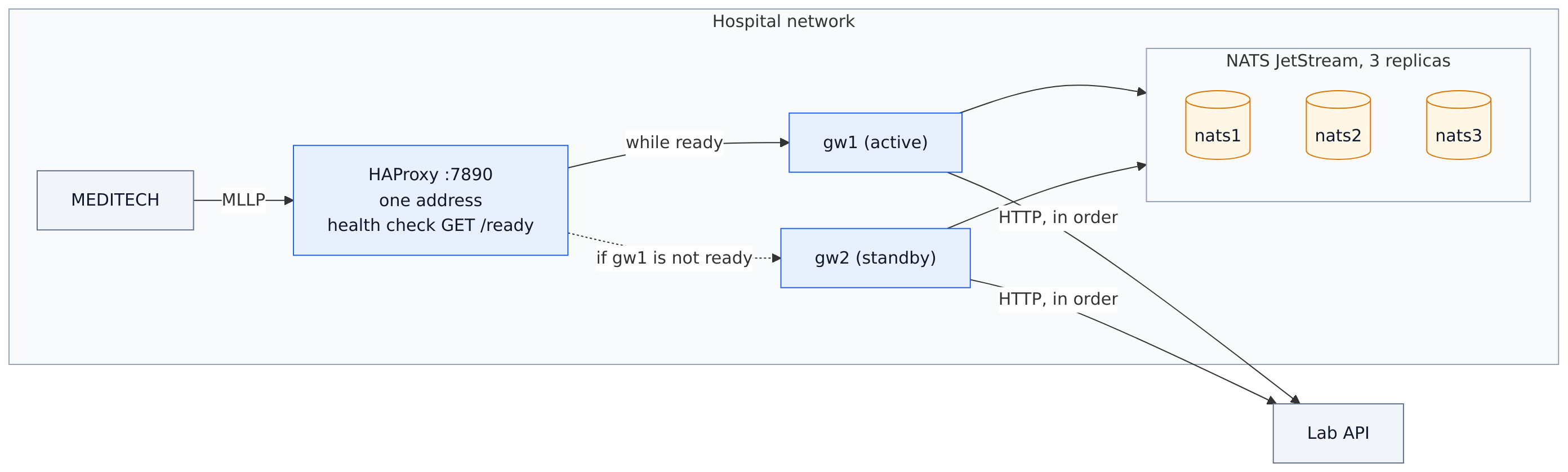
architecture.mmd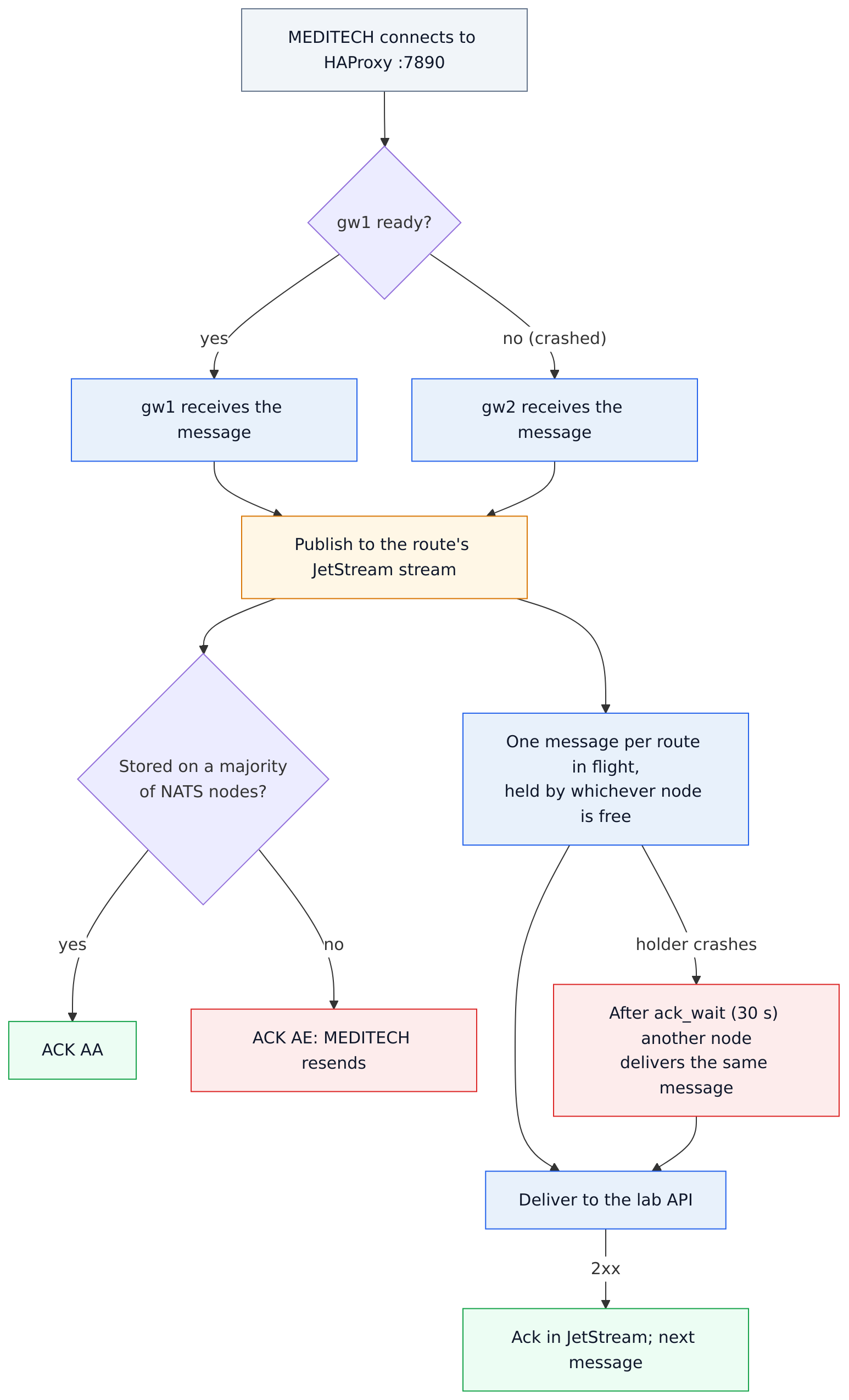
data-flow.mmd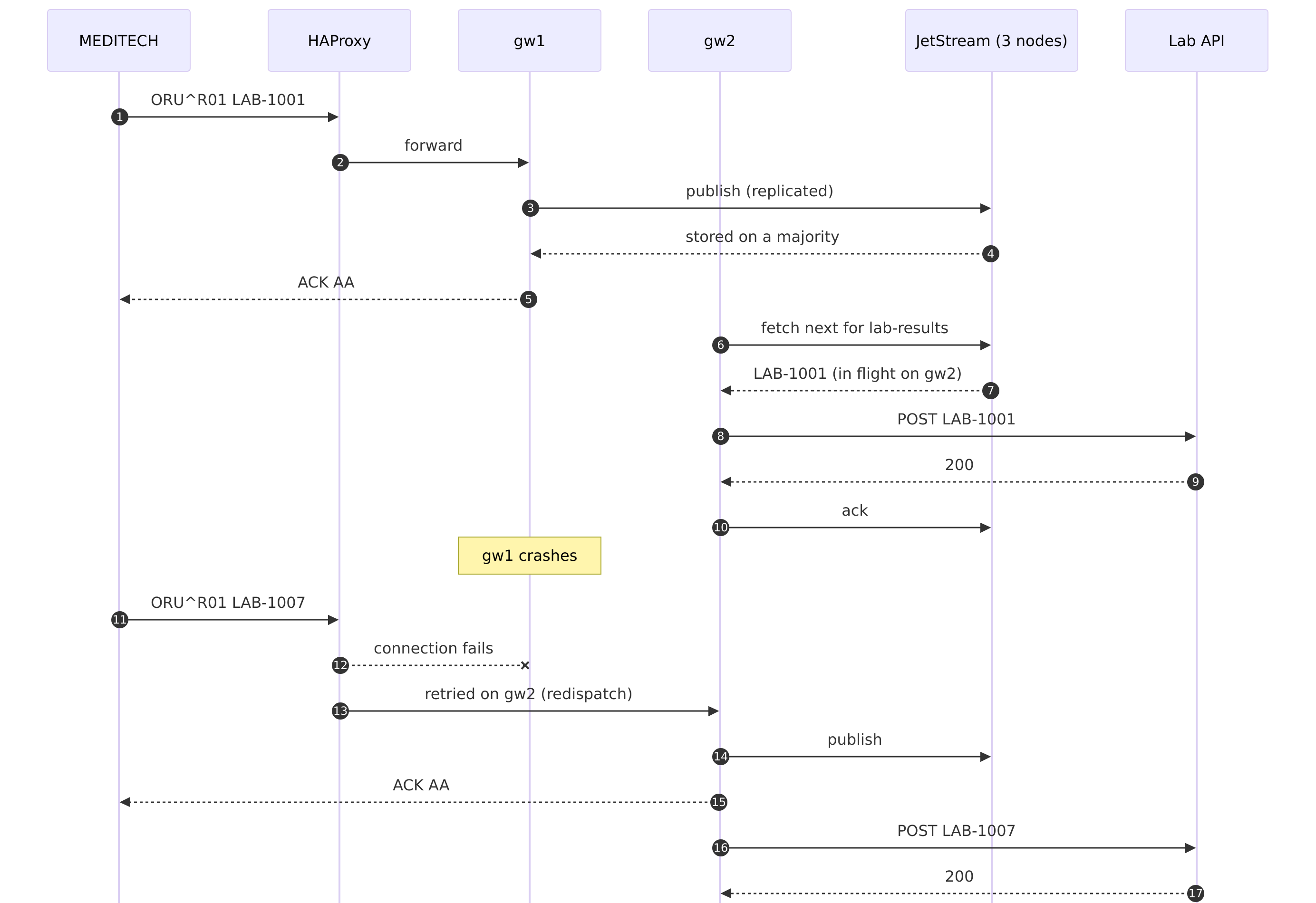
sequence.mmdThe configuration
Every gateway node uses the same file; only HL7EDGE_NODE_ID differs:
05-high-availability/gateway.toml
# Sample 05: high availability. Every gateway node uses this same file; only HL7EDGE_NODE_ID differs.
#
# The queue lives in a 3-node NATS JetStream cluster, with every message on all three NATS nodes
# (replicas = 3). Any gateway node can accept a message and any can deliver it, and the queue survives
# losing a gateway node and one NATS node.
#
# Delivery stays strictly in order per route: across the whole cluster, one message per route is in
# flight at a time, and whichever node is free delivers the next. If a node stops while it holds a
# message, another node delivers that message after ack_wait, and then carries on with the rest.

node_id = "${HL7EDGE_NODE_ID}"

[admin]
listen = "0.0.0.0:8080"
token = "${HL7EDGE_ADMIN_TOKEN}"
allow_payload_view = true

[store]
backend = "jetstream"
urls = ["nats://nats1:4222", "nats://nats2:4222", "nats://nats3:4222"]
replicas = 3
ack_wait = "30s"                     # how long before another node takes over an in-flight message

[[route]]
name = "lab-results"
mode = "store_and_forward"
request_timeout = "10s"              # must be at least 5 s shorter than ack_wait
source = { type = "mllp", listen = "0.0.0.0:7890" }

[route.destination]
type = "http"
url = "http://lab-api:8000/hl7/results"
headers = { Authorization = "Bearer ${LAB_API_TOKEN}" }

[route.store_and_forward]
on_reject = "dead_letter"
retry = { initial = "2s", max = "15s", multiplier = 2.0 }
HAProxy is the one address. Two of its settings matter in failover. It re-resolves the gateways' names, because a restarted container can get a different address. It also redispatches a connection that fails to reach a node that just died.
05-high-availability/haproxy/haproxy.cfg
# The one address MEDITECH connects to (in production: a VIP, F5, NetScaler, keepalived...).
# "balance first" is active/passive: every new connection goes to gw1 while it is ready, else to gw2.
# Readiness is the gateway's /ready on its admin port; a node that is down or not ready is skipped
# within about 2 seconds, and its open connections are closed so MEDITECH reconnects to the other.

global
    log stdout format raw local0

# Re-resolve gw1/gw2 through Docker's DNS: a restarted container can come back with another IP
# address, and an address resolved once at startup would then point at the wrong node (or none).
resolvers docker
    nameserver dns 127.0.0.11:53
    hold valid 2s

defaults
    mode tcp
    log global
    option tcplog
    timeout connect 2s
    timeout queue 10s
    timeout client 1h      # MLLP connections are long-lived
    timeout server 1h
    # A connection that fails to reach a node (it just died, before the health check noticed) is
    # retried on the other node instead of waiting for the dead one.
    retries 3
    option redispatch 1

frontend lab_results
    bind :7890
    default_backend lab_results

backend lab_results
    balance first
    option httpchk
    http-check send meth GET uri /ready
    # Health check every second, faster while a node changes state. Do not add "observe layer4 ...
    # on-error mark-down": with it, a connection that fails on a node that just died hangs instead of
    # moving to the other node.
    default-server check port 8080 inter 1s fastinter 500ms downinter 1s fall 2 rise 2 on-marked-down shutdown-sessions resolvers docker init-addr last,libc,none
    server gw1 gw1:7890
    server gw2 gw2:7890
05-high-availability/compose.yaml
# Sample 05: high availability. 3 NATS JetStream nodes, 2 gateway nodes, HAProxy in front.
#   docker compose up -d
#   MLLP (MEDITECH connects here):  localhost:7890  (HAProxy → gw1, or gw2 when gw1 is down)
#   Consoles:                       http://localhost:8081 (gw1), http://localhost:8082 (gw2)
name: hl7edge-sample-05

x-nats: &nats
  image: nats:2.15.1-alpine
  restart: unless-stopped

x-gateway: &gateway
  image: lambogenius/hl7-edge-gateway:${GATEWAY_VERSION:-0.3.0}
  restart: unless-stopped
  env_file: .env
  depends_on: [nats1, nats2, nats3, lab-api]
  volumes:
    - ./gateway.toml:/etc/hl7-edge-gateway/hl7-edge-gateway.toml:ro

services:
  nats1:
    <<: *nats
    command: ["-n", "nats1", "-js", "-sd", "/data", "-m", "8222", "--cluster_name", "hl7edge", "--cluster", "nats://0.0.0.0:6222", "--routes", "nats://nats2:6222,nats://nats3:6222"]
    volumes: [nats1:/data]
  nats2:
    <<: *nats
    command: ["-n", "nats2", "-js", "-sd", "/data", "-m", "8222", "--cluster_name", "hl7edge", "--cluster", "nats://0.0.0.0:6222", "--routes", "nats://nats1:6222,nats://nats3:6222"]
    volumes: [nats2:/data]
  nats3:
    <<: *nats
    command: ["-n", "nats3", "-js", "-sd", "/data", "-m", "8222", "--cluster_name", "hl7edge", "--cluster", "nats://0.0.0.0:6222", "--routes", "nats://nats1:6222,nats://nats2:6222"]
    volumes: [nats3:/data]

  gw1:
    <<: *gateway
    hostname: gw1
    environment: { HL7EDGE_NODE_ID: gw1 }
    ports: ["8081:8080"]
  gw2:
    <<: *gateway
    hostname: gw2
    environment: { HL7EDGE_NODE_ID: gw2 }
    ports: ["8082:8080"]

  lb:
    image: haproxy:3.0-alpine
    restart: unless-stopped
    depends_on: [gw1, gw2]
    volumes: ["./haproxy/haproxy.cfg:/usr/local/etc/haproxy/haproxy.cfg:ro"]
    ports: ["7890:7890"]

  lab-api:
    image: python:3.12-slim
    command: ["python", "-u", "/app/app.py"]
    env_file: .env
    ports: ["8000:8000"]
    volumes: ["./lab-api:/app:ro"]

  send:
    image: lambogenius/hl7-edge-gateway:${GATEWAY_VERSION:-0.3.0}
    entrypoint: ["hl7-edge-gateway", "send"]
    volumes: ["./messages:/messages:ro"]
    profiles: ["tools"]

volumes:
  nats1:
  nats2:
  nats3:
Step by step
- 1Start the cluster.
cd 05-high-availability
cp .env.example .env            # add your license
docker compose up -d            # about a minute while JetStream forms
Both consoles show the whole cluster:
http://localhost:8081(gw1) andhttp://localhost:8082(gw2). - 2Queue messages while the API is down.
curl -X POST localhost:8000/control/down
docker compose run --rm send --to lb:7890 /messages/oru-r01-4.hl7 /messages/oru-r01-5.hl7 /messages/oru-r01-6.hl7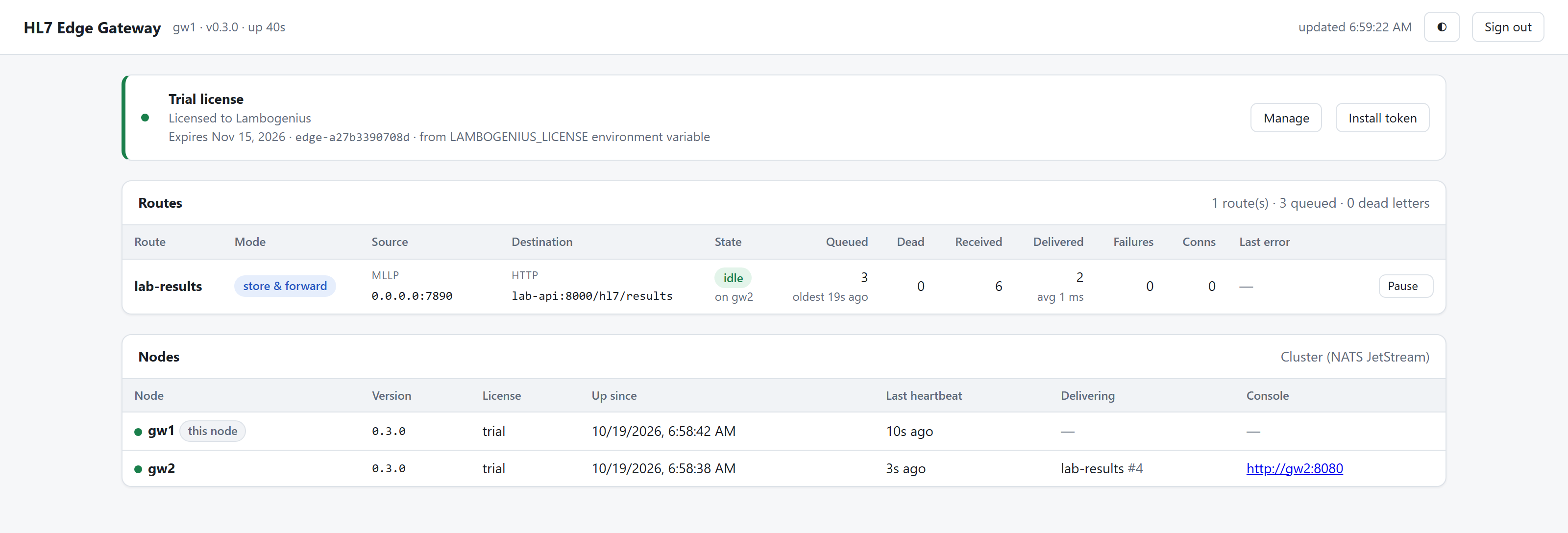
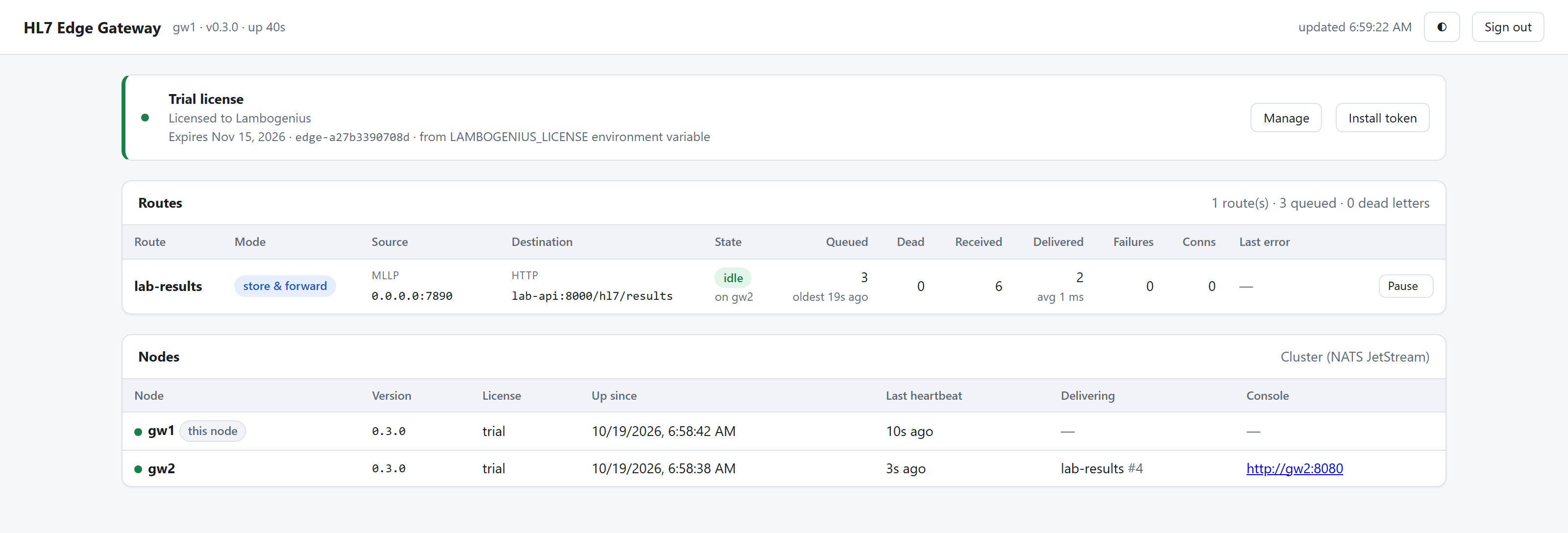
gw1 received the messages; gw2 holds the route's in-flight message (#4). Any node can deliver, but only one message per route is in flight. - 3Crash the delivering node, then bring the API back.
docker compose kill gw2(or whichever node the Nodes table shows), thencurl -X POST localhost:8000/control/up. The other node delivers LAB-1004 to LAB-1006 withinack_wait(30 s), in order. - 4Crash the node MEDITECH is connected to.
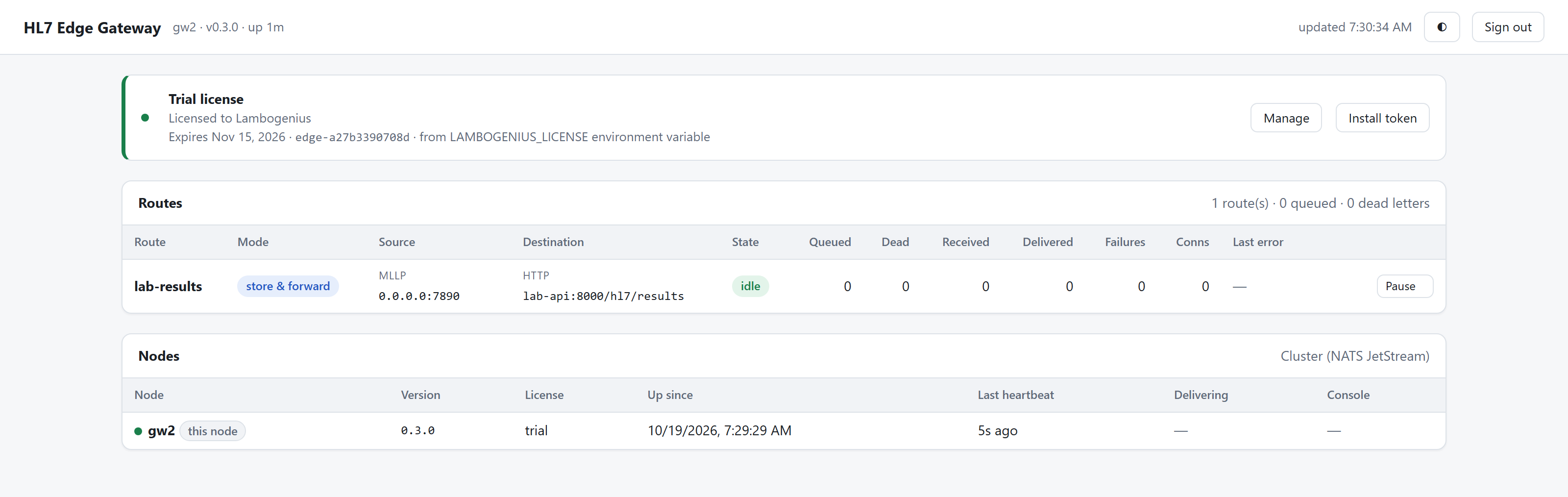
docker compose kill gw1, then sendoru-r01-7.hl7tolb:7890straight away. The connection to the dead gw1 fails, HAProxy retries it on gw2, and the result is delivered.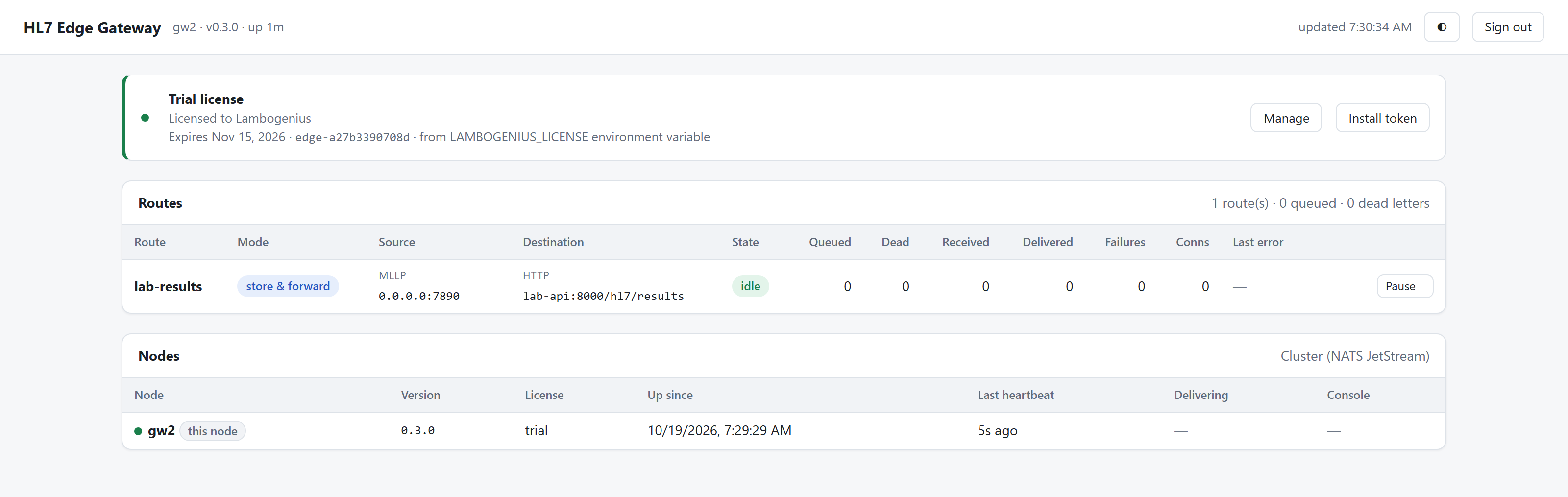
gw2 carries on alone. gw1 leaves the Nodes table when its heartbeat expires. - 5Crash a NATS node too.
docker compose kill nats1, then sendoru-r01-8.hl7. It's still delivered: two of three replicas are a majority. - 6Recover.
docker compose start nats1 gw1, then sendoru-r01-9.hl7. The lab API has LAB-1001 to LAB-1009, each once, in order../demo.shruns all of this and checks it.
The examples are tested with 2.15.1. In the same crash test with 2.11.17, the NATS server on the crashed host came back and deleted its copies of the queue streams as "orphaned". It never got them back, so the streams were left with two replicas and no error. After any restart, check that /jsz?streams=true on the monitoring port shows the same streams and last_seq on every server.
How the cluster works, and its guarantees: High availability.