
 Lambogenius
What it does
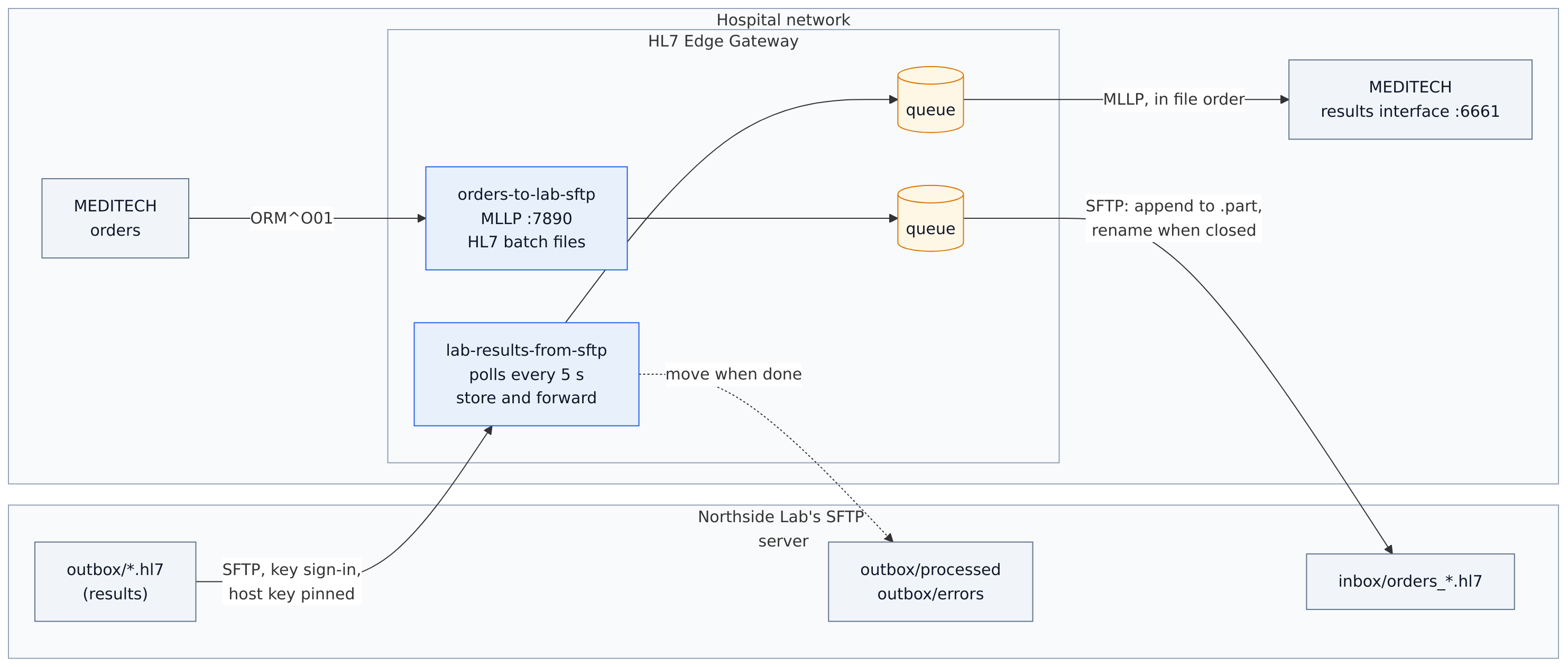
Many reference labs exchange HL7 files on an SFTP server instead of using MLLP or web services. Two routes connect such a lab with MEDITECH, both store-and-forward:
| Route | From → to | What happens |
|---|---|---|
lab-results-from-sftp | SFTP outbox/*.hl7 → MLLP | Every 5 s the gateway lists the lab's outbox and reads finished files, oldest first: single results or HL7 batches. Each result is stored and delivered to MEDITECH in file order; the file then moves to outbox/processed. Lines that are not HL7 go to outbox/errors; a result MEDITECH rejects goes to dead letters. |
orders-to-lab-sftp | MLLP :7890 → SFTP inbox/ | MEDITECH gets AA once an order is stored. Orders are appended to an HL7 batch file (orders_<time>.hl7.part), which is closed after 3 orders, or 20 seconds after its first one: BTS with the count, FTS, then renamed to .hl7. |
The lab's server is atmoz/sftp in a container. The gateway signs in with a private key and checks the server's host key against known_hosts; a keys container makes both on first start. You need the gateway image 0.4.0 or later.
The sample is in 10-sftp-files in the examples repository.
Diagrams
architecture.mmd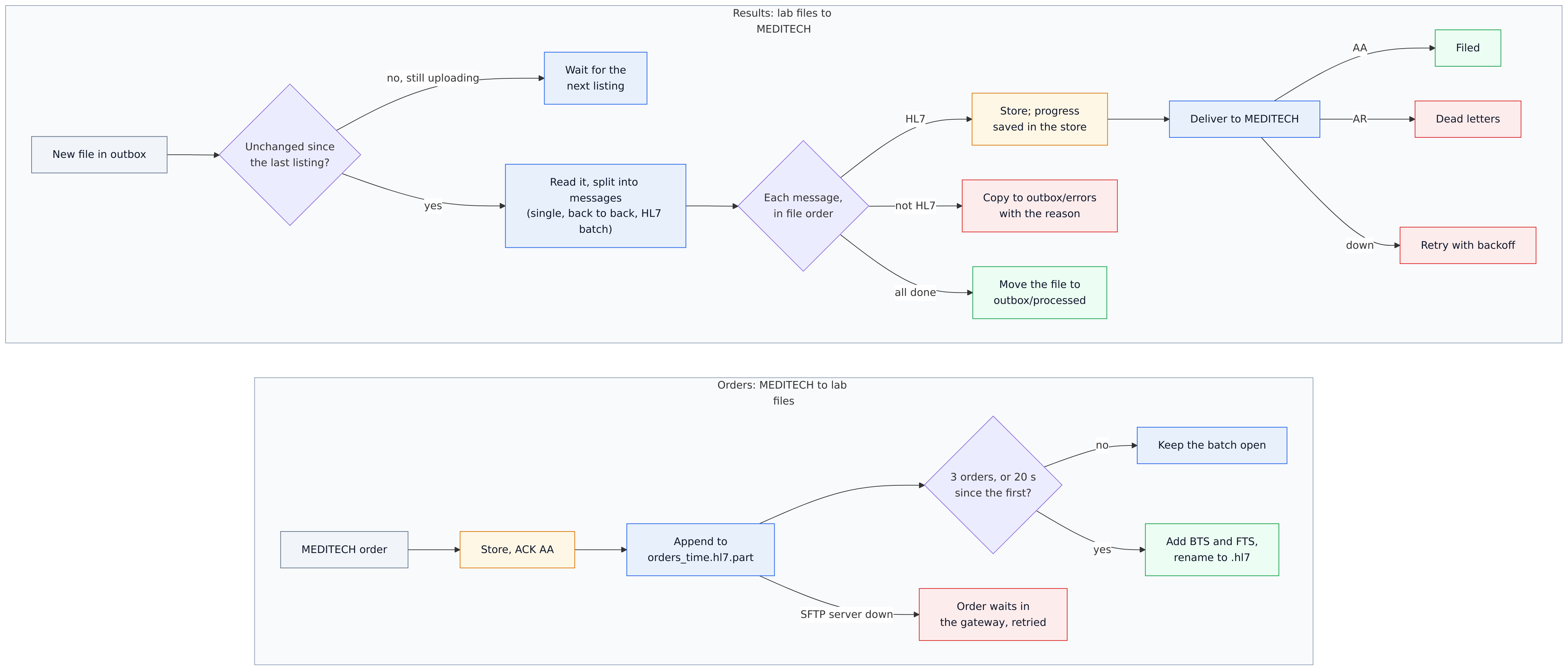
data-flow.mmd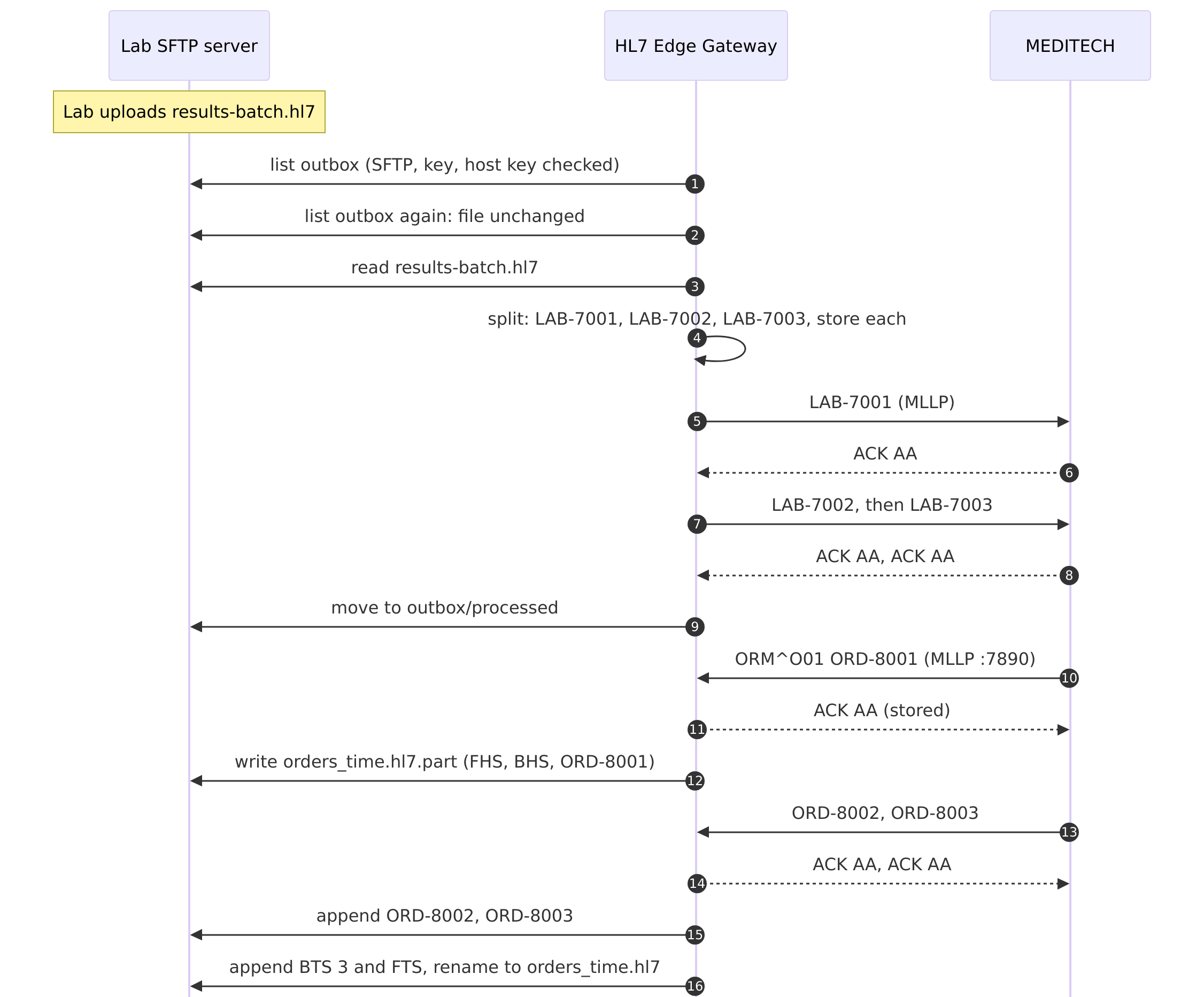
sequence.mmdThe configuration
# Sample 10: a reference lab ⇄ HL7 Edge Gateway ⇄ MEDITECH, with HL7 files on the lab's SFTP server
#
#   lab-results-from-sftp  The lab drops result files in its SFTP folder outbox: single messages or HL7
#                          batches. The gateway reads each finished file, oldest first, hands its results
#                          to MEDITECH over MLLP in order, then moves the file to outbox/processed.
#                          Lines that are not HL7 go to outbox/errors with the reason. A result MEDITECH
#                          rejects (AR) goes to the gateway's dead letters.
#   orders-to-lab-sftp     MEDITECH sends orders over MLLP; the gateway collects them into HL7 batch files
#                          in the lab's folder inbox: a file is closed after 3 orders, or 20 seconds after
#                          its first one.
#
# The gateway signs in with a private key and checks the server's host key against known_hosts; both
# are made by the keys container in compose.yaml (see README.md for using your own).

node_id = "gateway-1"

[admin]
listen = "0.0.0.0:8080"
token = "${HL7EDGE_ADMIN_TOKEN}"
allow_payload_view = true

[store]
backend = "embedded"
path = "/var/lib/hl7-edge-gateway"

[[route]]
name = "lab-results-from-sftp"
mode = "store_and_forward"

[route.source]
type = "sftp"
host = "sftp"
username = "hospital"
private_key = "/keys/gateway_ed25519"
known_hosts = "/keys/known_hosts"     # or host_key = "SHA256:…" (hl7-edge-gateway host-key --to sftp)
directory = "outbox"                  # relative to the user's home folder
pattern = "*.hl7"
poll_interval = "5s"                  # a file is read once it is unchanged between two listings
after = "move:outbox/processed"       # or "delete", or "rename:.done"
error_directory = "outbox/errors"

[route.destination]
type = "mllp"
address = "meditech:6661"

[route.store_and_forward]
on_reject = "dead_letter"
retry = { initial = "2s", max = "30s", multiplier = 2.0 }

[[route]]
name = "orders-to-lab-sftp"
mode = "store_and_forward"
source = { type = "mllp", listen = "0.0.0.0:7890" }

[route.destination]
type = "sftp"
host = "sftp"
username = "hospital"
private_key = "/keys/gateway_ed25519"
known_hosts = "/keys/known_hosts"
directory = "inbox"
batch_format = "hl7_batch"            # FHS, BHS, the orders, BTS (with the count), FTS
file_name = "orders_{timestamp}.hl7"  # written as .part and renamed when the batch is closed
line_ending = "crlf"
batch = { max_messages = 3, max_wait = "20s" }

[route.store_and_forward]
retry = { initial = "2s", max = "30s", multiplier = 2.0 }
# Sample 10: a reference lab's SFTP server ⇄ HL7 Edge Gateway ⇄ MEDITECH
#   docker compose up -d                      keys, the lab's SFTP server, the gateway and a stand-in MEDITECH
#   docker compose run --rm send …            send HL7 files to the gateway over MLLP (as MEDITECH)
#   docker compose run --rm gateway-cli …     other gateway commands, e.g. host-key --to sftp
name: hl7edge-sample-10

services:
  gateway:
    image: lambogenius/hl7-edge-gateway:${GATEWAY_VERSION:-0.4.0}
    env_file: .env
    ports:
      - "7890:7890"   # orders from MEDITECH (MLLP)
      - "8080:8080"   # admin console
    volumes:
      - ./gateway.toml:/etc/hl7-edge-gateway/hl7-edge-gateway.toml:ro
      - keys:/keys:ro
      - queue:/var/lib/hl7-edge-gateway
    depends_on:
      sftp: { condition: service_started }
      meditech: { condition: service_started }

  # The reference lab's SFTP server. The hospital's account "hospital" has the folders outbox (the lab's
  # results, with processed and errors) and inbox (MEDITECH's orders). It accepts the gateway's key, and
  # LAB_SFTP_PASSWORD for you, on localhost:2222.
  sftp:
    image: atmoz/sftp:alpine
    command: ["hospital:${LAB_SFTP_PASSWORD}:1001:100:outbox,outbox/processed,outbox/errors,inbox"]
    ports: ["2222:22"]
    volumes:
      - keys:/keys:ro
      - ./sftp/install-keys.sh:/etc/sftp.d/install-keys.sh:ro
    depends_on:
      keys: { condition: service_completed_successfully }

  # Makes the SFTP server's host keys, the gateway's key and its known_hosts, once.
  keys:
    image: alpine:3.20
    command: ["sh", "/scripts/make-keys.sh"]
    volumes:
      - keys:/keys
      - ./sftp:/scripts:ro

  # Stand-in for MEDITECH's inbound results interface.
  meditech:
    image: python:3.12-slim
    command: ["python", "-u", "/app/receiver.py"]
    volumes: ["./meditech:/app:ro"]

  # Tools, not started by `up`.
  send:
    image: lambogenius/hl7-edge-gateway:${GATEWAY_VERSION:-0.4.0}
    entrypoint: ["hl7-edge-gateway", "send"]
    volumes: ["./messages:/messages:ro"]
    profiles: ["tools"]
  gateway-cli:
    image: lambogenius/hl7-edge-gateway:${GATEWAY_VERSION:-0.4.0}
    entrypoint: ["hl7-edge-gateway"]
    profiles: ["tools"]

volumes:
  keys:
  queue:
The keys: in production the lab sends you its host key fingerprint, and you send the lab your public key.
10-sftp-files/sftp/make-keys.sh
#!/bin/sh
# Run once by the keys container: the lab SFTP server's host keys, the gateway's private key, and a
# known_hosts file with the server's keys, all in the keys volume. In production the lab sends you its
# host key fingerprint, and you give the lab your public key.
set -eu
[ -f /keys/known_hosts ] && { echo "keys already made"; exit 0; }
apk add --no-cache -q openssh-keygen
ssh-keygen -q -t ed25519 -N "" -C "lab sftp host key" -f /keys/ssh_host_ed25519_key
ssh-keygen -q -t rsa -b 3072 -N "" -C "lab sftp host key" -f /keys/ssh_host_rsa_key
ssh-keygen -q -t ed25519 -N "" -C "hl7-edge-gateway" -f /keys/gateway_ed25519
for k in ed25519 rsa; do echo "sftp $(cut -d' ' -f1,2 /keys/ssh_host_${k}_key.pub)"; done > /keys/known_hosts
# The gateway runs as its own user (uid 10001) and must read its key. On a real server, make the key
# file readable by that user only.
chmod 644 /keys/gateway_ed25519
echo "keys made; the SFTP server's host key:"
ssh-keygen -lf /keys/ssh_host_ed25519_key.pub
10-sftp-files/sftp/install-keys.sh — run by the SFTP server at startup
#!/bin/sh
# Run by the SFTP server at startup (atmoz/sftp runs /etc/sftp.d/*): use the host keys from the keys
# volume, so known_hosts stays valid when the container is recreated, and let the gateway's key in.
set -eu
for k in ed25519 rsa; do
  cp "/keys/ssh_host_${k}_key" "/etc/ssh/ssh_host_${k}_key"
  cp "/keys/ssh_host_${k}_key.pub" "/etc/ssh/ssh_host_${k}_key.pub"
  chmod 600 "/etc/ssh/ssh_host_${k}_key"
done
mkdir -p /home/hospital/.ssh
grep -qsF "$(cat /keys/gateway_ed25519.pub)" /home/hospital/.ssh/authorized_keys ||
  cat /keys/gateway_ed25519.pub >> /home/hospital/.ssh/authorized_keys
chown -R 1001:100 /home/hospital/.ssh
chmod 700 /home/hospital/.ssh
chmod 600 /home/hospital/.ssh/authorized_keys
Step by step
- 1Start it.
cd 10-sftp-files
cp .env.example .env            # add your license
docker compose up -d
docker compose logs keys        # the SFTP server's host key
keys-1  | 256 SHA256:EbKoEJqwa3Ffa/gudKmtDQSqn3kSVtKgBbYJxjPRnFU lab sftp host key (ED25519)
The commands below drop files into the lab's outbox with
docker compose exec, written under a temporary name and then renamed, as SFTP uploads usually finish. You can also connect any SFTP client tolocalhost:2222ashospitalwithLAB_SFTP_PASSWORDfrom.env.lab_drop() { docker compose exec -T sftp sh -c 'f=/home/hospital/outbox/$1; cat > "$f.tmp" && chown 1001:100 "$f.tmp" && mv "$f.tmp" "$f"' sh "$1" < "messages/$1"; } - 2The lab drops an HL7 batch file with three results.
lab_drop results-batch.hl7
docker compose logs meditech
meditech results: AA LAB-7001 ORU^R01^ORU_R01 patient 100121 (filed)
meditech results: AA LAB-7002 ORU^R01^ORU_R01 patient 100122 (filed)
meditech results: AA LAB-7003 ORU^R01^ORU_R01 patient 100123 (filed)
Within about 10 seconds (two listings) MEDITECH files the three results, in file order, and the file moves to
outbox/processed. The batch's FHS, BHS, BTS and FTS segments are dropped, and its CRLF line endings don't matter.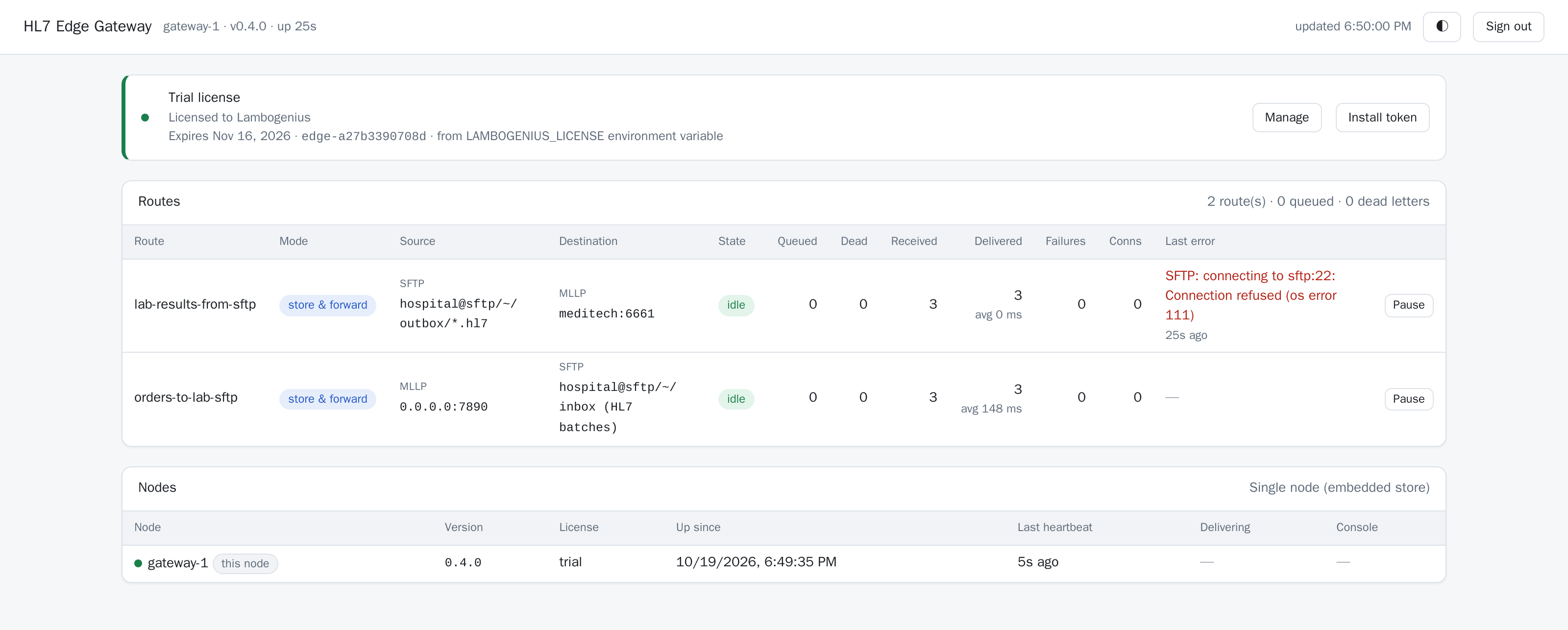
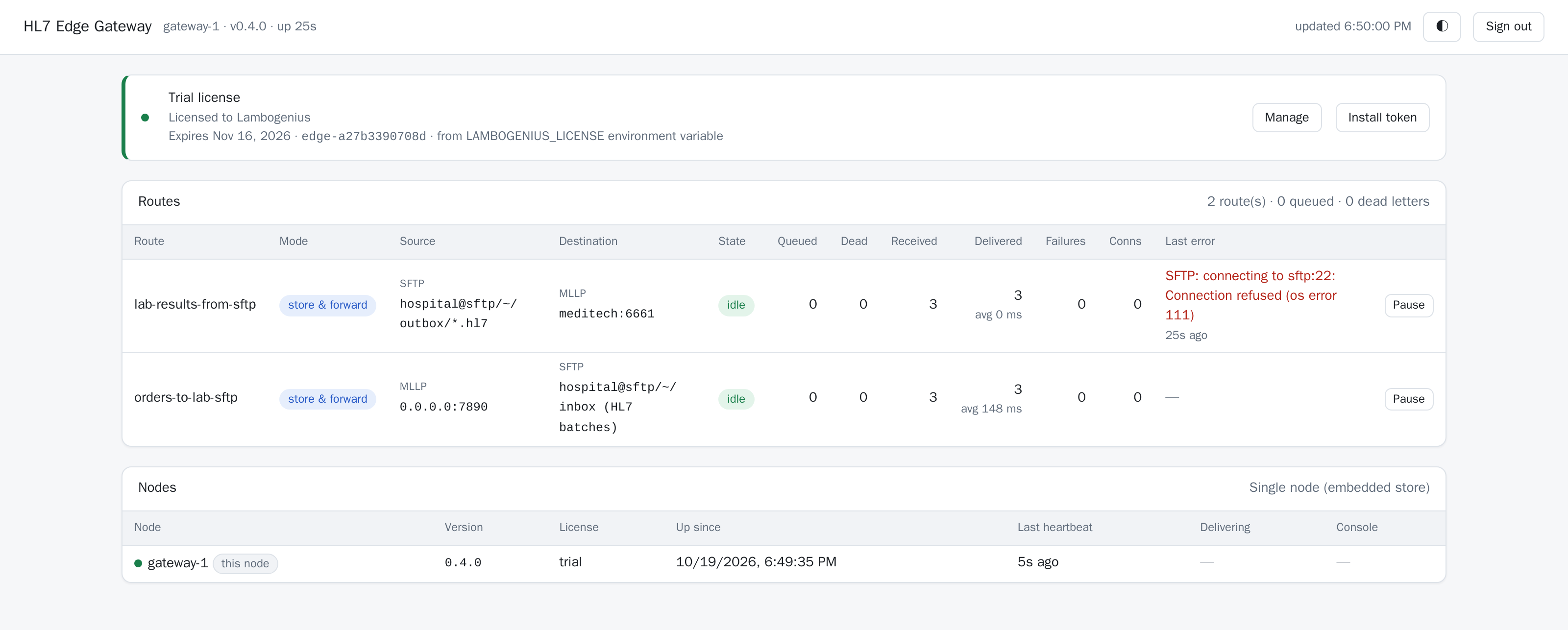
Both routes after the first file and three orders. The connection error is from the first poll, before the SFTP server was up. - 3A stray line, and a patient MEDITECH doesn't know.
lab_drop results-mixed.hl7
docker compose exec sftp cat /home/hospital/outbox/errors/results-mixed.hl7.txt
message 2 (no MSH-10): message does not start with an MSH segment
LAB-7004 is filed. The stray line is rejected on its own and copied to
outbox/errorswith the reason. MEDITECH answers LAB-7005 with AR, so it goes to the route's dead letters, where you can requeue it once the patient exists.
The result MEDITECH rejected, in the route's dead letters: view it, requeue it, or delete it. - 4MEDITECH sends orders; they reach the lab as HL7 batch files.
docker compose run --rm send --to gateway:7890 /messages/orm-o01-1.hl7 /messages/orm-o01-2.hl7 /messages/orm-o01-3.hl7
docker compose exec sftp ls /home/hospital/inbox
orders_20261019182915609.hl7
docker compose exec sftp cat /home/hospital/inbox/orders_20261019182915609.hl7
FHS|^~\&|MEDITECH|GENERAL_HOSPITAL|NORTHSIDE_LAB|NORTHSIDE|20261019182915+0000||orders_20261019182915609.hl7||1792434555609
BHS|^~\&|MEDITECH|GENERAL_HOSPITAL|NORTHSIDE_LAB|NORTHSIDE|20261019182915+0000||||1792434555609
MSH|^~\&|MEDITECH|GENERAL_HOSPITAL|NORTHSIDE_LAB|NORTHSIDE|20261019150100||ORM^O01^ORM_O01|ORD-8001|T|2.5.1
PID|1||100121^^^GENERAL_HOSPITAL^MR||NAKAMURA^EMI||19700101|U
…
BTS|3
FTS|1
While a batch is open it is
orders_<time>.hl7.part, which the lab's system ignores. Sendorm-o01-4.hl7, and its batch is closed 20 seconds later bymax_wait, withBTS|1. - 5MEDITECH goes down.
docker compose stop meditech, thenlab_drop result-single.hl7. The gateway still takes the file: LAB-7006 is stored, and the file moves toprocessed. The console shows the route retrying.docker compose start meditech, and LAB-7006 is filed. - 6The lab's SFTP server goes down.
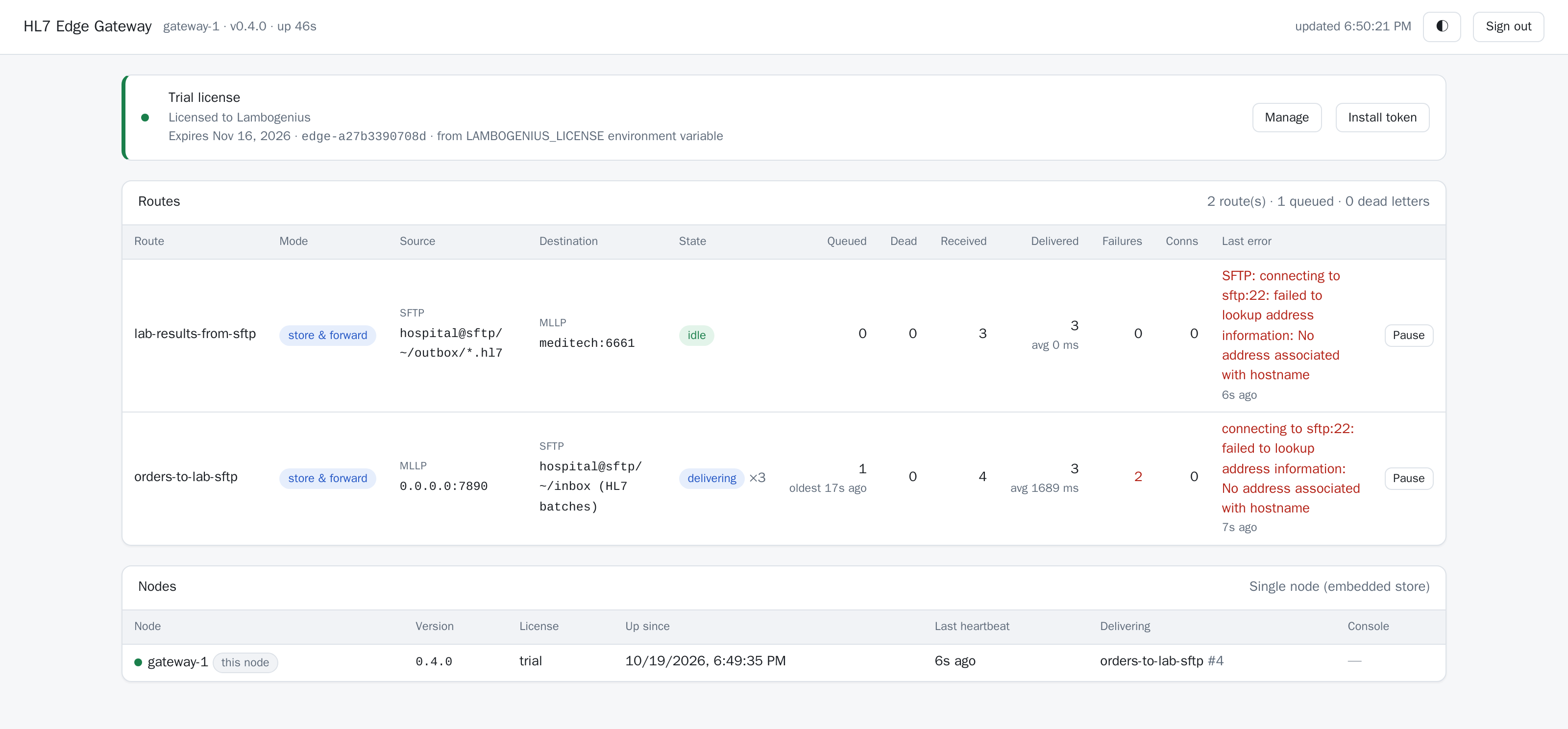
docker compose stop sftp, then sendorm-o01-5.hl7: MEDITECH still gets AA, and the order waits in the gateway.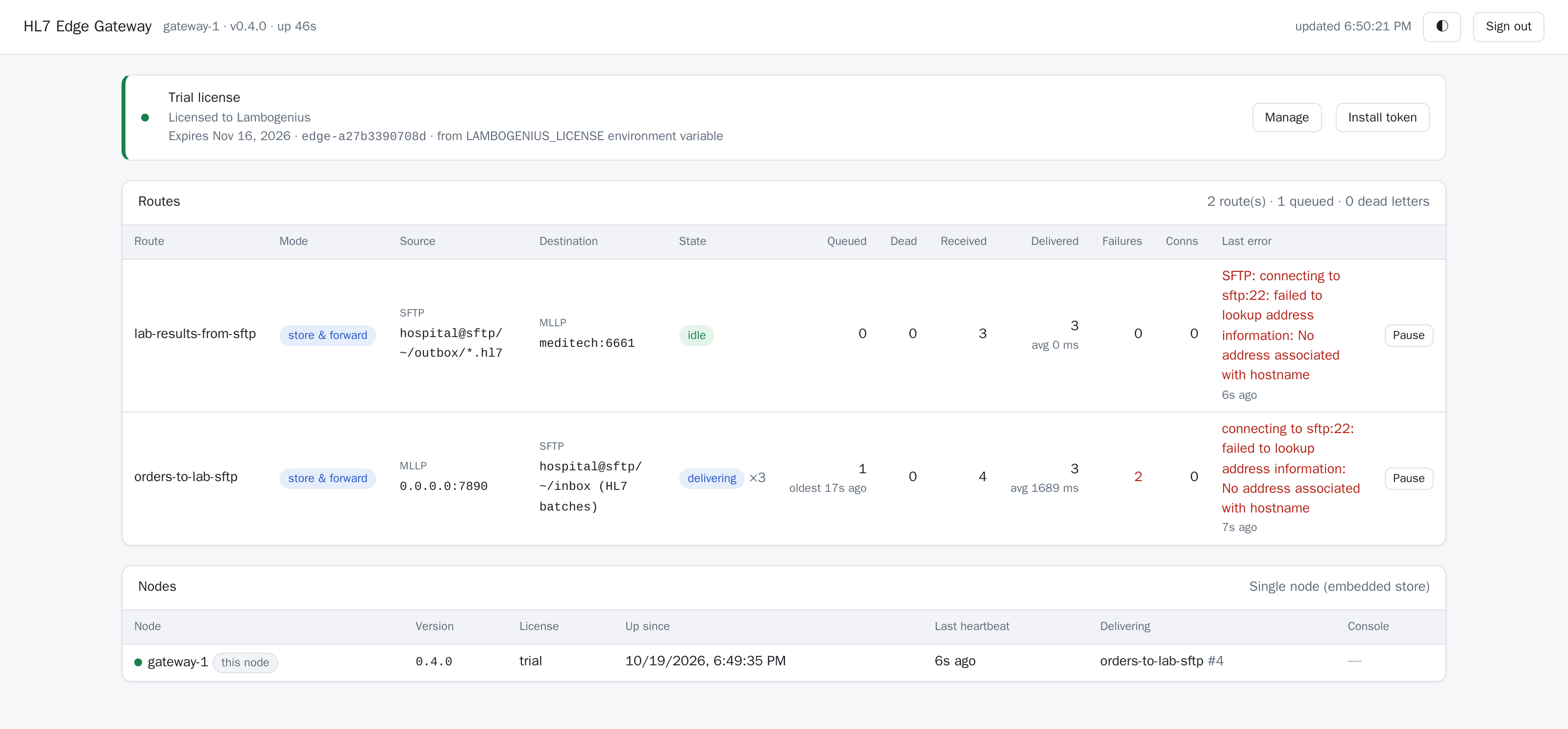
The SFTP server is down: the order waits in the gateway, which keeps retrying. docker compose start sftp, and the order reaches the inbox. - 7Check the host key.
docker compose run --rm gateway-cli host-key --to sftp
host_key = "SHA256:EbKoEJqwa3Ffa/gudKmtDQSqn3kSVtKgBbYJxjPRnFU"
It matches the fingerprint the
keyscontainer printed: the gateway refuses a server with any other key.

Or run every step with ./demo.sh (Linux, macOS, Git Bash) or ./demo.ps1 (PowerShell). Clean up with docker compose down -v.
With your own SFTP server
- Host key: get the fingerprint from the server's administrator, or read it with
hl7-edge-gateway host-key --to sftp.lab.example.organd check it with them. Sethost_key = "SHA256:…", or use aknown_hostsfile. - Sign-in: make a key (
ssh-keygen -t ed25519 -f gateway_ed25519), send the lab the.pubfile, and pointprivate_keyat the private key, readable only by the gateway's user. A password works too. - Folders:
directoryis relative to the account's home folder unless it starts with/. Theprocessedanderrorsfolders must exist. - What the lab expects: one message per file, messages back to back, or HL7 batches; CR, CRLF or LF line endings; the file name pattern. See SFTP files.