
 Lambogenius
The layout
Hospital ──Interconnect / Cloud VPN──▶ VPC ──▶ internal passthrough NLB (regional):7890
                                                    │
                          GKE regional cluster      ▼
                          hl7-edge-gateway × 2  (spread across zones)  ──HTTPS──▶ your API
                          NATS JetStream × 3    (one per zone, pd-ssd)
                          images from Artifact Registry
The same shared Kubernetes base as the Azure example, with:
The sample is in 09-gcp-gke in the examples repository.
# Sample 09: the shared base on GKE. setup.sh fills in your registry.
apiVersion: kustomize.config.k8s.io/v1beta1
kind: Kustomization
namespace: hl7edge
resources:
  - ../shared/kubernetes
images:
  - name: lambogenius/hl7-edge-gateway
    newName: REGION-docker.pkg.dev/PROJECT/hl7edge/hl7-edge-gateway   # setup.sh sets your Artifact Registry
    newTag: "0.3.0"
patches:
  # MLLP on an internal passthrough Network Load Balancer (a private IP in the VPC), never external.
  - target: { kind: Service, name: hl7edge-mllp }
    patch: |
      - op: add
        path: /metadata/annotations
        value:
          networking.gke.io/load-balancer-type: "Internal"
          # Reachable from other regions of the VPC and over Interconnect/VPN attached elsewhere:
          networking.gke.io/internal-load-balancer-allow-global-access: "true"
      - op: add
        path: /spec/externalTrafficPolicy
        value: Local      # keep the sender's address (for allow_from)
# GKE additions to ../shared/kubernetes/nats-values.yaml: SSD persistent disks (pd-ssd) for JetStream.
config:
  jetstream:
    fileStore:
      pvc:
        storageClassName: premium-rwo
Diagrams
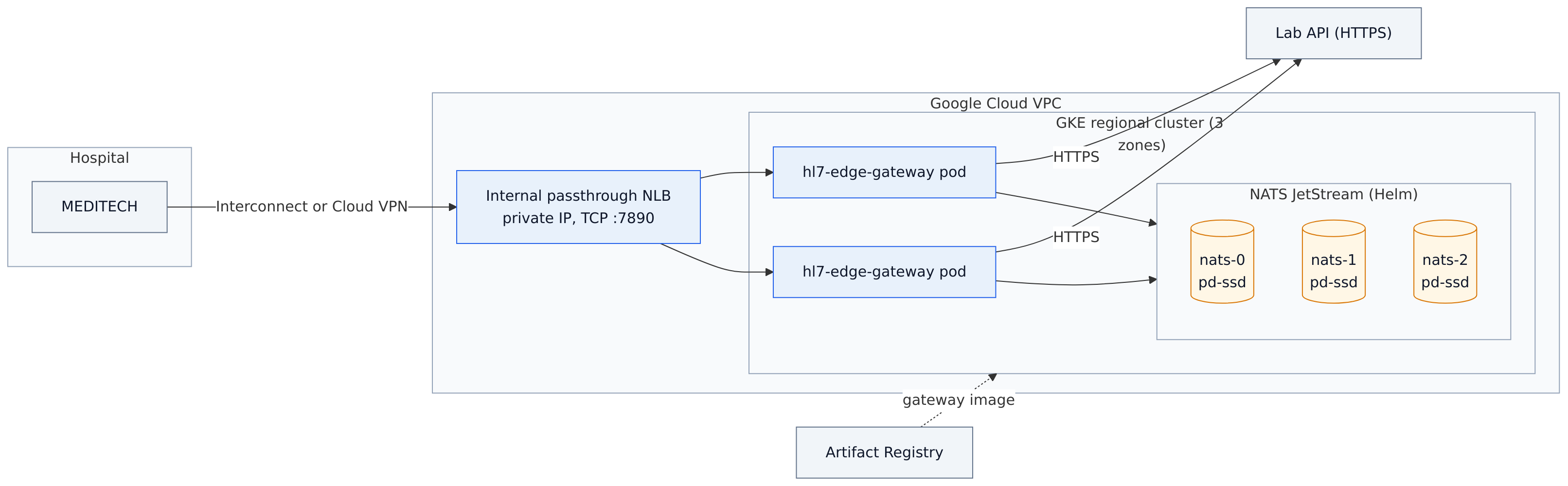
architecture.mmd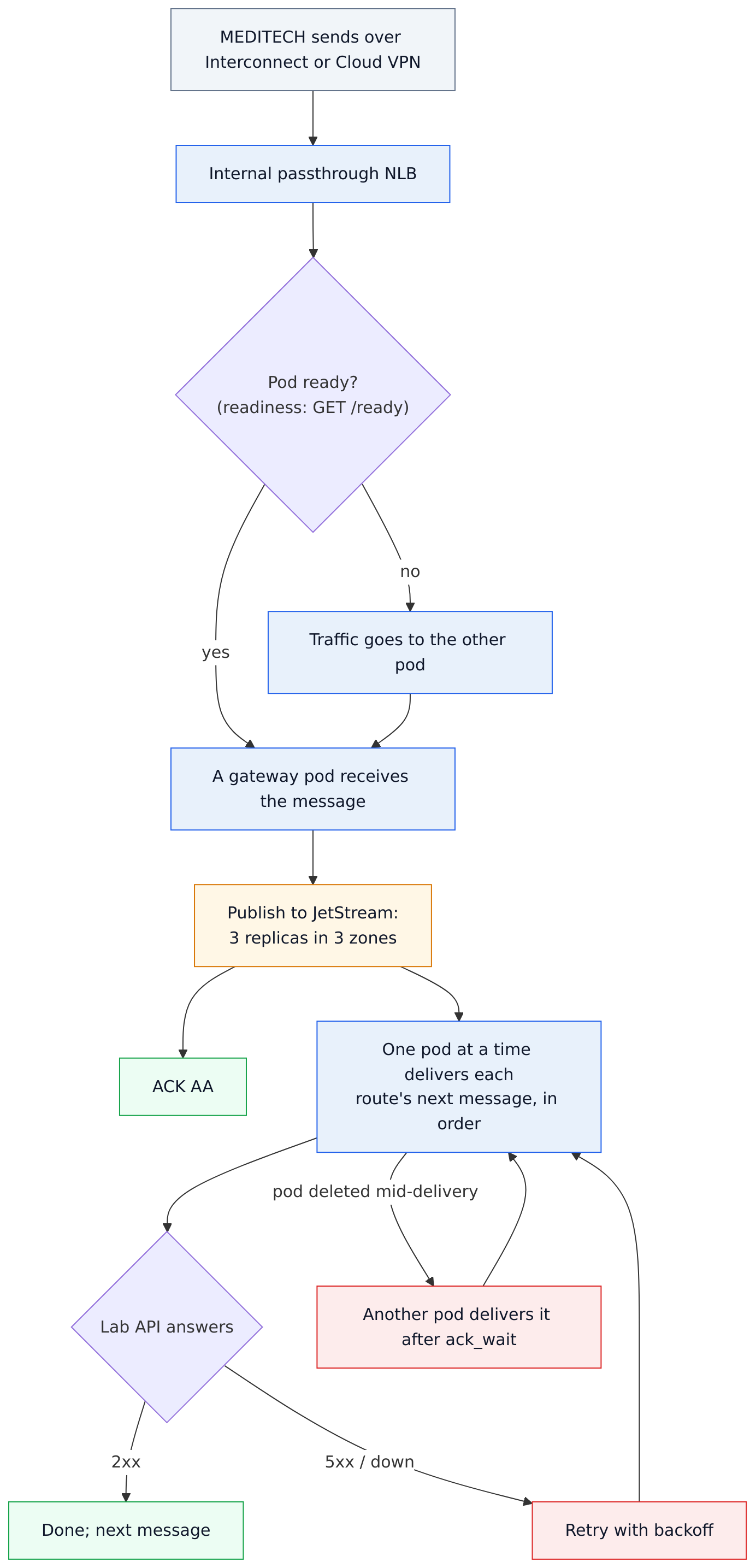
data-flow.mmd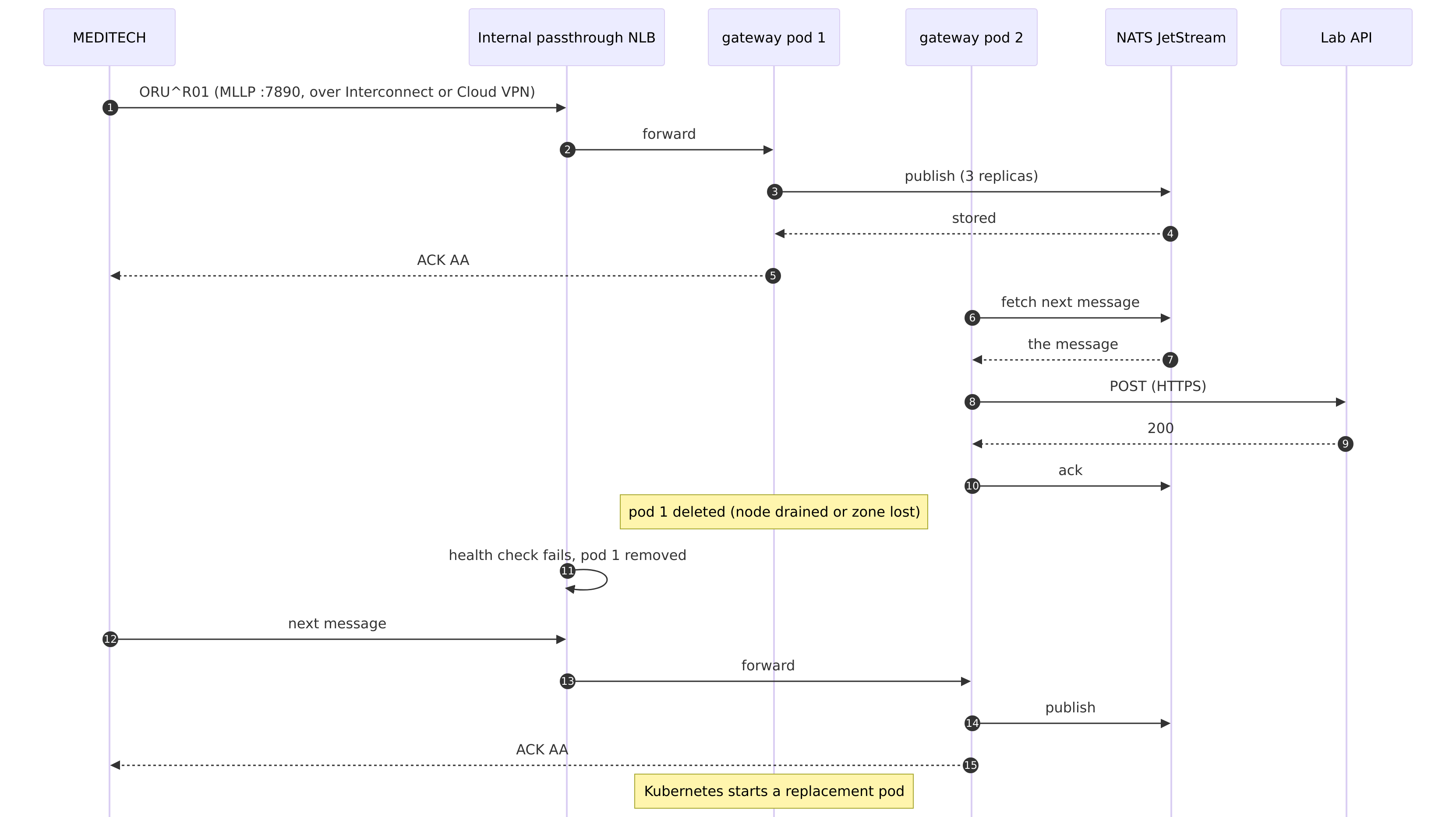
sequence.mmdDeploy
You need the Google Cloud CLI, kubectl with gke-gcloud-auth-plugin, helm 3, Docker, a project with billing, and the image archive. The script creates billable resources.
#!/usr/bin/env sh
# Sample 09: HL7 Edge Gateway with NATS JetStream on GKE, a regional cluster across three zones.
# Needs the Google Cloud CLI (gcloud auth login), kubectl, helm and Docker. Creates billable resources;
# ./teardown.sh deletes them.
set -eu
cd "$(dirname "$0")"
[ -f .env ] || { echo "copy .env.example to .env and fill it in"; exit 1; }
set -a; . ./.env; set +a
step() { printf '\n== %s\n' "$*"; }
REPO="$GCP_REGION-docker.pkg.dev/$GCP_PROJECT/hl7edge/hl7-edge-gateway"
gcloud config set project "$GCP_PROJECT" >/dev/null

step "APIs, registry and a regional GKE cluster (one node in each of three zones)"
gcloud services enable container.googleapis.com artifactregistry.googleapis.com
gcloud artifacts repositories describe hl7edge --location "$GCP_REGION" >/dev/null 2>&1 ||
  gcloud artifacts repositories create hl7edge --location "$GCP_REGION" --repository-format docker
gcloud container clusters create hl7edge --region "$GCP_REGION" --num-nodes 1 \
  --machine-type e2-standard-2 --release-channel regular --enable-ip-alias \
  --workload-pool "$GCP_PROJECT.svc.id.goog" --enable-shielded-nodes
gcloud container clusters get-credentials hl7edge --region "$GCP_REGION"

step "The gateway image, into Artifact Registry"
docker load -i "$GATEWAY_IMAGE_ARCHIVE"
gcloud auth configure-docker "$GCP_REGION-docker.pkg.dev" --quiet
docker tag "lambogenius/hl7-edge-gateway:$GATEWAY_VERSION" "$REPO:$GATEWAY_VERSION"
docker push "$REPO:$GATEWAY_VERSION"
sed -i.bak "s|newName: .*docker.pkg.dev/.*hl7-edge-gateway.*|newName: $REPO|; s|newTag: .*|newTag: \"$GATEWAY_VERSION\"|" kustomization.yaml
rm -f kustomization.yaml.bak

step "Namespace and secrets"
kubectl create namespace hl7edge --dry-run=client -o yaml | kubectl apply -f -
kubectl -n hl7edge create secret generic hl7edge-secrets --dry-run=client -o yaml \
  --from-literal=LAMBOGENIUS_LICENSE="$LAMBOGENIUS_LICENSE" --from-literal=HL7EDGE_ADMIN_TOKEN="$HL7EDGE_ADMIN_TOKEN" \
  --from-literal=NATS_TOKEN="$NATS_TOKEN" --from-literal=LAB_API_URL="$LAB_API_URL" --from-literal=LAB_API_TOKEN="$LAB_API_TOKEN" |
  kubectl apply -f -

step "NATS JetStream (3 pods, one per zone, SSD persistent disks)"
helm repo add nats https://nats-io.github.io/k8s/helm/charts/ >/dev/null 2>&1 || true
helm repo update nats >/dev/null
helm upgrade --install nats nats/nats --version 2.15.1 -n hl7edge \
  -f ../shared/kubernetes/nats-values.yaml -f nats-gcp.yaml --wait --timeout 10m

step "The gateway (2 pods) and its internal load balancer"
kubectl apply -k .
kubectl -n hl7edge rollout status deploy/hl7-edge-gateway --timeout=5m
echo "Waiting for the internal load balancer's address..."
for i in $(seq 1 60); do
  ip=$(kubectl -n hl7edge get svc hl7edge-mllp -o jsonpath='{.status.loadBalancer.ingress[0].ip}')
  [ -n "$ip" ] && break
  sleep 5
done
kubectl -n hl7edge get pods -o wide
echo
echo "MEDITECH connects to ${ip:-<pending>}:7890 (a private address in the VPC: reach it over Interconnect or a VPN)."
echo "Admin console: kubectl -n hl7edge port-forward svc/hl7edge-admin 8080, then http://localhost:8080"
When you are done, teardown.sh deletes the namespace (and with it the load balancer), the cluster and the repository:
#!/usr/bin/env sh
# Deletes what setup.sh created. The load balancer goes with the Service, so the namespace is deleted first.
set -eu
cd "$(dirname "$0")"
set -a; . ./.env; set +a
kubectl delete namespace hl7edge --wait=true || true
gcloud container clusters delete hl7edge --region "$GCP_REGION" --quiet
gcloud artifacts repositories delete hl7edge --location "$GCP_REGION" --quiet
echo "Deleted."
Check it
kubectl -n hl7edge get pods -o wide        # 2 gateway and 3 NATS pods, in different zones
kubectl -n hl7edge get svc hl7edge-mllp    # EXTERNAL-IP: a private VPC address
kubectl -n hl7edge port-forward svc/hl7edge-admin 8080
../shared/kubernetes/check.sh              # the failover test, automated
check.sh is the same as for Azure: set LAB_API_URL=http://lab-api:8000/hl7/results in .env before ./setup.sh.
For production
- Reserve a static internal address and set it as the Service's
loadBalancerIP. - Allow TCP 7890 only from the hospital's ranges, with a VPC firewall rule, and with
allow_from. - Keep secrets in Secret Manager, and scrape
/metricswith Managed Service for Prometheus.
On October 21, 2026, setup.sh ran in a real Google Cloud project (northamerica-northeast1, gateway 0.5.1) in about 7 minutes, and check.sh passed: nodes and NATS pods in zones a, b and c, results through the Service and the internal load balancer's private address, and K8S-1 to K8S-4 delivered once each, in order, with a gateway pod and a NATS pod deleted. teardown.sh then deleted the cluster, its disks and load balancer, and the repository.