
 Lambogenius
The layout
                VIP 10.0.10.10  (keepalived: on edge1 while its gateway is ready, else edge2)
MEDITECH ──MLLP :7890──▶ │
┌── edge1 10.0.10.11 ──────────┐ ┌── edge2 10.0.10.12 ──────────┐ ┌── edge3 10.0.10.13 ──┐
│ hl7-edge-gateway :7890 :8080 │ │ hl7-edge-gateway :7890 :8080 │ │                      │
│ keepalived (priority 150)    │ │ keepalived (priority 100)    │ │                      │
│ nats-server :4222 :6222      │ │ nats-server :4222 :6222      │ │ nats-server :4222    │
└──────────────────────────────┘ └──────────────────────────────┘ └──────────────────────┘- Any one host can fail, including the one holding the VIP. NATS keeps its majority, and keepalived moves the VIP in about 4–6 seconds.
- Security: the NATS servers authenticate each other with mutual TLS. The gateways connect to NATS over TLS with a password.
- Tested: a Docker harness in the example runs these exact files on three simulated hosts. It crashes edge1 (gateway, NATS and keepalived at once) and checks four things: the VIP moved, nothing was lost or reordered, the VIP came back, and edge1's NATS caught up.
The sample is in 06-on-premises in the examples repository.
Diagrams
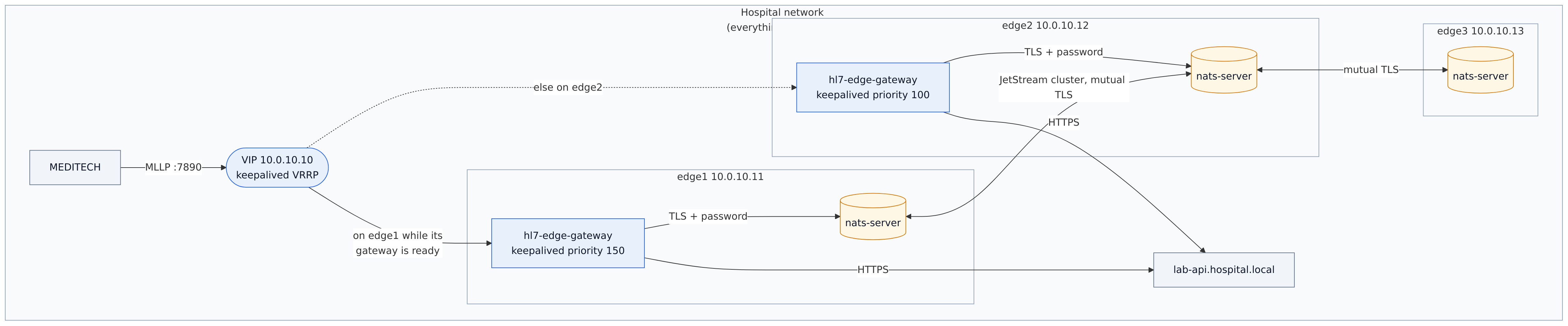
architecture.mmd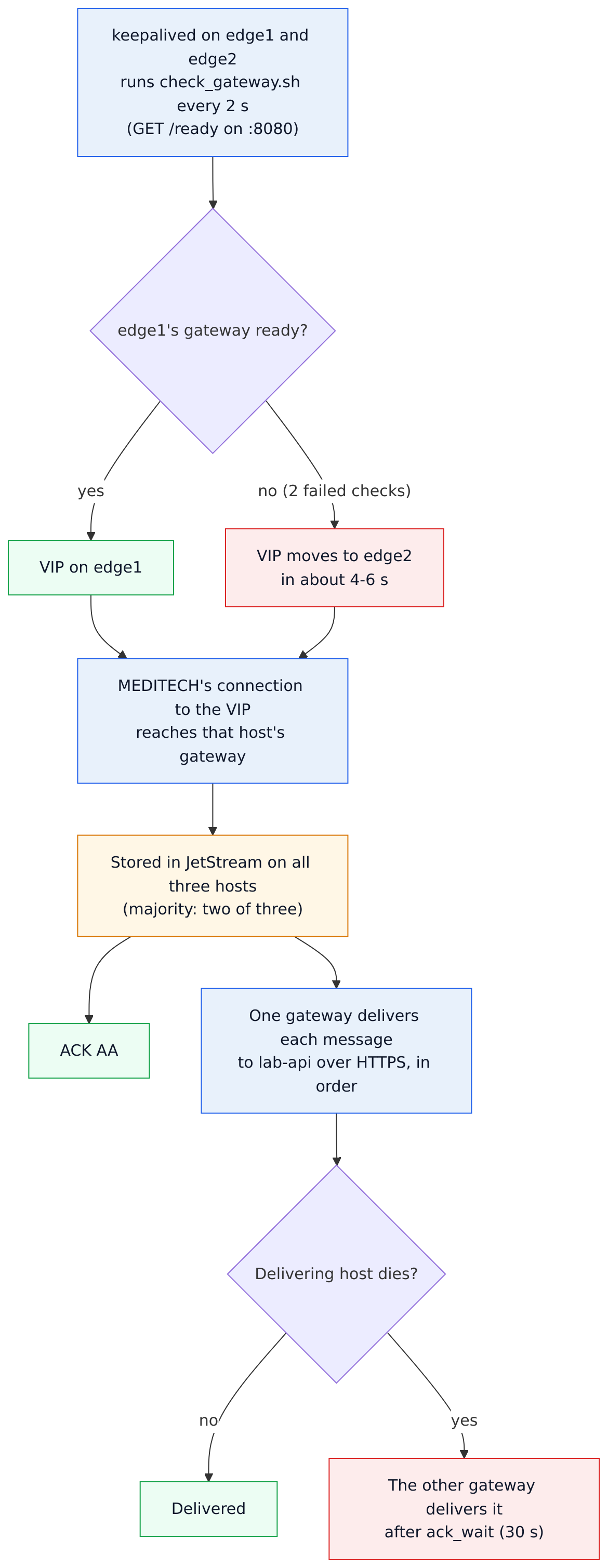
data-flow.mmd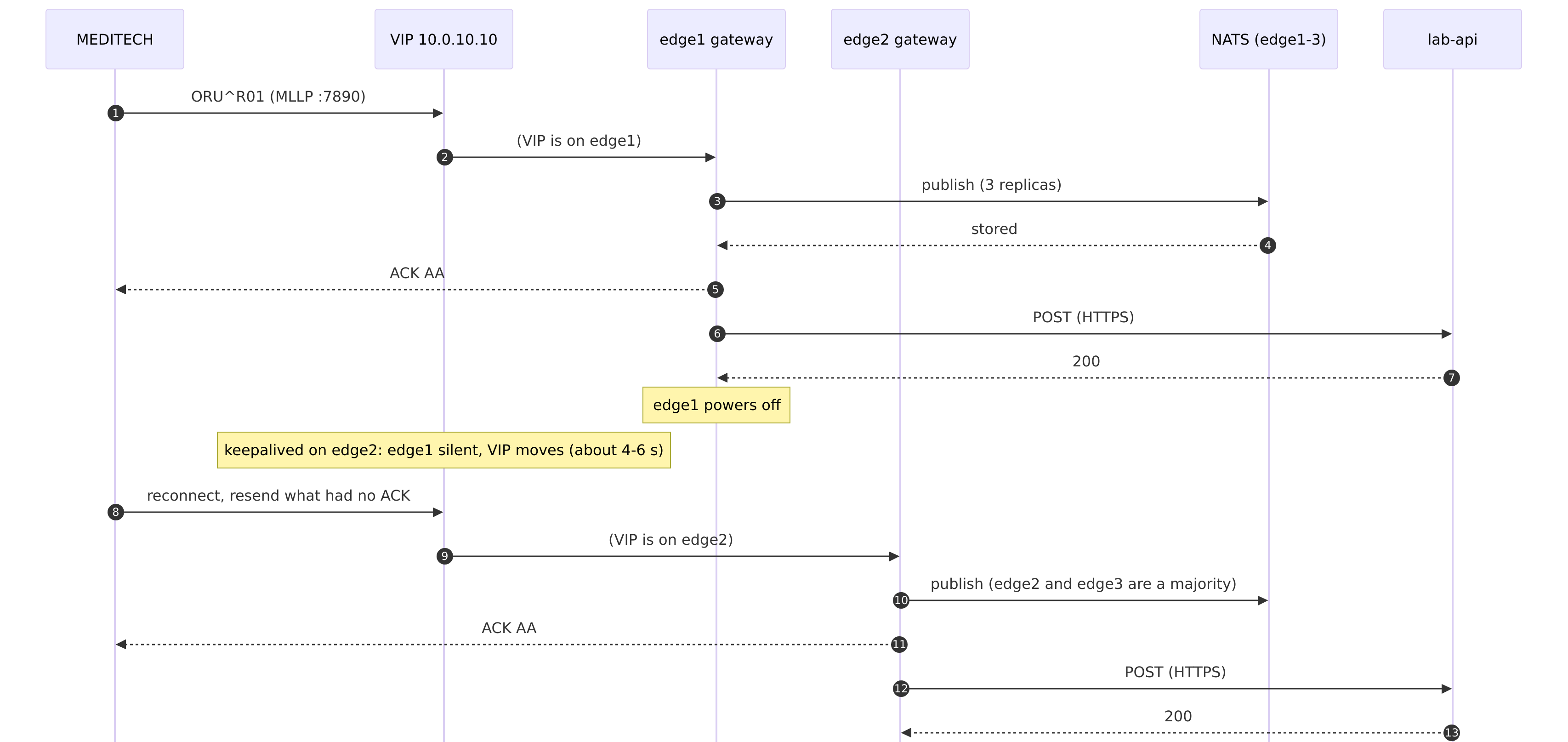
sequence.mmdBefore you start
- Three hosts on one subnet, running RHEL 9, Ubuntu 22.04/24.04 or Debian 12, and a free address for the VIP.
- Firewall rules between the hosts: TCP 4222 and 6222 (NATS), and VRRP (IP protocol 112).
- From MEDITECH to the VIP: TCP 7890. From your admin network: 8080.
Replace the addresses (10.0.10.11–13, VIP 10.0.10.10) with yours in every file below.
Step by step
- 1Certificates.
On your workstation,
./certs/make-certs.shmakes a private CA and a certificate per host (serverAuth and clientAuth, with the host's name and address). Copycerts/edgeN/to each host. Or use your organization's CA. - 2NATS on all three hosts.
06-on-premises/nats/nats-server.conf# NATS JetStream for HL7 Edge Gateway: the same file on edge1, edge2 and edge3. # Per-host values come from /etc/nats/env (see nats-server.service): NATS_SERVER_NAME and # HL7EDGE_NATS_PASSWORD. Each host has its own certificate in /etc/nats/certs (certs/make-certs.sh). server_name: $NATS_SERVER_NAME listen: 0.0.0.0:4222 http: 127.0.0.1:8222 # monitoring, local only: curl localhost:8222/jsz # Clients (the gateways) must use TLS and a password. tls { cert_file: "/etc/nats/certs/server.crt" key_file: "/etc/nats/certs/server.key" ca_file: "/etc/nats/certs/ca.crt" timeout: 2 } authorization { users = [ { user: hl7edge, password: $HL7EDGE_NATS_PASSWORD } ] } jetstream { store_dir: "/var/lib/nats" max_file_store: 20GB # disk for queues and dead letters max_memory_store: 256MB } # The cluster between the three hosts: mutual TLS, so only hosts with a certificate from your CA # can join. cluster { name: hl7edge listen: 0.0.0.0:6222 tls { cert_file: "/etc/nats/certs/server.crt" key_file: "/etc/nats/certs/server.key" ca_file: "/etc/nats/certs/ca.crt" verify: true timeout: 2 } routes: [ "nats-route://10.0.10.11:6222" "nats-route://10.0.10.12:6222" "nats-route://10.0.10.13:6222" ] }06-on-premises/nats/nats-server.service— install steps in its header# NATS server, on edge1, edge2 and edge3. # sudo useradd --system --home /var/lib/nats --shell /usr/sbin/nologin nats # sudo install -m 755 nats-server /usr/local/bin/ (from https://github.com/nats-io/nats-server/releases) # sudo install -d -o nats -m 700 /var/lib/nats && sudo install -d /etc/nats/certs # sudo cp nats-server.conf /etc/nats/ && sudo cp certs/edgeN/* /etc/nats/certs/ && sudo chown -R nats /etc/nats/certs # /etc/nats/env (chmod 600): NATS_SERVER_NAME=edgeN HL7EDGE_NATS_PASSWORD=... # sudo cp nats-server.service /etc/systemd/system/ && sudo systemctl enable --now nats-server [Unit] Description=NATS JetStream for HL7 Edge Gateway After=network-online.target Wants=network-online.target [Service] Type=simple User=nats EnvironmentFile=/etc/nats/env ExecStart=/usr/local/bin/nats-server --config /etc/nats/nats-server.conf ExecReload=/bin/kill -s HUP $MAINPID Restart=always RestartSec=2 # Lame duck mode on stop: clients and stream leaders move to the other nodes before it exits. KillSignal=SIGUSR2 TimeoutStopSec=60 NoNewPrivileges=true ProtectSystem=strict ProtectHome=true ReadWritePaths=/var/lib/nats PrivateTmp=true LimitNOFILE=65536 [Install] WantedBy=multi-user.targetCheck, once all three are up:
curl -s localhost:8222/jszshows"cluster_size": 3and a leader. - 3The gateway on edge1 and edge2.
06-on-premises/gateway/hl7-edge-gateway.toml# HL7 Edge Gateway on edge1 and edge2: the same file on both; only HL7EDGE_NODE_ID differs # (set in /etc/hl7-edge-gateway/env, with the secrets). node_id = "${HL7EDGE_NODE_ID}" [admin] listen = "0.0.0.0:8080" token = "${HL7EDGE_ADMIN_TOKEN}" [store] backend = "jetstream" urls = ["tls://10.0.10.11:4222", "tls://10.0.10.12:4222", "tls://10.0.10.13:4222"] ca = "/etc/hl7-edge-gateway/nats-ca.crt" user = "hl7edge" password = "${HL7EDGE_NATS_PASSWORD}" replicas = 3 ack_wait = "30s" # MEDITECH sends lab results to the VIP, 10.0.10.10:7890. [[route]] name = "lab-results" mode = "store_and_forward" request_timeout = "15s" source = { type = "mllp", listen = "0.0.0.0:7890" } [route.destination] type = "http" url = "${LAB_API_URL}" headers = { Authorization = "Bearer ${LAB_API_TOKEN}" } [route.store_and_forward] on_reject = "dead_letter" retry = { initial = "2s", max = "60s", multiplier = 2.0 }06-on-premises/gateway/env.example— /etc/hl7-edge-gateway/env, chmod 600; HL7EDGE_NODE_ID=edge2 on edge2# /etc/hl7-edge-gateway/env on each gateway host (chmod 600, owned by root). Read by systemd. HL7EDGE_NODE_ID=edge1 LAMBOGENIUS_LICENSE= HL7EDGE_ADMIN_TOKEN=change-me-to-a-long-random-string HL7EDGE_NATS_PASSWORD=change-me-the-same-on-every-host LAB_API_URL=https://lab-api.hospital.local/hl7/results LAB_API_TOKEN=06-on-premises/gateway/hl7-edge-gateway.service# HL7 Edge Gateway, on edge1 and edge2. # sudo useradd --system --home /var/lib/hl7-edge-gateway --shell /usr/sbin/nologin hl7edge # sudo install -m 755 hl7-edge-gateway /usr/local/bin/ (from lambogenius.com/downloads, Linux x86_64) # sudo install -d -o hl7edge /var/lib/hl7-edge-gateway && sudo install -d /etc/hl7-edge-gateway # sudo cp hl7-edge-gateway.toml /etc/hl7-edge-gateway/ && sudo cp ../certs/ca.crt /etc/hl7-edge-gateway/nats-ca.crt # sudo install -m 600 env.example /etc/hl7-edge-gateway/env (then edit it) # sudo cp hl7-edge-gateway.service /etc/systemd/system/ && sudo systemctl enable --now hl7-edge-gateway [Unit] Description=Lambogenius HL7 Edge Gateway After=network-online.target nats-server.service Wants=network-online.target [Service] Type=simple User=hl7edge EnvironmentFile=/etc/hl7-edge-gateway/env ExecStart=/usr/local/bin/hl7-edge-gateway run --config /etc/hl7-edge-gateway/hl7-edge-gateway.toml Restart=always RestartSec=2 WorkingDirectory=/var/lib/hl7-edge-gateway AmbientCapabilities=CAP_NET_BIND_SERVICE NoNewPrivileges=true ProtectSystem=strict ProtectHome=true ReadWritePaths=/var/lib/hl7-edge-gateway PrivateTmp=true LimitNOFILE=65536 [Install] WantedBy=multi-user.targetcurl -s localhost:8080/readyanswersreadyonce the gateway has connected to JetStream. - 4keepalived on edge1 and edge2.
06-on-premises/keepalived/keepalived-edge1.conf— edge2's file differs only in priority (100) and the unicast addresses# keepalived on edge1: /etc/keepalived/keepalived.conf # The VIP 10.0.10.10 is where MEDITECH connects. It lives on edge1 while edge1's gateway is ready # (priority 150), and moves to edge2 (priority 100) within a few seconds if it is not. global_defs { router_id edge1 enable_script_security script_user root } vrrp_script gateway_ready { script "/etc/keepalived/check_gateway.sh" interval 2 # seconds between checks timeout 3 fall 2 # 2 failures: not ready rise 2 # 2 successes: ready again } vrrp_instance HL7EDGE { state BACKUP # both start as backup; priority decides interface eth0 # the interface on the 10.0.10.0/24 network virtual_router_id 51 priority 150 advert_int 1 # Unicast VRRP: works on networks that block multicast. unicast_src_ip 10.0.10.11 unicast_peer { 10.0.10.12 } authentication { auth_type PASS auth_pass hl7edge1 # up to 8 characters; the same on both hosts } virtual_ipaddress { 10.0.10.10/24 } track_script { gateway_ready } }06-on-premises/keepalived/check_gateway.sh#!/bin/sh # keepalived health check: this host may hold the VIP only while its gateway is ready # (running, licensed config loaded, and the JetStream store reachable). exec curl -sf -m 2 -o /dev/null http://127.0.0.1:8080/readyip -brief address show eth0on edge1 now lists 10.0.10.10 as well. - 5Point MEDITECH at the VIP.
10.0.10.10:7890. Either console works:http://10.0.10.11:8080orhttp://10.0.10.12:8080. - 6Test failover.
Do Expect systemctl stop hl7-edge-gateway on edge1 The VIP moves to edge2 within about 6 s (journalctl -u keepalived: Entering MASTER STATE). Messages keep flowing. Power off edge1 The same, and NATS keeps working on edge2 and edge3. Power off edge3 Nothing visible: JetStream still has two of three. Start edge1 again The VIP returns once its gateway is ready (priority 150), and its NATS catches up. The harness runs the same test in Docker:
cd test && cp .env.example .env && ./run.sh.
Use NATS Server 2.15.1 or later. With 2.11.17, a server restarted after a crash dropped its stream replicas, and they were not restored. Upgrade NATS one host at a time, waiting for curl localhost:8222/healthz?js-enabled-only=true to answer ok.