
 Lambogenius
What it does
MEDITECH sends lab results (ORU^R01) and admissions (ADT^A01/A08) over MLLP. The gateway posts each one to a lab system's REST API, with a bearer token. The two routes show the two delivery modes:
| Route | MLLP port | Mode | What MEDITECH sees |
|---|---|---|---|
lab-results | 7890 | store-and-forward | AA as soon as the result is stored. The gateway delivers in order and keeps retrying while the API is down. A result the API rejects goes to dead letters, and the rest keep flowing. |
admissions | 7891 | pass-through | The API's own answer. Nothing is stored: if the API is down, MEDITECH gets AE and resends. |
The sample is in 01-meditech-to-rest-api in the examples repository.
Diagrams
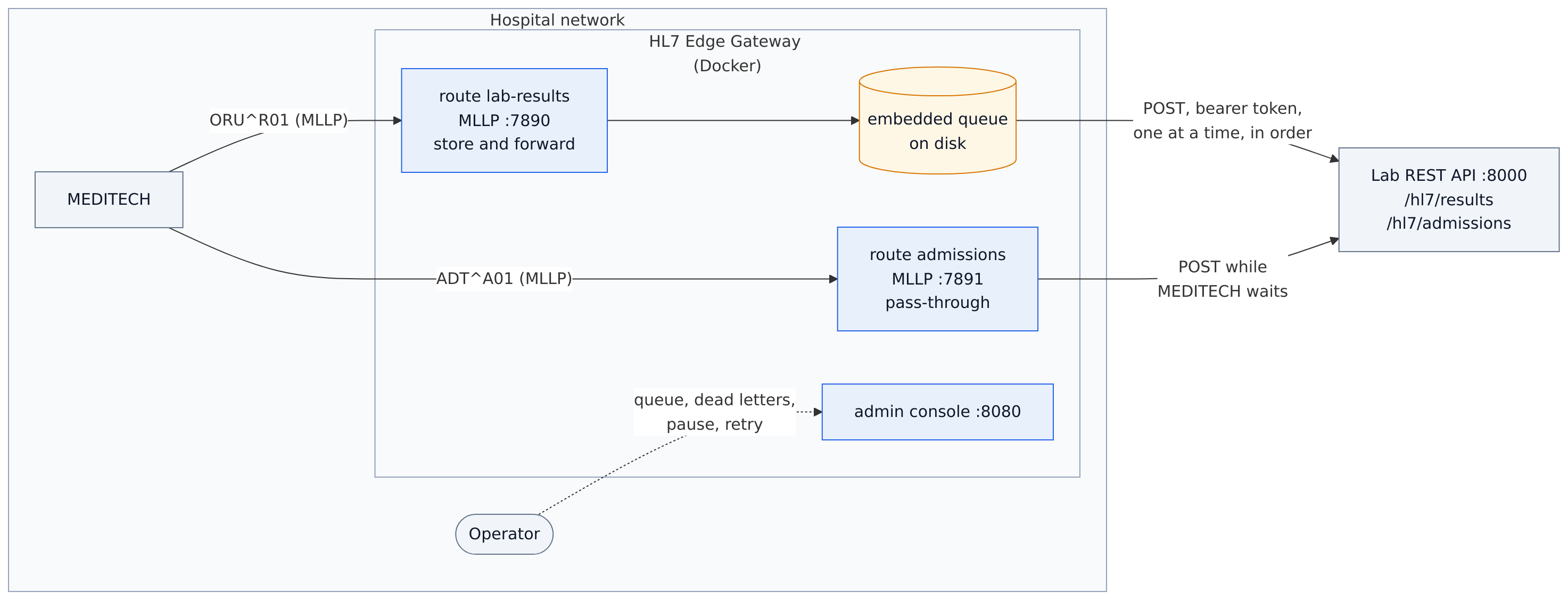
architecture.mmd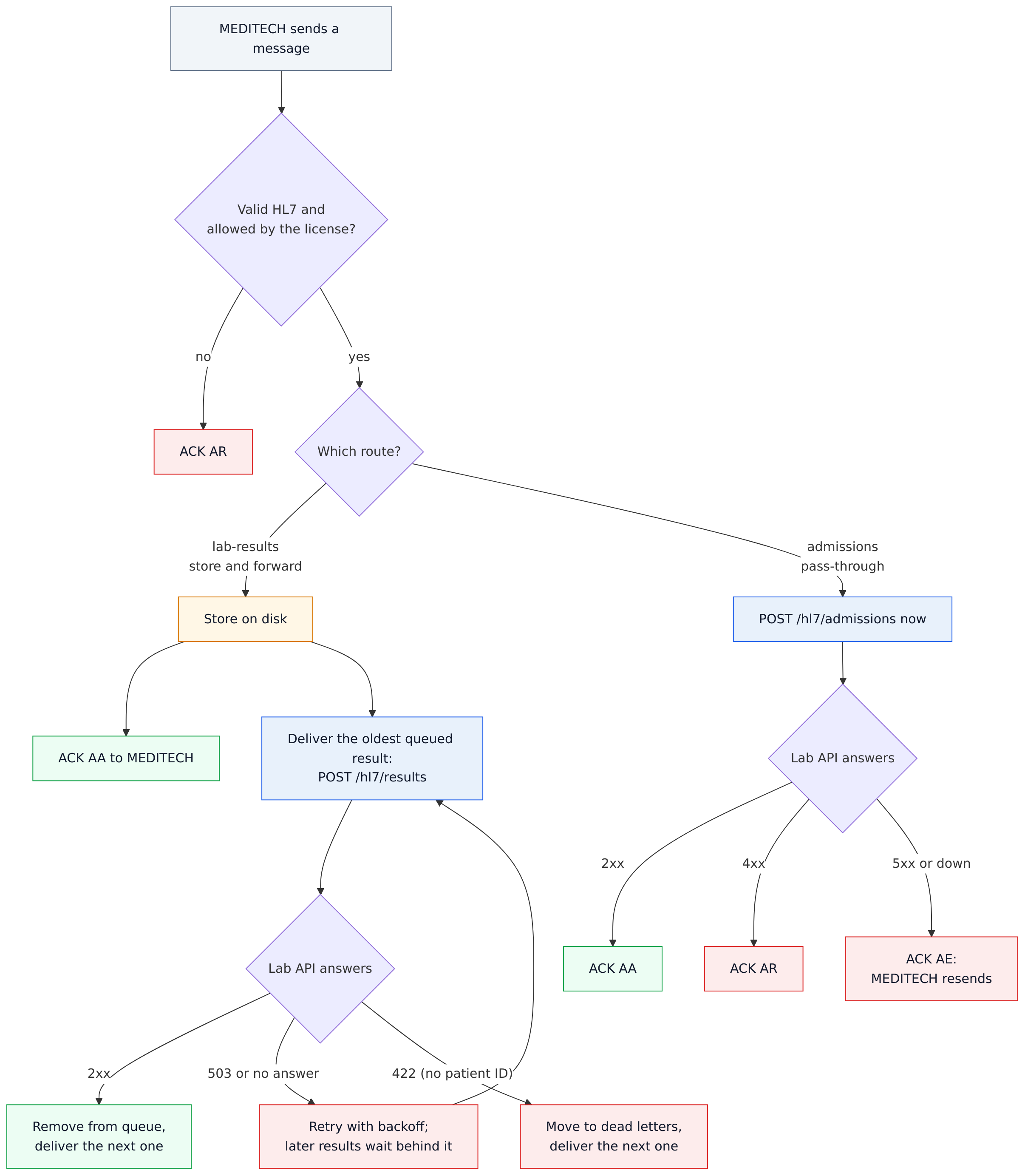
data-flow.mmd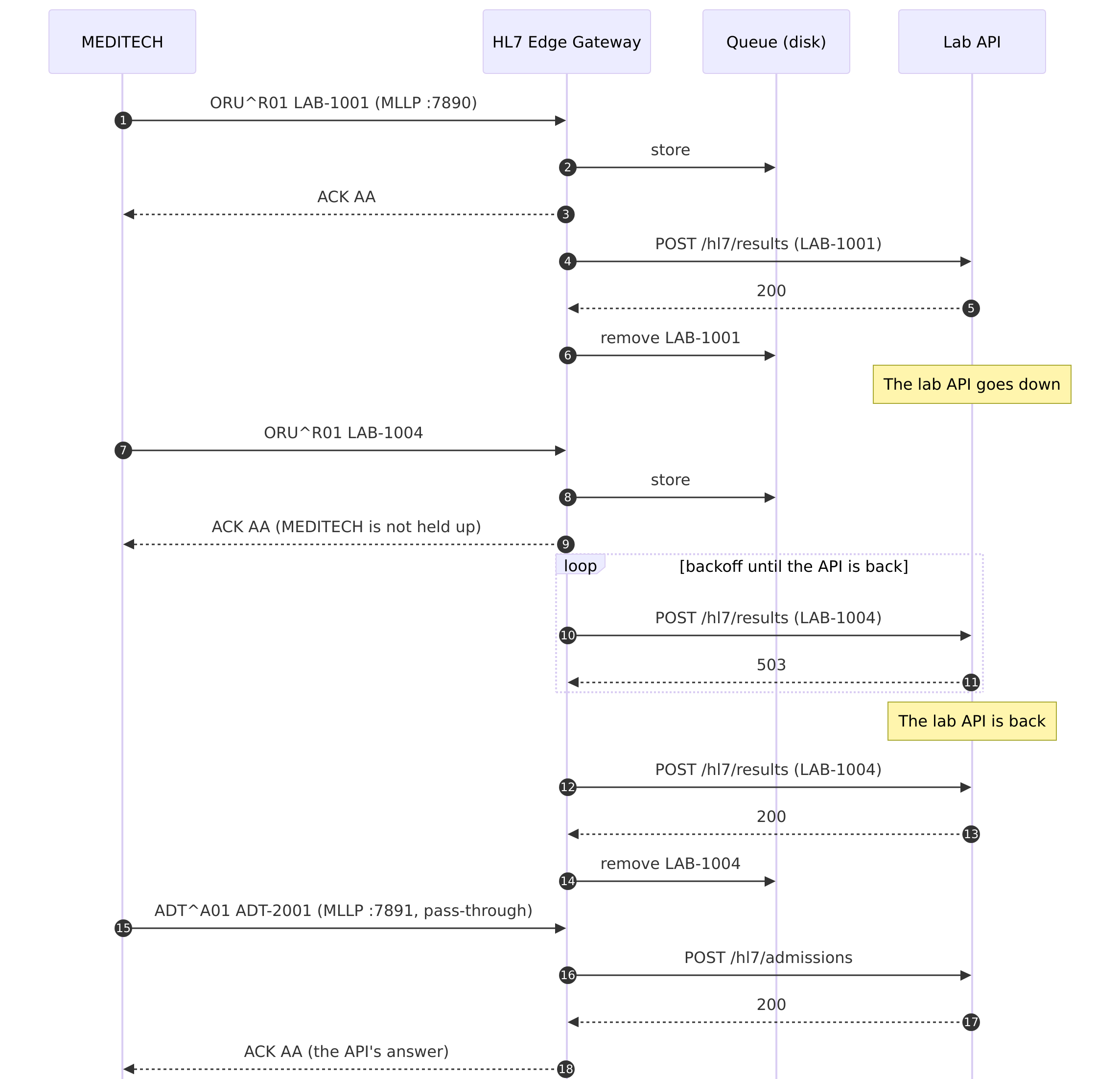
sequence.mmdThe configuration
01-meditech-to-rest-api/gateway.toml
# Sample 01: MEDITECH → MLLP → HL7 Edge Gateway → HTTPS REST API
#
# Two routes, the two delivery modes:
#   lab-results  ORU^R01 results, store-and-forward: the sender gets AA as soon as the message is
#                stored; the gateway then delivers in order and retries while the API is down.
#                A message the API rejects goes to dead letters and the route carries on.
#   admissions   ADT^A01/A08 events, pass-through: the sender waits and gets the API's answer.
#
# ${NAME} reads an environment variable (set in .env), so secrets stay out of this file.

node_id = "gateway-1"

[admin]
listen = "0.0.0.0:8080"
token = "${HL7EDGE_ADMIN_TOKEN}"
allow_payload_view = true            # the console may show message contents (each view is audit-logged)

[store]
backend = "embedded"
path = "/var/lib/hl7-edge-gateway"   # a Docker volume, so queued messages survive restarts

[[route]]
name = "lab-results"
mode = "store_and_forward"
source = { type = "mllp", listen = "0.0.0.0:7890" }

[route.destination]
type = "http"
url = "http://lab-api:8000/hl7/results"
headers = { Authorization = "Bearer ${LAB_API_TOKEN}" }

[route.store_and_forward]
on_reject = "dead_letter"            # park a rejected result and keep the others moving
retry = { initial = "2s", max = "30s", multiplier = 2.0 }

[[route]]
name = "admissions"
mode = "passthrough"
source = { type = "mllp", listen = "0.0.0.0:7891" }

[route.destination]
type = "http"
url = "http://lab-api:8000/hl7/admissions"
headers = { Authorization = "Bearer ${LAB_API_TOKEN}" }
${LAB_API_TOKEN} and the other ${…} values come from environment variables, here from .env, so secrets stay out of the file:
01-meditech-to-rest-api/.env.example — copy it to .env and add your license
# Copy to .env and fill in. .env is ignored by git.

# A license token from https://lambogenius.com/app/licensing. A free developer license is enough:
# the sample messages are test messages (MSH-11 = T).
LAMBOGENIUS_LICENSE=

# The admin console asks for this token (http://localhost:8080). Use any long random string.
HL7EDGE_ADMIN_TOKEN=change-me-to-a-long-random-string

# The token the gateway sends to the lab API, and the lab API expects.
LAB_API_TOKEN=sample-lab-api-token

# The gateway image version you loaded with `docker load`.
GATEWAY_VERSION=0.3.0
The compose file runs the gateway, a stand-in lab API (a small Python program), and the gateway's own MLLP test client as send:
01-meditech-to-rest-api/compose.yaml
# Sample 01: MEDITECH → MLLP → HL7 Edge Gateway → HTTPS REST API
#   docker compose up -d                 start the gateway and the stand-in lab API
#   docker compose run --rm send …       send HL7 files to the gateway (see README.md)
name: hl7edge-sample-01

services:
  gateway:
    image: lambogenius/hl7-edge-gateway:${GATEWAY_VERSION:-0.3.0}
    env_file: .env
    ports:
      - "7890:7890"   # lab-results (MLLP)
      - "7891:7891"   # admissions (MLLP)
      - "8080:8080"   # admin console
    volumes:
      - ./gateway.toml:/etc/hl7-edge-gateway/hl7-edge-gateway.toml:ro
      - queue:/var/lib/hl7-edge-gateway
    depends_on: [lab-api]

  lab-api:
    image: python:3.12-slim
    command: ["python", "-u", "/app/app.py"]
    env_file: .env
    ports: ["8000:8000"]
    volumes: ["./lab-api:/app:ro"]

  # The gateway's own test client: `docker compose run --rm send --to gateway:7890 /messages/…`
  send:
    image: lambogenius/hl7-edge-gateway:${GATEWAY_VERSION:-0.3.0}
    entrypoint: ["hl7-edge-gateway", "send"]
    volumes: ["./messages:/messages:ro"]
    profiles: ["tools"]

volumes:
  queue:
Step by step
- 1Start it.
cd 01-meditech-to-rest-api
cp .env.example .env            # add your license
docker compose up -d
Open
http://localhost:8080and sign in withHL7EDGE_ADMIN_TOKENfrom.env. - 2Send three results and an admission.
docker compose run --rm send --to gateway:7890 /messages/oru-r01-1.hl7 /messages/oru-r01-2.hl7 /messages/oru-r01-3.hl7
    1       5 ms  MSA|AA|LAB-1001
    2       4 ms  MSA|AA|LAB-1002
    3       7 ms  MSA|AA|LAB-1003
docker compose run --rm send --to gateway:7891 /messages/adt-a01.hl7
    1       2 ms  MSA|AA|ADT-2001
curl http://localhost:8000/received      # the lab API lists all four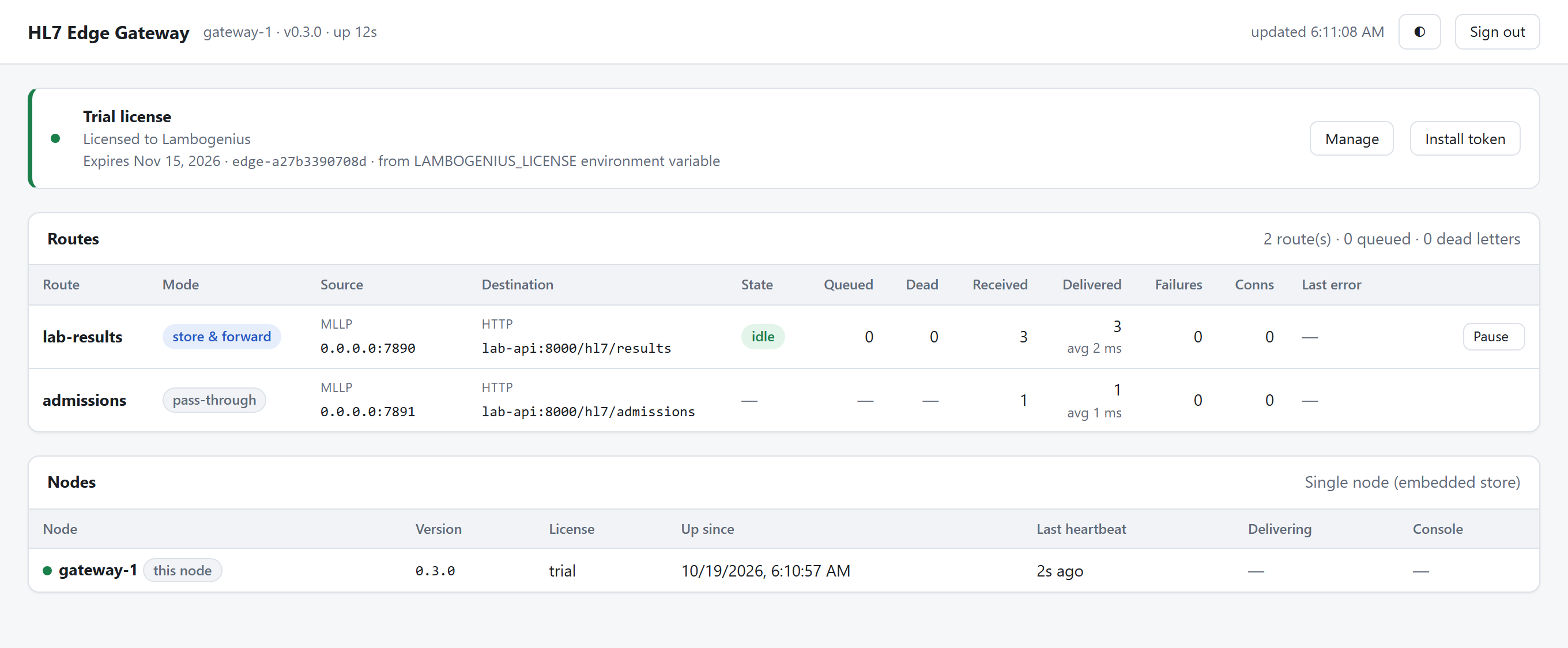
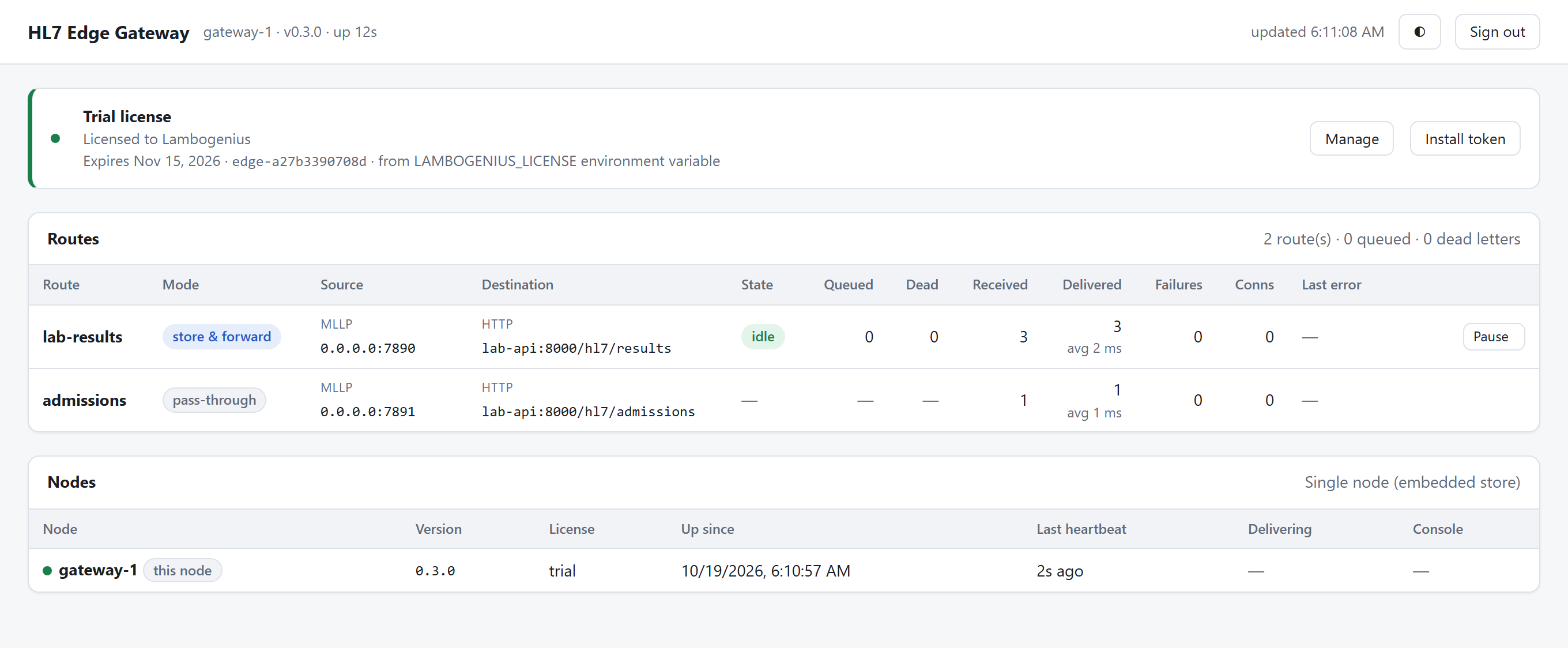
Both routes with their source and destination. lab-results has received and delivered 3; admissions 1. - 3Take the API down and keep sending.
curl -X POST http://localhost:8000/control/down
docker compose run --rm send --to gateway:7890 /messages/oru-r01-4.hl7 /messages/oru-r01-5.hl7
    1       2 ms  MSA|AA|LAB-1004
    2       1 ms  MSA|AA|LAB-1005
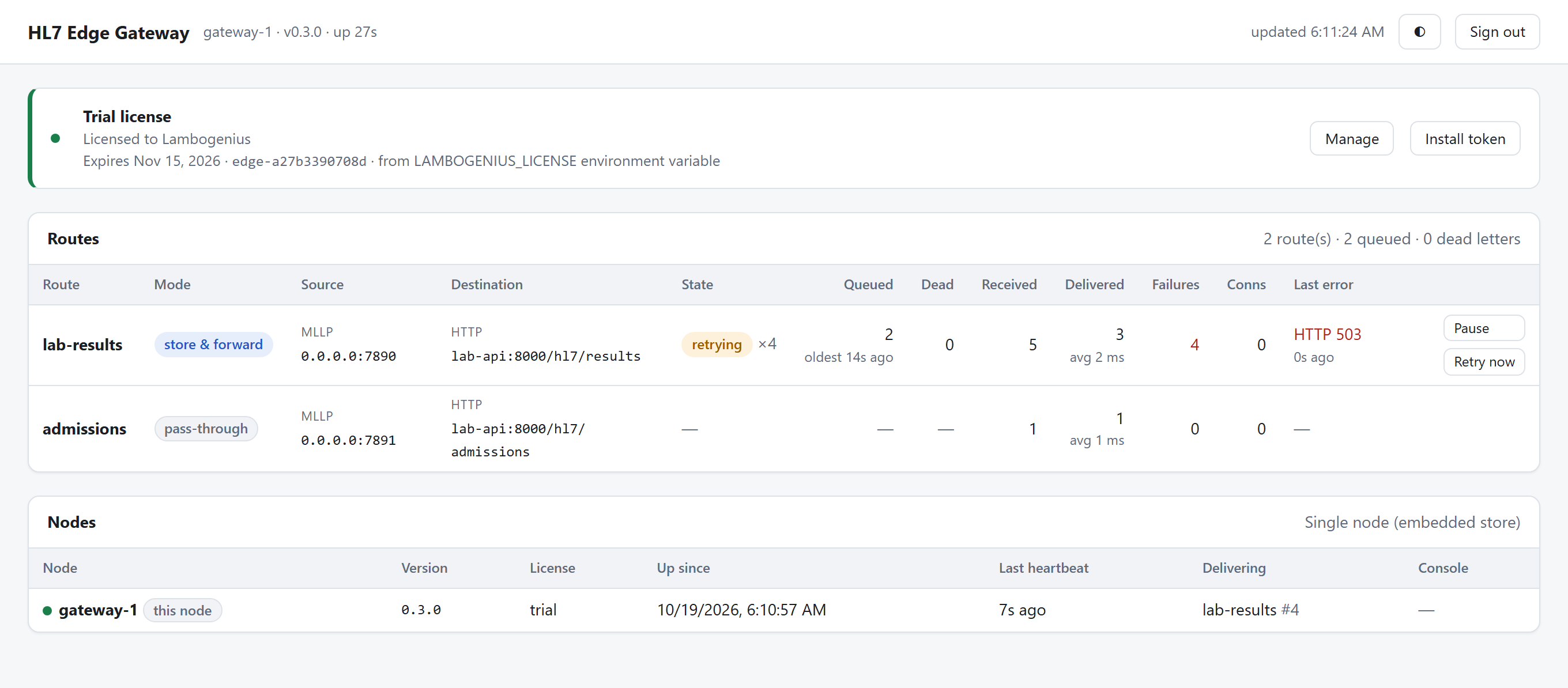
MEDITECH still gets AA: the results are on disk in the gateway's queue. The route shows retrying, two queued, and the API's
HTTP 503: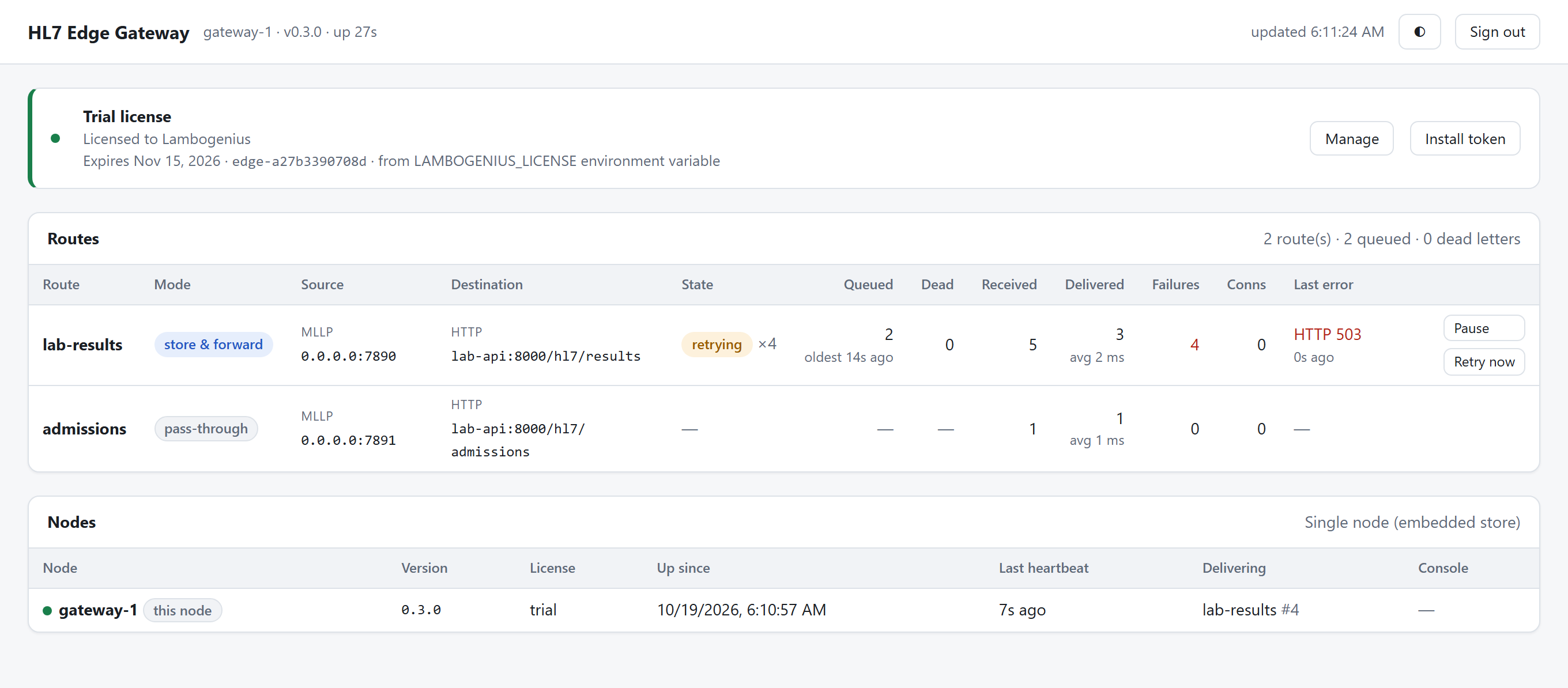
The API is down: two results queued, retrying with back-off (2 s, then up to 30 s), with Pause and Retry now. Select the route to see the queue. The first message is in flight, and the rest wait behind it in order:

The queue during the outage. Pass-through behaves differently. An admission sent now gets the outage back, and MEDITECH keeps it and resends later:
docker compose run --rm send --to gateway:7891 /messages/adt-a08.hl7 1 4 ms MSA|AE|ADT-2002|HTTP 503 - 4Bring the API back.
curl -X POST http://localhost:8000/control/upWithin 30 seconds, LAB-1004 and LAB-1005 are delivered in order, with no resend from MEDITECH.
- 5Send a result the API rejects.
docker compose run --rm send --to gateway:7890 /messages/oru-r01-no-patient-id.hl7
docker compose logs lab-api
lab-api-1  | lab-api: REJECTED LAB-1099 ORU^R01^ORU_R01: no patient ID
The API answers
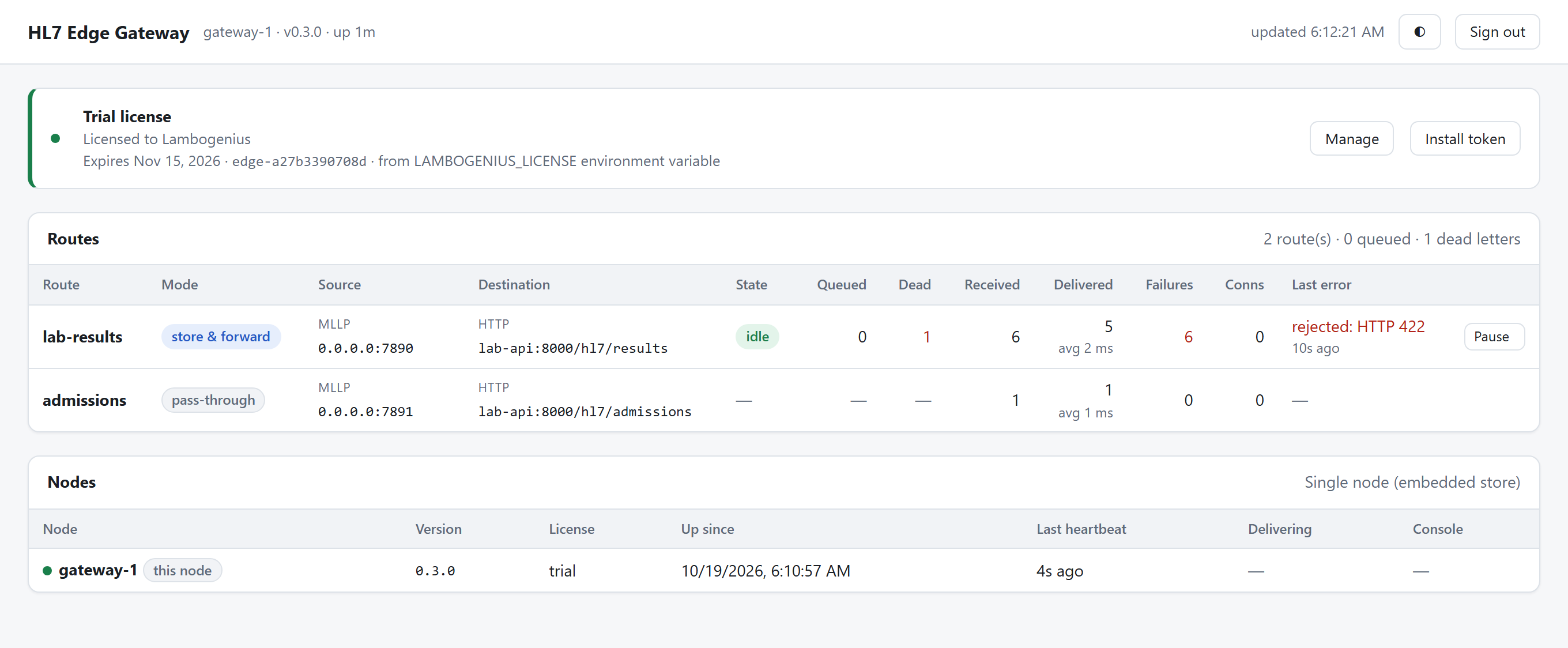
422. A 4xx other than 408 and 429 means retrying will not help, so the gateway moves the message to dead letters and carries on with the next one (on_reject = "dead_letter"):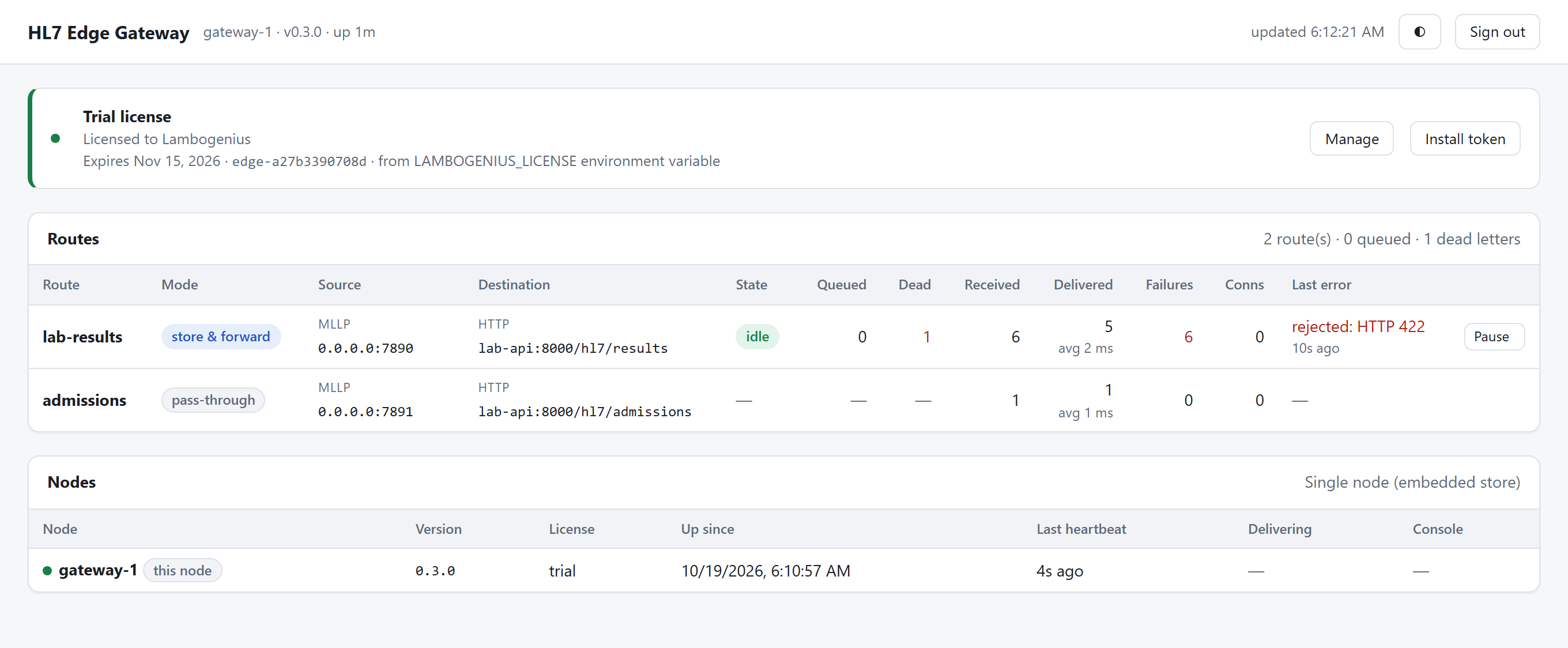
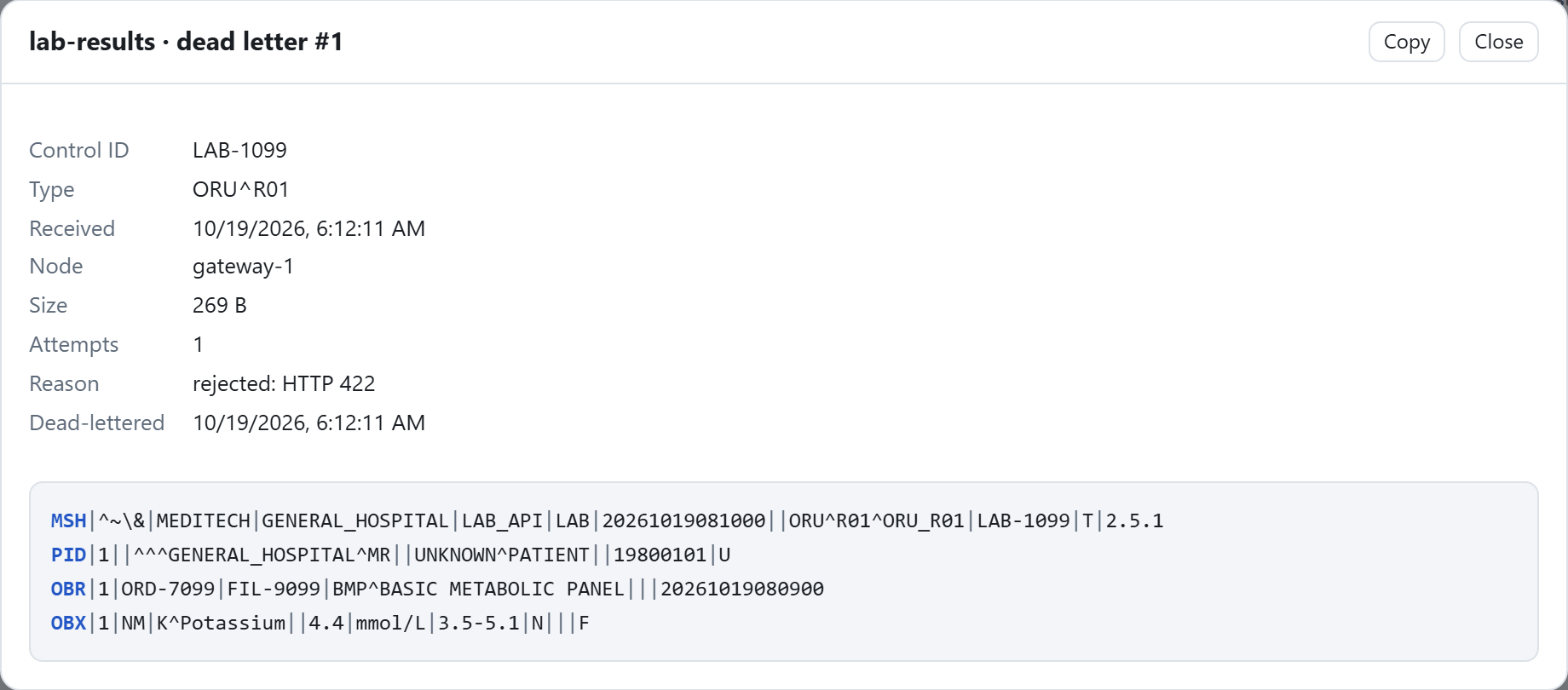
One dead letter; the route is idle again. Open the route, then Dead letters → View:
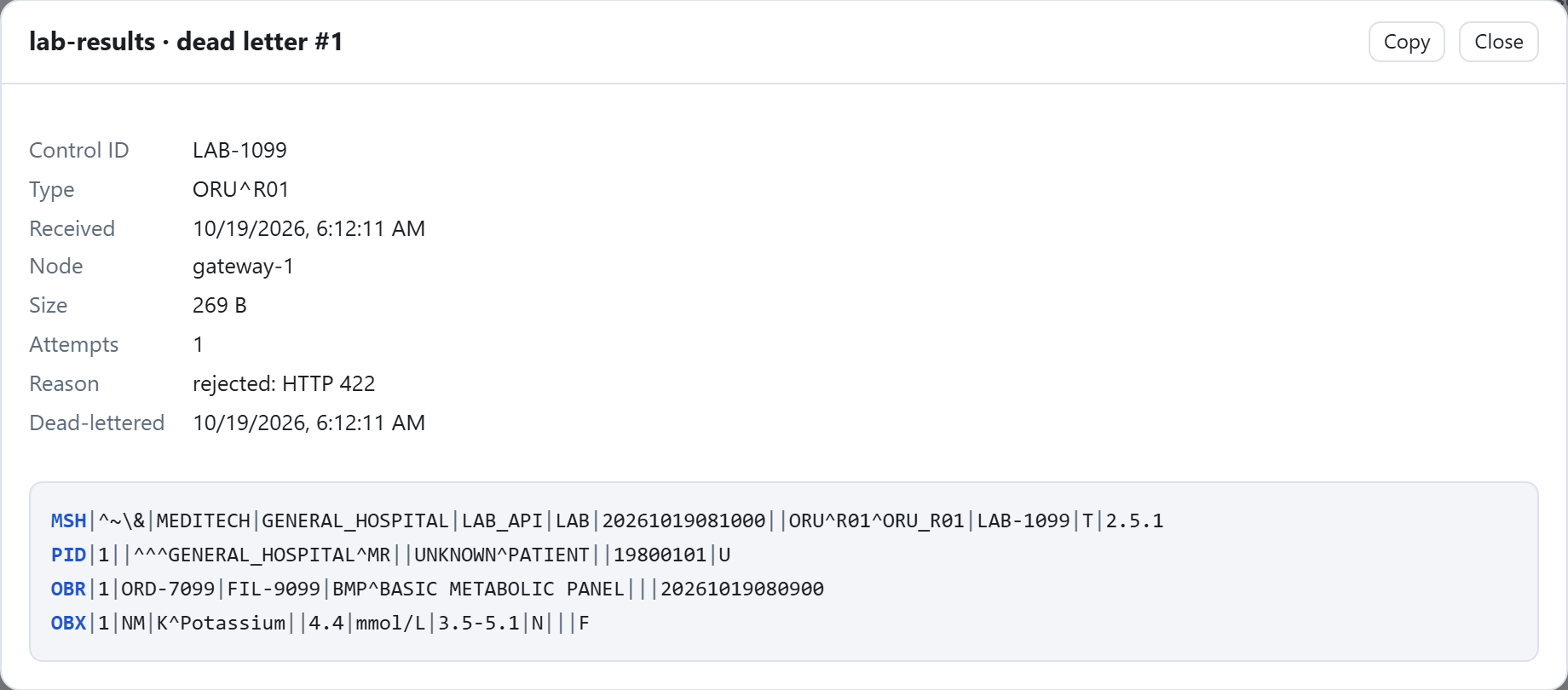
The reason, and the message itself: PID-3 has no patient ID. After fixing the cause, requeue it from the same tab. - 6Clean up.
docker compose down -v. Or run the whole walkthrough, with checks, using./demo.shor.\demo.ps1.

Adapting it
- MEDITECH: point the outbound lab results interface at the gateway's host, port 7890, and admissions at 7891.
- Your API: set
urlandheaders. For a private CA, addtls = { ca = "…" }to the destination. For OAuth2, see Entra ID and Salesforce. - MLLPS: add
tls = { cert = "…", key = "…" }to the source. See TLS. - Production traffic (MSH-11
P) needs a trial or production license. See Licensing.