
 Lambogenius
What it does
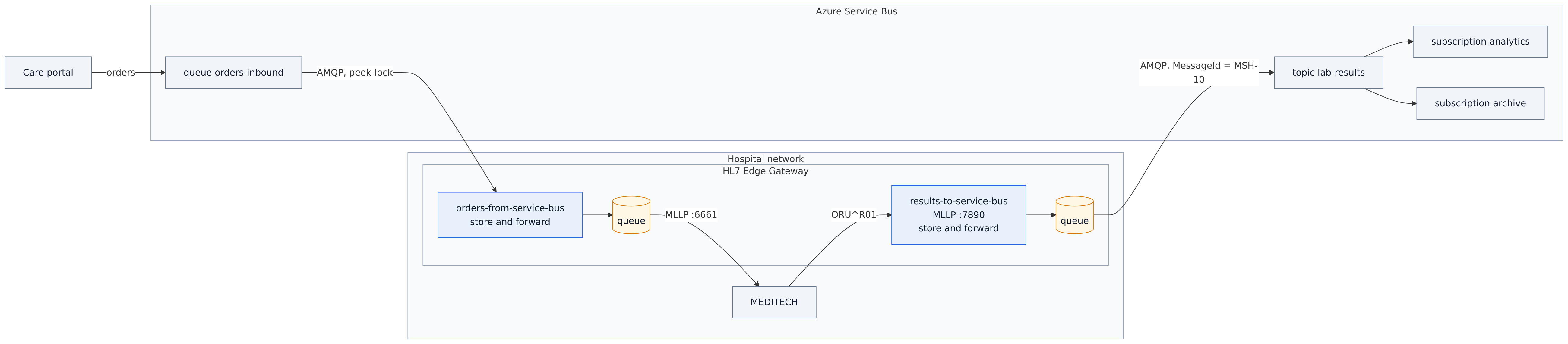
Two routes connect MEDITECH and Azure Service Bus in both directions, both store-and-forward, so neither side has to be up at the same time as the other:
| Route | From → to | What happens |
|---|---|---|
results-to-service-bus | MLLP :7890 → topic lab-results | MEDITECH gets AA once the result is stored. The gateway publishes in order. The subscriptions analytics and archive each get a copy. |
orders-from-service-bus | queue orders-inbound → MLLP | The gateway takes each order off the queue, stores it, completes the Service Bus message, and sends the order to MEDITECH. MEDITECH's AR sends it to dead letters. |
It runs against the official Service Bus emulator, so it needs no Azure subscription; give Docker at least 4 GB of memory for the emulator's SQL Server. The end of this page shows the changes for a real namespace.
The sample is in 03-azure-service-bus in the examples repository.
Diagrams
architecture.mmd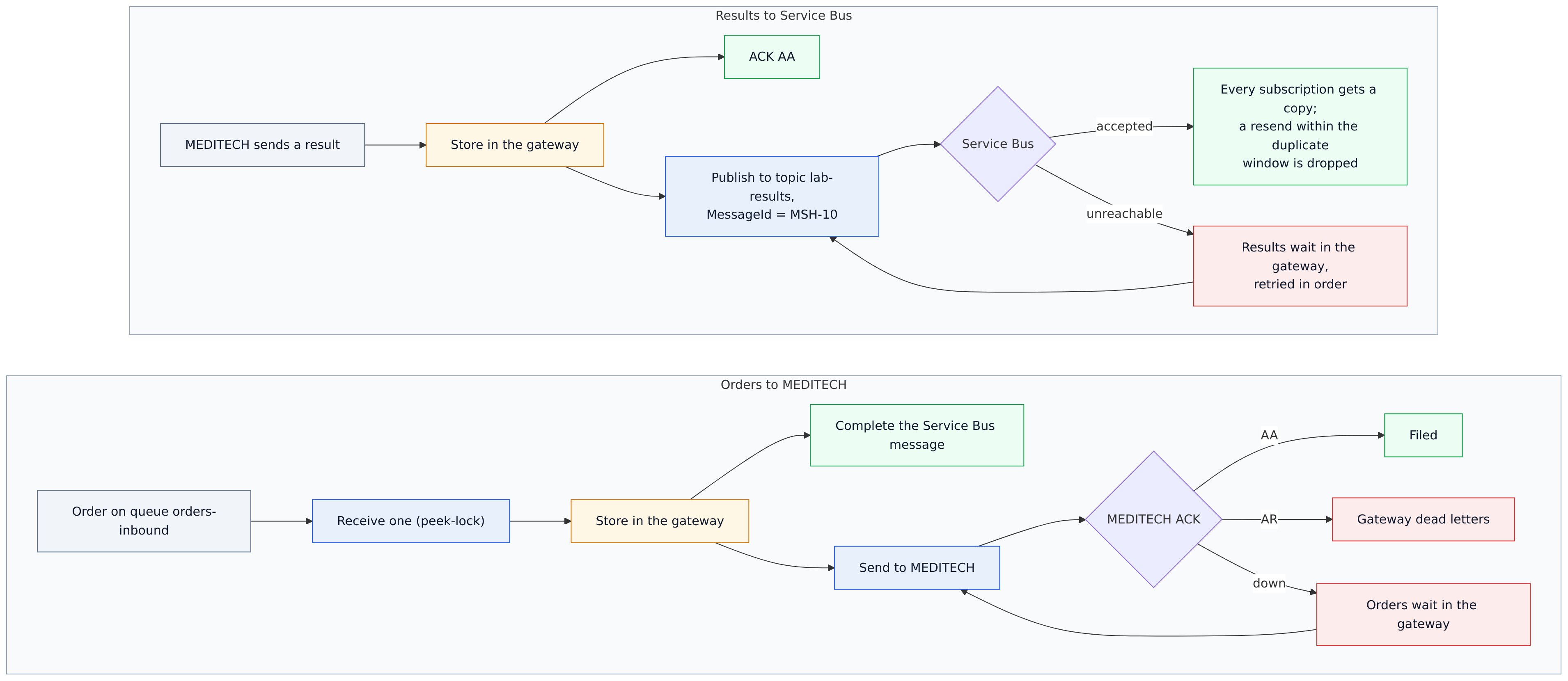
data-flow.mmd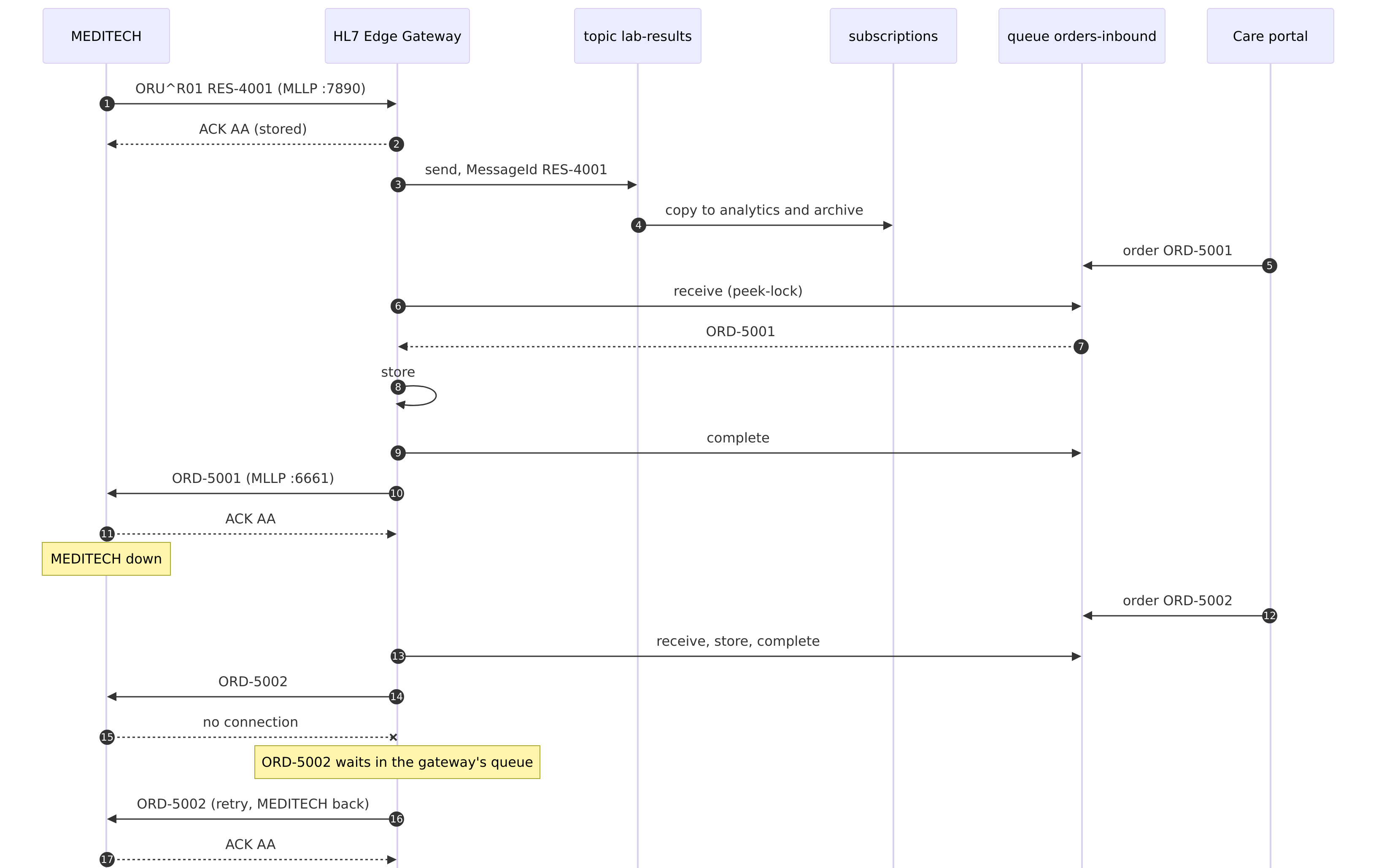
sequence.mmdThe configuration
03-azure-service-bus/gateway.toml
# Sample 03: MEDITECH ⇄ HL7 Edge Gateway ⇄ Azure Service Bus
#
#   results-to-service-bus   MEDITECH sends lab results over MLLP; the gateway publishes each one to the
#                            topic lab-results. Every subscription (analytics, archive) gets its own copy.
#                            Store-and-forward: MEDITECH gets AA once the result is stored; publishing
#                            retries while Service Bus is unreachable.
#   orders-from-service-bus  Cloud applications put orders on the queue orders-inbound; the gateway
#                            receives them and sends each to MEDITECH over MLLP. Store-and-forward: the
#                            Service Bus message is completed once the order is stored, and the gateway
#                            retries into MEDITECH for as long as MEDITECH is down. An order MEDITECH
#                            rejects (AR) goes to the gateway's dead letters.
#
# SERVICE_BUS_CONNECTION_STRING (in .env) points at the local emulator. For a real namespace, see
# "Running against Azure" in README.md: the same routes with a namespace and Entra ID instead.

node_id = "gateway-1"

[admin]
listen = "0.0.0.0:8080"
token = "${HL7EDGE_ADMIN_TOKEN}"
allow_payload_view = true

[store]
backend = "embedded"
path = "/var/lib/hl7-edge-gateway"

[[route]]
name = "results-to-service-bus"
mode = "store_and_forward"
source = { type = "mllp", listen = "0.0.0.0:7890" }

[route.destination]
type = "service_bus"
connection_string = "${SERVICE_BUS_CONNECTION_STRING}"
topic = "lab-results"
# Each message is sent with MessageId = MSH-10 (so duplicate detection drops resends) and the
# application properties hl7_route, hl7_message_type, hl7_sending_application,
# hl7_sending_facility and hl7_processing_id, which subscription filters can use.

[route.store_and_forward]
retry = { initial = "2s", max = "30s", multiplier = 2.0 }

[[route]]
name = "orders-from-service-bus"
mode = "store_and_forward"

[route.source]
type = "service_bus"
connection_string = "${SERVICE_BUS_CONNECTION_STRING}"
queue = "orders-inbound"

[route.destination]
type = "mllp"
address = "meditech:6661"

[route.store_and_forward]
on_reject = "dead_letter"
retry = { initial = "2s", max = "30s", multiplier = 2.0 }
The emulator's entities. Duplicate detection is on, and the gateway sends MSH-10 as each message's MessageId, so a resent message is dropped:
03-azure-service-bus/emulator/Config.json
{
  "UserConfig": {
    "Namespaces": [
      {
        "Name": "sbemulatorns",
        "Queues": [
          {
            "Name": "orders-inbound",
            "Properties": {
              "DeadLetteringOnMessageExpiration": false,
              "DefaultMessageTimeToLive": "PT1H",
              "DuplicateDetectionHistoryTimeWindow": "PT5M",
              "LockDuration": "PT1M",
              "MaxDeliveryCount": 5,
              "RequiresDuplicateDetection": true,
              "RequiresSession": false
            }
          }
        ],
        "Topics": [
          {
            "Name": "lab-results",
            "Properties": {
              "DefaultMessageTimeToLive": "PT1H",
              "DuplicateDetectionHistoryTimeWindow": "PT5M",
              "RequiresDuplicateDetection": true
            },
            "Subscriptions": [
              { "Name": "analytics", "Properties": { "DeadLetteringOnMessageExpiration": false, "DefaultMessageTimeToLive": "PT1H", "LockDuration": "PT1M", "MaxDeliveryCount": 5, "RequiresSession": false } },
              { "Name": "archive",   "Properties": { "DeadLetteringOnMessageExpiration": false, "DefaultMessageTimeToLive": "PT1H", "LockDuration": "PT1M", "MaxDeliveryCount": 5, "RequiresSession": false } }
            ]
          }
        ]
      }
    ],
    "Logging": { "Type": "Console" }
  }
}
03-azure-service-bus/compose.yaml — the sb tool is a small Azure SDK program that plays the cloud side
# Sample 03: MEDITECH ⇄ HL7 Edge Gateway ⇄ Azure Service Bus (the local emulator)
#   docker compose up -d                       the emulator takes a minute or two to start
#   docker compose run --rm send …             send HL7 files to the gateway over MLLP
#   docker compose run --rm sb …               send to / receive from Service Bus (see README.md)
name: hl7edge-sample-03

services:
  gateway:
    image: lambogenius/hl7-edge-gateway:${GATEWAY_VERSION:-0.3.0}
    env_file: .env
    ports:
      - "7890:7890"   # lab results from MEDITECH (MLLP)
      - "8080:8080"   # admin console
    volumes:
      - ./gateway.toml:/etc/hl7-edge-gateway/hl7-edge-gateway.toml:ro
      - queue:/var/lib/hl7-edge-gateway
    depends_on: [servicebus, meditech]

  # Stand-in for MEDITECH's inbound orders interface.
  meditech:
    image: python:3.12-slim
    command: ["python", "-u", "/app/receiver.py"]
    volumes: ["./meditech:/app:ro"]

  # The Azure Service Bus emulator and the SQL Server it keeps its state in.
  # By starting them you accept their licenses: https://github.com/Azure/azure-service-bus-emulator-installer
  servicebus:
    image: mcr.microsoft.com/azure-messaging/servicebus-emulator:latest
    volumes: ["./emulator/Config.json:/ServiceBus_Emulator/ConfigFiles/Config.json:ro"]
    environment:
      SQL_SERVER: sqlserver
      MSSQL_SA_PASSWORD: ${EMULATOR_SQL_PASSWORD}
      ACCEPT_EULA: "Y"
    depends_on: [sqlserver]
  sqlserver:
    image: mcr.microsoft.com/mssql/server:2022-latest
    environment:
      MSSQL_SA_PASSWORD: ${EMULATOR_SQL_PASSWORD}
      ACCEPT_EULA: "Y"

  # Tools, not started by `up`.
  send:
    image: lambogenius/hl7-edge-gateway:${GATEWAY_VERSION:-0.3.0}
    entrypoint: ["hl7-edge-gateway", "send"]
    volumes: ["./messages:/messages:ro"]
    profiles: ["tools"]
  sb:
    build: ./sb-tool
    env_file: .env
    volumes: ["./messages:/messages:ro"]
    profiles: ["tools"]

volumes:
  queue:
Step by step
- 1Start it, and wait for the emulator.
cd 03-azure-service-bus
cp .env.example .env            # add your license
docker compose --profile tools build sb
docker compose up -d
docker compose logs -f servicebus     # wait for "Emulator Service is Successfully Up!"
Until the emulator is up, the gateway logs
Service Bus connection failed, retrying, which is expected. It then connects on its own:connected to sb://servicebus/orders-inbound. - 2MEDITECH sends results; both subscriptions get them.
docker compose run --rm send --to gateway:7890 /messages/oru-r01-1.hl7 /messages/oru-r01-2.hl7
docker compose run --rm sb receive lab-results analytics
lab-results/subscriptions/analytics: #1
  message_id=RES-5001  content_type=x-application/hl7-v2+er7
  properties: hl7_message_type=ORU^R01, hl7_processing_id=T, hl7_route=results-to-service-bus,
              hl7_sending_application=MEDITECH, hl7_sending_facility=GENERAL_HOSPITAL
    MSH|^~\&|MEDITECH|GENERAL_HOSPITAL|CLOUD|AZURE|20261019120100||ORU^R01^ORU_R01|RES-5001|T|2.5.1
    …
lab-results/subscriptions/analytics: 2 message(s)
docker compose run --rm sb receive lab-results archive      # its own copy of both
Subscriptions can filter on the gateway's application properties, for example the SQL filter
hl7_message_type = 'ORU^R01'. - 3A cloud application sends orders.
docker compose run --rm sb send orders-inbound /messages/orm-o01-1.hl7 /messages/orm-o01-2.hl7 /messages/orm-o01-unknown-patient.hl7
docker compose logs meditech
meditech-1  | meditech orders: AA ORD-6001 ORM^O01^ORM_O01 patient 100151 (filed)
meditech-1  | meditech orders: AA ORD-6002 ORM^O01^ORM_O01 patient 100152 (filed)
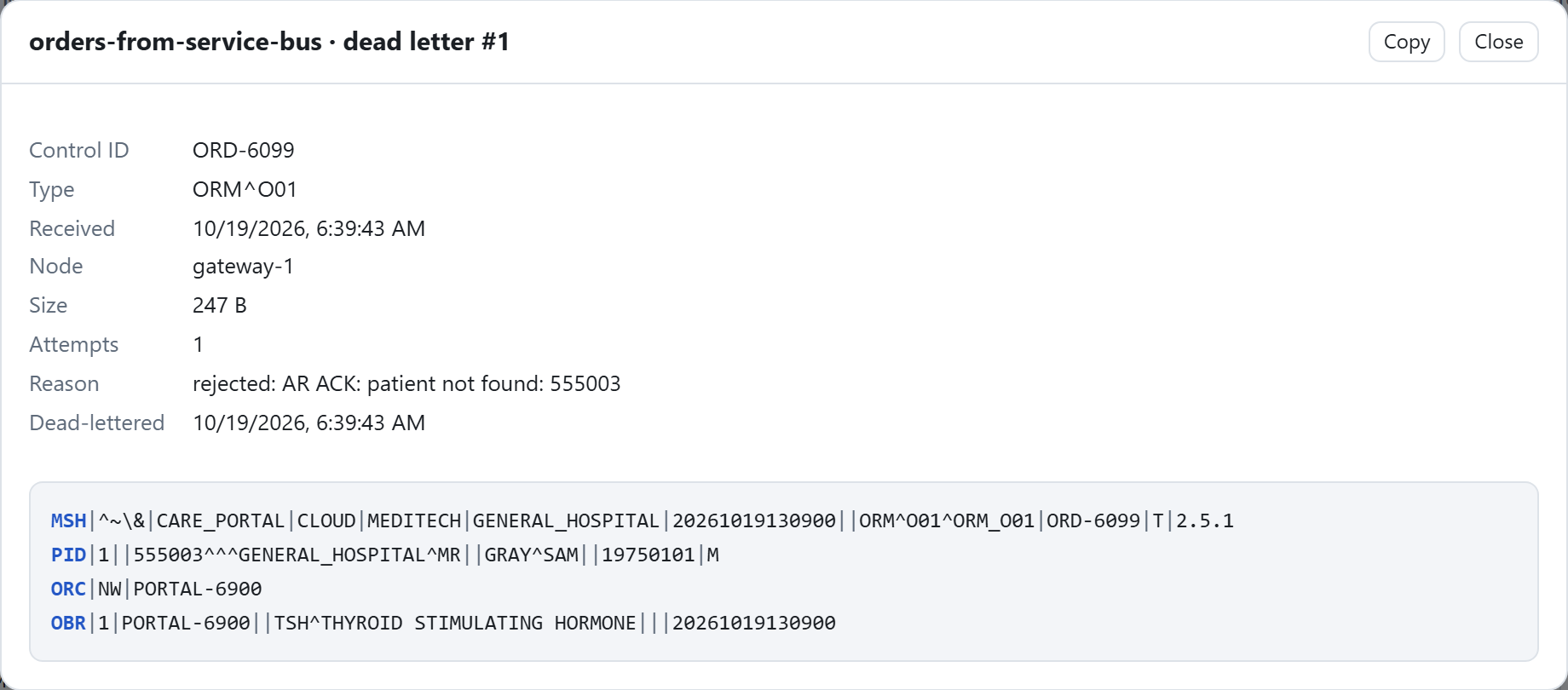
meditech-1  | meditech orders: AR ORD-6099 ORM^O01^ORM_O01 patient 555003 (patient not found: 555003)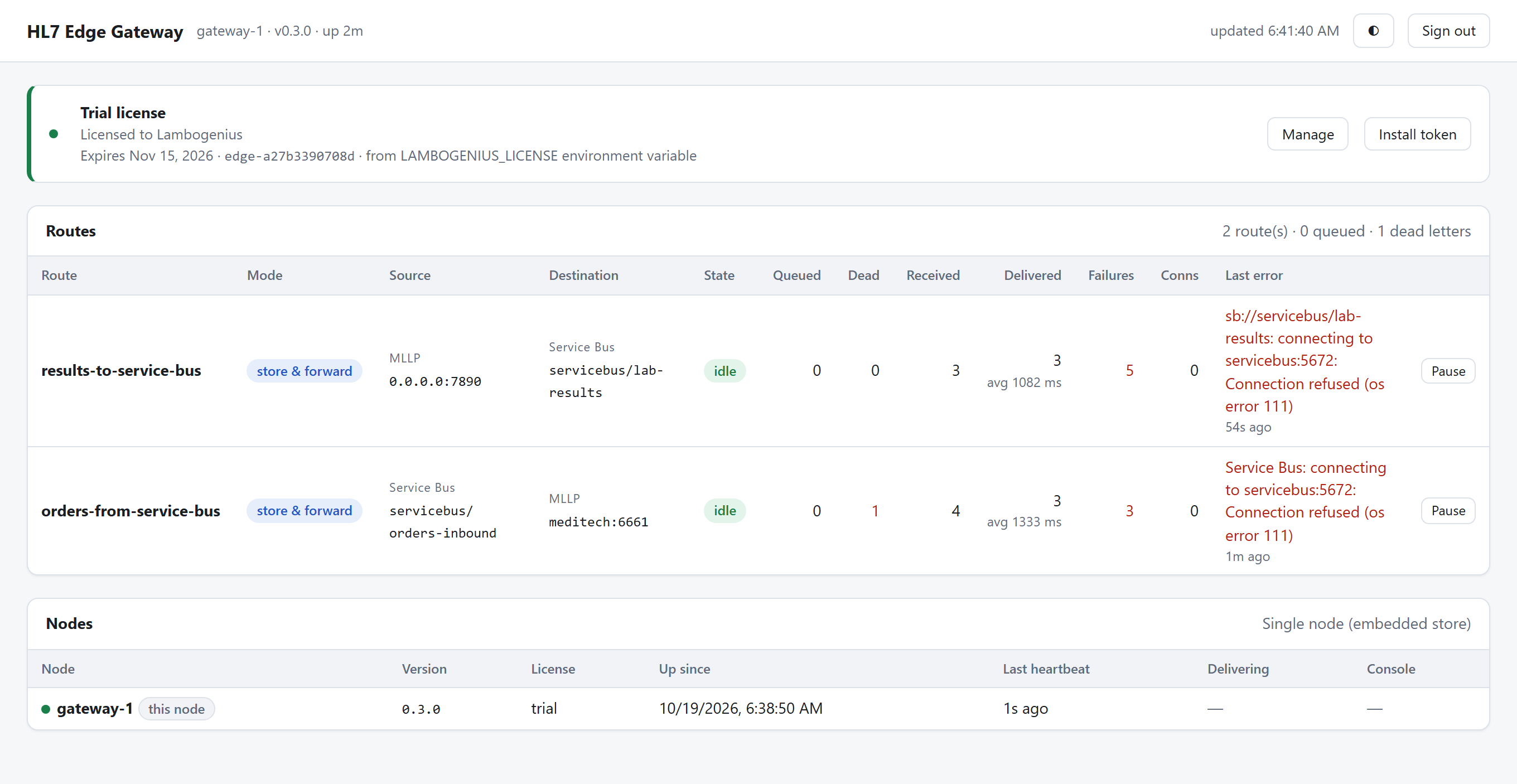
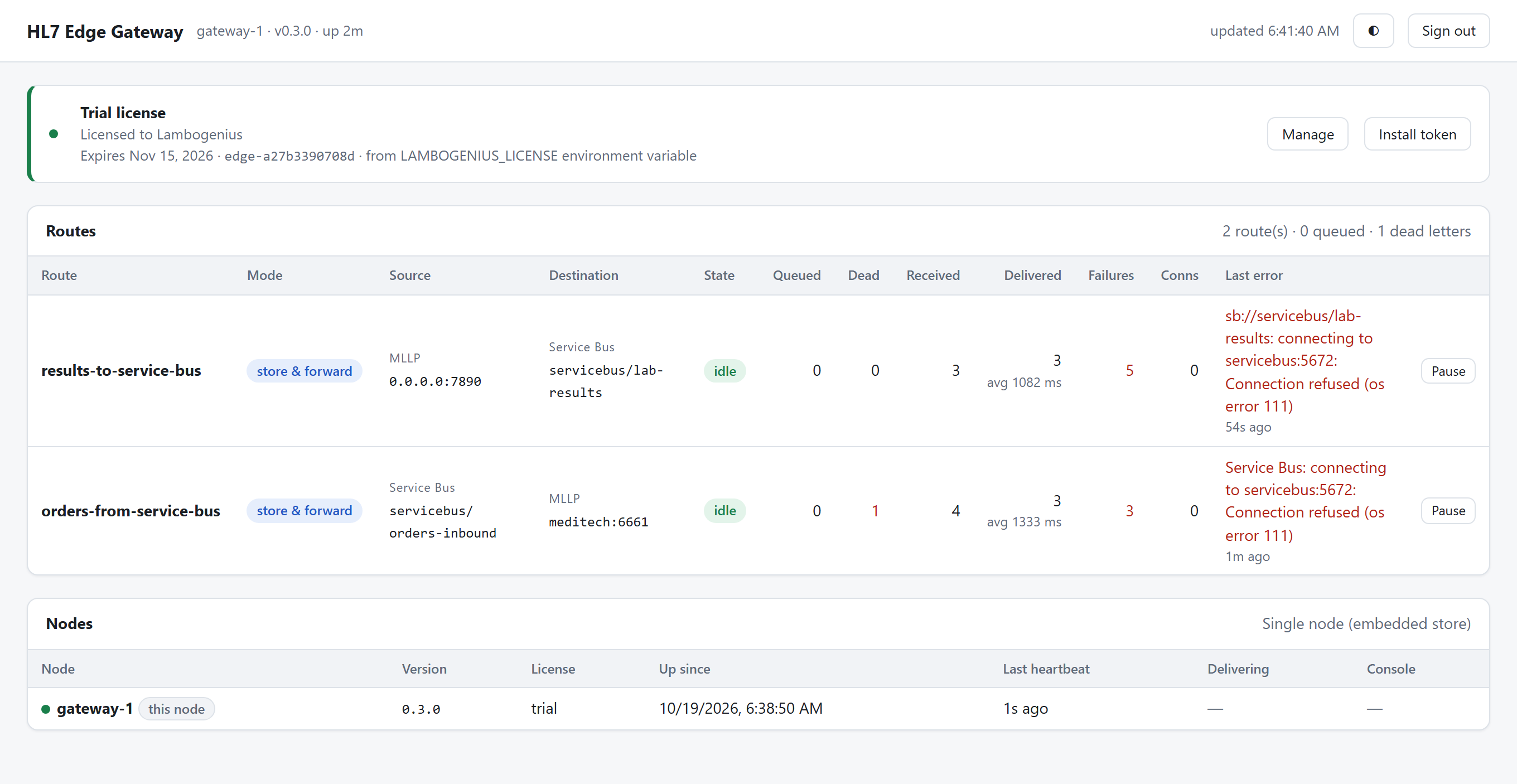
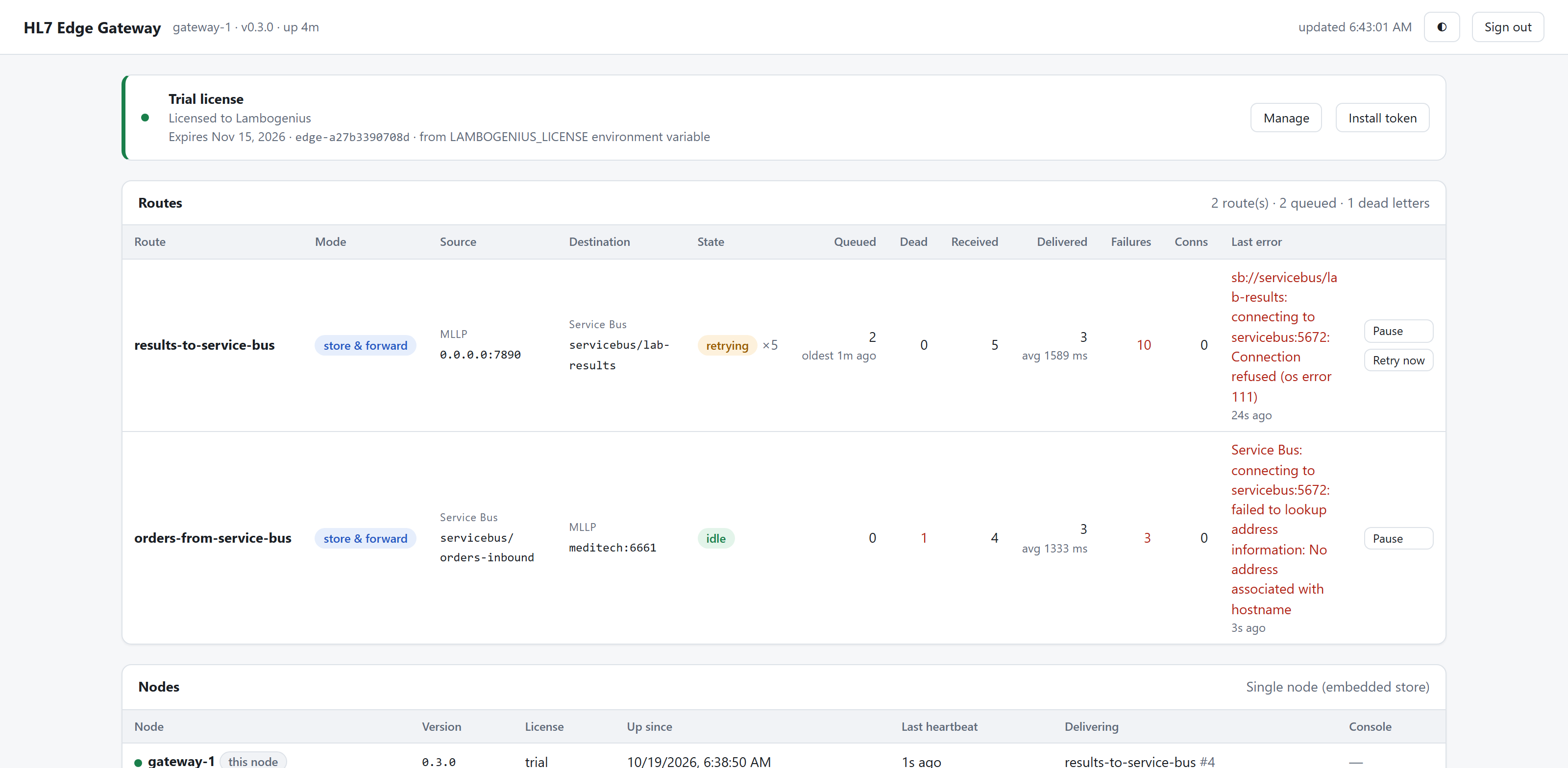
Both directions. The last errors are from before the emulator was up; orders-from-service-bus has one dead letter. 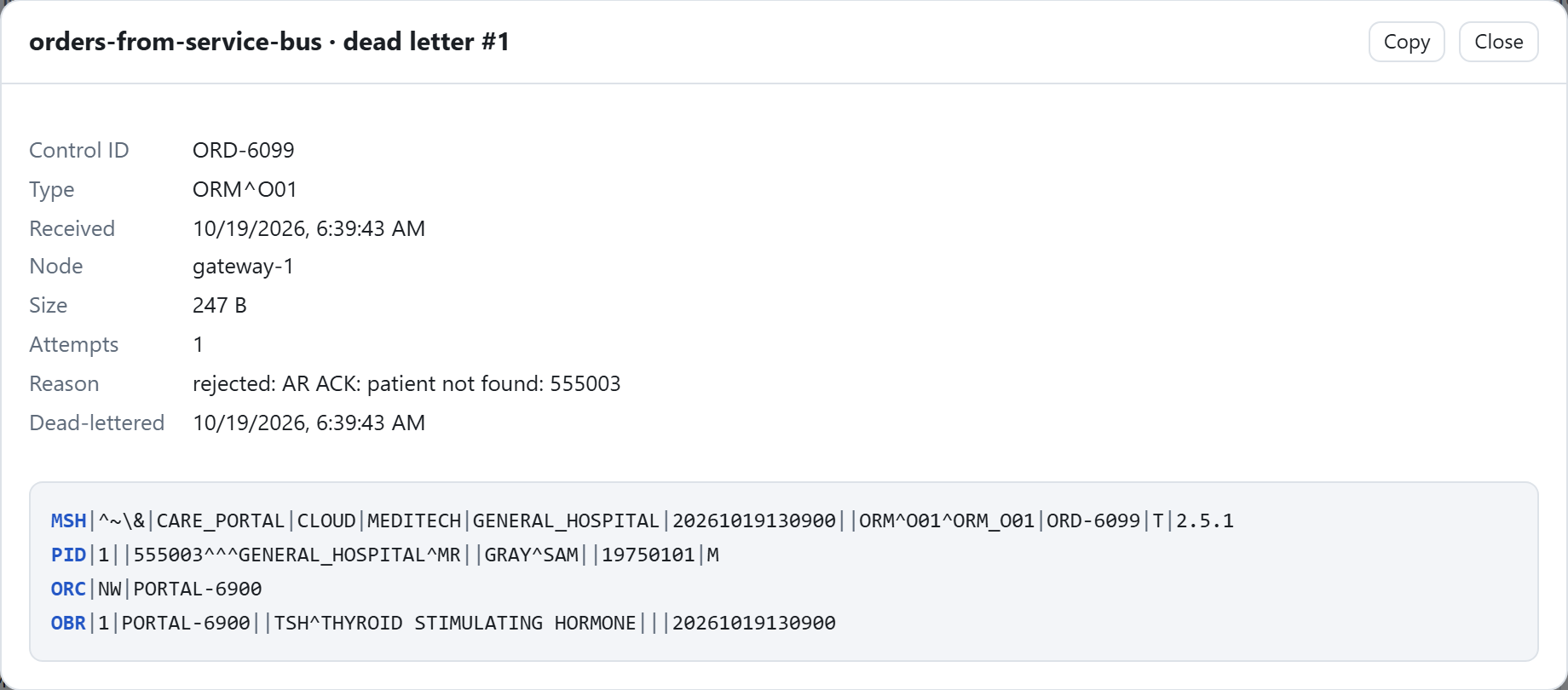
The order MEDITECH rejected, in the gateway's dead letters. - 4MEDITECH goes down.
docker compose stop meditech, then sendorm-o01-3.hl7. The order leaves Service Bus at once, because it's completed after the gateway stores it, and waits in the gateway.docker compose start meditech, and it's filed within 30 seconds. - 5Service Bus becomes unreachable.
docker compose stop servicebus, then sendoru-r01-3.hl7: MEDITECH still gets AA, and the result waits in the gateway.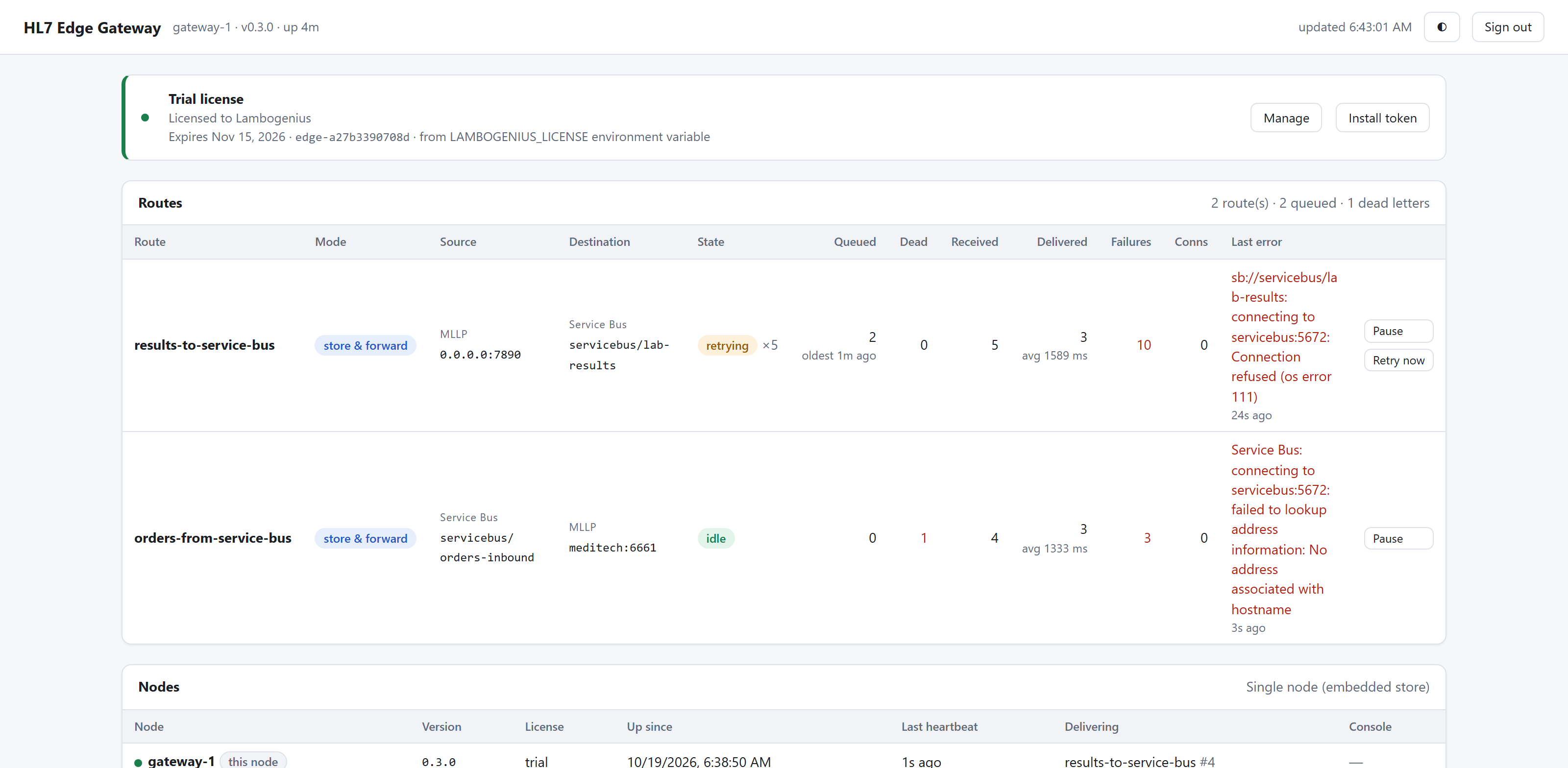
Service Bus is unreachable: results queue in the gateway and are published once it's back. docker compose start servicebus; once the emulator is up again (a minute), the result is published.
A route from Service Bus can be pass-through. The gateway then settles each message by MEDITECH's answer: AA completes it, AR dead-letters it in Service Bus with reason HL7 AR, and no answer abandons it for redelivery. The catch is that a MEDITECH outage uses up the queue's MaxDeliveryCount: in this example's test, an order reached the Service Bus dead-letter queue after about 20 seconds of outage. Use store-and-forward unless the cloud side should own failed messages.
Running against Azure
Create a Standard (or Premium) namespace with the same entities:
az servicebus namespace create -g rg-hl7edge -n contoso-hl7 --sku Standard
az servicebus topic create -g rg-hl7edge --namespace-name contoso-hl7 -n lab-results --enable-duplicate-detection true
az servicebus topic subscription create -g rg-hl7edge --namespace-name contoso-hl7 --topic-name lab-results -n analytics
az servicebus topic subscription create -g rg-hl7edge --namespace-name contoso-hl7 --topic-name lab-results -n archive
az servicebus queue create -g rg-hl7edge --namespace-name contoso-hl7 -n orders-inbound --enable-duplicate-detection true --max-delivery-count 5
With a shared access policy (Send and Listen), put its connection string in .env, and gateway.toml stays as it is. With Entra ID (recommended), give the gateway's identity Azure Service Bus Data Sender on the topic and Data Receiver on the queue, and use:
[route.destination]
type = "service_bus"
namespace = "contoso-hl7.servicebus.windows.net"
topic = "lab-results"
auth = { type = "managed_identity" }      # or workload_identity, or client_secret
transport = "websockets"                  # only if the network allows nothing but HTTPS (443) out
More in Azure Service Bus.